Smart Home Privacy: How to Stop Your TV, Fridge & Doorbell Spying on You
The Houseguest That Never Leaves
Picture a houseguest who moves in, learns your schedule, notices which shows you binge at 1 a.m., and quietly writes it all down. Now picture that houseguest never leaving, and occasionally mailing those notes to strangers.
That's your smart home in a nutshell.
Recently, the CEO of a major AI chip company predicted that AI assistants are moving into every home, not just your phone. That prediction is worth taking seriously, because in many houses, it has already happened. Your TV, fridge, doorbell, and speaker are all connected, all listening in their own way, and all collecting data.
This isn't a tinfoil-hat situation. Nobody is suggesting you throw your TV in the trash. But it is worth ten minutes of your attention, because most of this data collection is legal, buried in settings menus, and easy to switch off once you know where to look.
Think of your smart devices like houseguests who never leave. Most are polite. But they take notes on everything you do, and some of those notes get shared. Let's go room by room, then fix it in an afternoon.
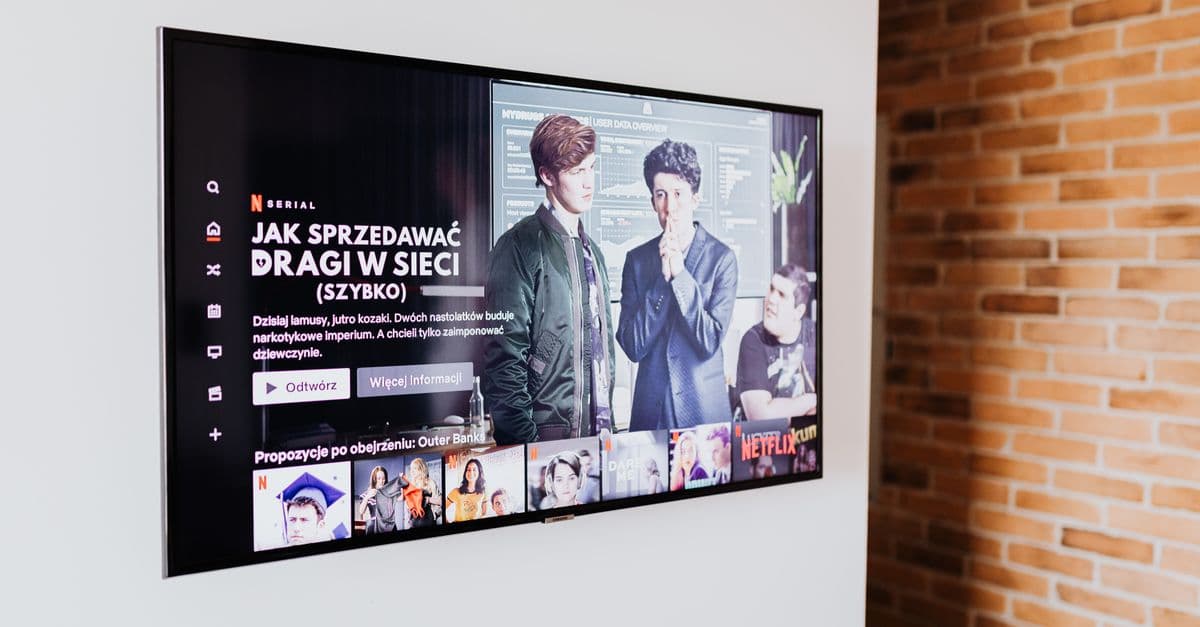
What Your Smart TV Really Knows About You
 Photo by https://kaboompics.com/ on Pexels
Your TV is the biggest talker in the house, and it's not close.
Smart TVs track what you watch, when you watch it, and how long you linger on a screen. They match that viewing data to your identity through your Wi-Fi network and your streaming logins. In other words, it's basically a survey you never agreed to take.
The feature doing the heavy lifting: ACR
Automatic content recognition, or ACR, is the big one. Think of it like Shazam running 24/7 on your screen. It identifies every show, every ad, and even the video games you play, then builds a viewing profile that gets sold to advertisers and data brokers.
The American television industry trade body, the Video Advertising Bureau, has openly described ACR as a way to understand what audiences watch across inputs, including content played from a console or cable box. That's the point: it sees everything on the screen, not just what you stream through the TV's own apps.
Have you ever noticed ads for a product you saw in a TV commercial show up on your phone later? ACR data making the rounds is one common explanation. Academic researchers and consumer groups have raised this exact concern, and the FTC has issued guidance noting that smart TV data collection can be hard for viewers to spot.
What to do about it
- Dig into Settings, then Privacy, and turn off ACR. The name varies by brand: Samsung calls it "Viewing Information Services," LG uses "Live Plus," Vizio has "Viewing Data," and Roku has "Advertising" and "Smart TV Experience" toggles.
- If you only use your TV with a streaming stick or cable box, disconnect the TV itself from the internet. You lose nothing.
- Check your streaming apps separately. Netflix, Hulu, and YouTube all collect their own viewing data on top of whatever the TV does.
Your Smart Fridge Is Not Plotting Against You (But It Is Chatting)
 Photo by RDNE Stock project on Pexels
Here's some good news: refrigerators are mostly boring.
They collect temperature readings, energy use, how often the door opens, and whatever grocery list items you type in. On its own, that's not a privacy crisis. The risk isn't the fridge. It's the app and the account behind it.
The real concern is the pattern. A fridge that knows you're low on milk, combined with your grocery loyalty card and your phone's location data, paints a detailed picture of your household. Consumer privacy advocates have been warning about this kind of "data merging" for years, and it's the reason a single boring device isn't the problem. It's the combination.
It's like a roommate who keeps a shared grocery list. Fine on its own. But if that roommate also shares the list with the whole neighborhood, that's a problem.
What to do about it
- Read the app's privacy policy before you connect an appliance. Search the page for the phrase "we share data with third parties." If it's there, you know what you're signing up for.
- Put appliances on a guest Wi-Fi network so they're separated from your laptop and phone.
- Ask yourself honestly: does this appliance need to be online? A fridge works fine without Wi-Fi.
Your Doorbell Sees More Than You Think
Video doorbells are the device people underestimate most.
They capture your neighbors, your mail carrier, and everyone who walks past. That footage typically lives on company servers, not just on your phone. And law enforcement requests for that footage are common.
This isn't speculation. Amazon has disclosed in letters to U.S. senators that it has provided Ring footage to police in emergency situations without the homeowner's consent. Reporting from outlets including CNET and the Washington Post has documented police departments building cases using doorbell footage from people who never interacted with the homeowner at all. In several U.S. cities, that footage has been used in investigations involving people who had no relationship with the camera owner.
The lesson isn't "don't own a doorbell." It's "know where the footage goes."
What to do about it
- Turn on end-to-end encryption if your doorbell offers it. Ring and Nest both do now. This means only your devices can decrypt the video.
- Set recording zones so you're capturing your porch, not the entire street.
- Review sharing settings and opt out of "community" features that let police request footage through a portal.
- For step-by-step device setup, our full smart home security guide walks through each major brand.
"Hey Alexa, Who's Listening?" Voice Assistants Explained
 Photo by Joshua Brown on Pexels
Let's clear up the biggest myth first: your smart speaker is not recording everything you say.
Voice assistants wait for a wake word, like "Alexa," "Hey Google," or "Siri." The microphone buffers a short window of audio locally and only sends it to the cloud after it hears the trigger phrase.
But false wake-ups happen. A TV ad, a similar-sounding word, or a name in conversation can trigger a recording. And when recordings do happen, those clips get stored in the cloud, and in some cases reviewed by humans to improve accuracy. Both Amazon and Google have publicly acknowledged that contractors listened to voice snippets, and both faced backlash and policy changes as a result.
It's like a receptionist who only writes down what you say after you say their name, but occasionally mishears and writes down the wrong conversation.
What to do about it
- Delete your voice history regularly. On Amazon: Alexa app, then Settings, then Alexa Privacy. On Google: myactivity.google.com.
- Turn off the "help improve" settings that allow human review of recordings.
- Mute the microphone during private conversations. There's a physical button on most devices, and it's the only guarantee that matters.
Who's Actually Buying All This Data?
Three groups, mostly.
Data brokers. Companies you've never heard of that buy, bundle, and resell information about you. They're the middlemen between the devices in your house and everyone who wants to sell you something.
Advertisers. The end customers. They want to show you targeted ads across every screen you own, and they pay well for the viewing and shopping profiles that smart devices generate.
Insurers, marketers, and sometimes law enforcement. The buyer list varies, and the rules are looser than most people assume. There's no single federal privacy law in the United States covering all of this, which means the protections you get depend heavily on where you live.
You can't opt out of every list. But you can shrink your footprint dramatically with a few settings changes. Our Online Privacy Guide covers how data brokers operate and how to opt out of the major ones.
Locking It Down: A 30-Minute Privacy Tune-Up
Here's the part that actually helps. Block out half an hour and work through this list.
Change default passwords on every smart device. Yes, all of them. Default credentials are one of the most common ways devices get hijacked, and it takes two minutes per device.
Create a separate Wi-Fi network for smart devices. Most routers let you set up a guest network in a few minutes. This keeps a compromised fridge from becoming a doorway into your laptop. If you need help, our guide on using a VPN on public Wi-Fi covers the same principle of separating your devices from untrusted networks.
Turn off ACR on your TV and disable "improve our services" options everywhere. These settings almost never benefit you.
Review app permissions. Does your fridge app really need your location and contacts? Probably not.
Delete old voice recordings and set them to auto-delete going forward.
Use a password manager so every device gets a unique password. Reusing passwords is how one breach becomes five.
Consider a local smart home hub. This is the option most people don't know about. Devices built on the Matter and Thread standards can run through a local hub like Home Assistant or Hubitat, which keeps automation on your own hardware instead of routing every command through a company's cloud. It takes more setup, but it's the closest thing to a genuinely private smart home.
Key Takeaways
- Your TV is the biggest talker in the house. Turn off automatic content recognition (ACR) in settings today.
- Smart appliances are low-risk on their own. The danger is when their data gets combined with everything else.
- Doorbell footage can end up with police. Amazon has confirmed sharing Ring footage without consent in emergencies. Enable encryption and limit recording zones.
- Voice assistants only record after wake words, but false triggers happen. Delete your history and mute the mic when it matters.
- A 30-minute tune-up (passwords, guest Wi-Fi, privacy settings) blocks most of the data collection.
- Local hubs like Home Assistant keep smart home data on your own hardware instead of in someone's cloud.
If you want one tool that covers the network side of this, GhostShield VPN runs on Windows, macOS, Android, iPhone and iPad, and Google TV, and it supports up to 10 devices at once, which is enough for a laptop, a phone, and a streaming stick. It uses WireGuard with ChaCha20-Poly1305 encryption, includes a kill switch and DNS leak protection, and has a strict no-logs policy. Worth knowing: it relies on WireGuard alone, with no obfuscation, so it isn't reliable in countries like China, Russia, Iran, or the UAE. For everyone else, you can check plans at ghostshield.ai/pricing.
Your house doesn't have to be a listening device. Half an hour, a few settings menus, and you're back in charge.
Related Topics
Keep Reading
How to Stop AI Voice Scams: Protect Your Family from Deepfake Calls in 2026
How to Use AI Chatbots Safely: Avoid Scams & Protect Your Privacy

Smart Glasses Privacy Risks: 5 Easy Steps to Protect Your Data in 2026

AI Girlfriends & Boyfriends: Privacy Risks & How to Stay Safe in 2026
How to Turn Off Amazon Ring’s Facial Recognition in 2026 – Step-by-Step Guide
