Best Android VPN Software 2026: 6 Tests to Run First
The best Android VPN software is the app that behaves well on a phone, not the one with the longest feature list. Before you pay, check that it passes these six tests on your own Android phone:
- Always-on support: it works with Android's Always-on VPN and "Block connections without VPN" switches.
- A working kill switch: traffic actually stops when the tunnel drops.
- Low battery drain: it does not eat a noticeable share of your battery over a normal day.
- Split tunneling: banking and work apps can skip the VPN.
- Smooth network switching: it reconnects by itself when you move from Wi-Fi to mobile data.
- No leaks: it passes a DNS leak test and a WebRTC leak test.
Review sites rarely show these behaviours in their feature tables, so you test them yourself, in about a week, during a free trial.
What makes the best Android VPN software (quick answer)
If you are asking "what is the best VPN app for Android?" or "what is the best VPN client for Android?", the honest answer is that it depends on how the app handles the six behaviours above on your phone. A VPN that scores well on a laptop can still fall short on Android. A phone hops between home Wi-Fi, mobile data and cafe hotspots all day, and Android limits background apps to save battery.
You are far from the only person asking. "Best android vpn software" gets about 3,600 US searches a month. Interest peaked at 5,400 a month in October and November 2025 (DataForSEO, October 2026).
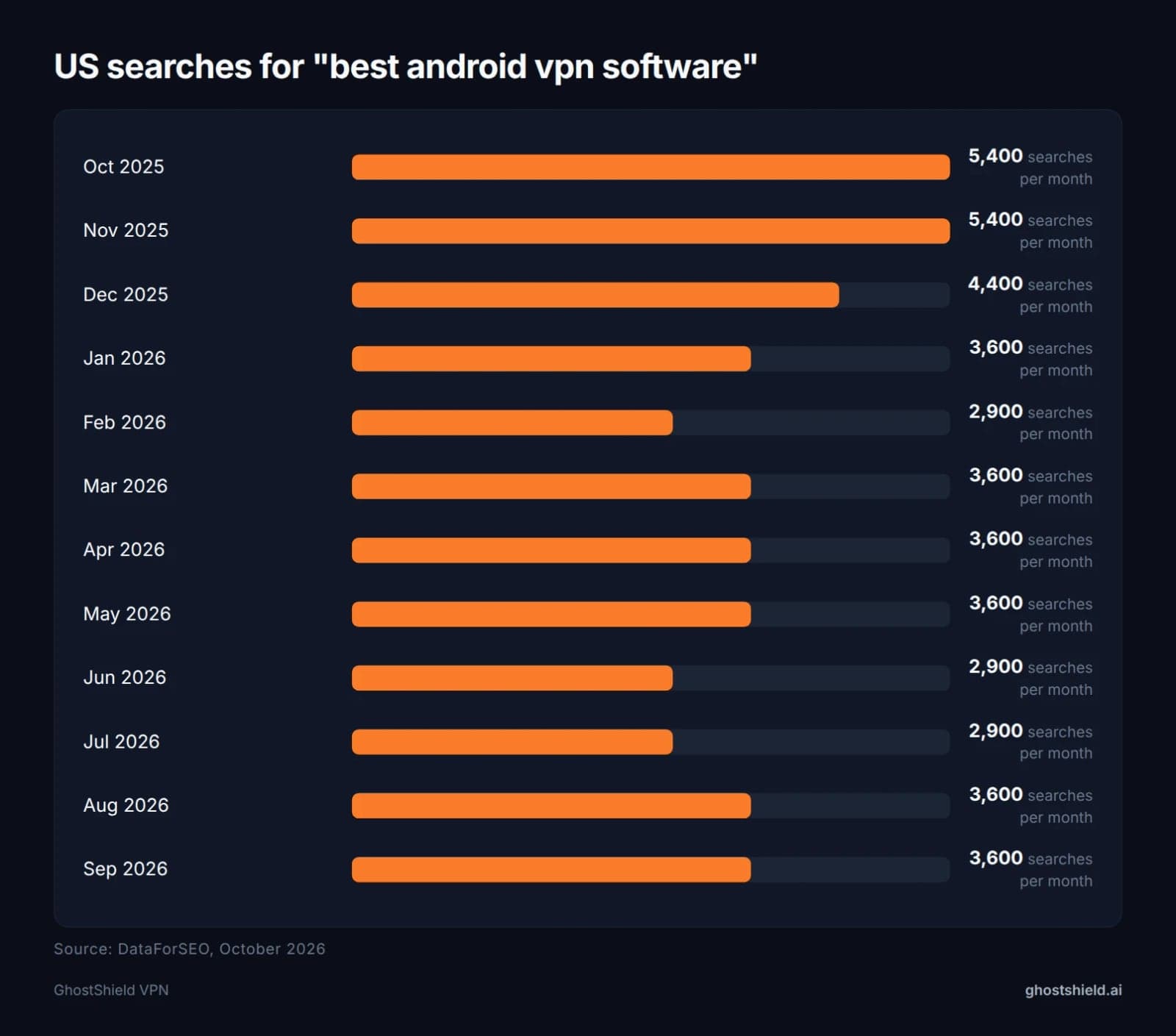 Interest peaked at 5,400 searches a month in late 2025 and has held near 3,600 since. Source: DataForSEO, October 2026.
| Period | US searches per month |
|---|---|
| Oct to Nov 2025 | 5,400 |
| Dec 2025 | 4,400 |
| Jan 2026 | 3,600 |
| Feb 2026 | 2,900 |
| Mar to May 2026 | 3,600 |
| Jun to Jul 2026 | 2,900 |
| Aug to Sep 2026 | 3,600 |
Source: DataForSEO, October 2026.
Demand stays steady through the year, and so does the confusion. Most results are ranked lists, so the rest of this guide gives you a way to judge any app yourself.
What the top Android VPN lists recommend
If you want to know the most trusted VPN for Android, start with what page one of Google shows today:
- PCMag features Proton VPN, Surfshark, ExpressVPN, TunnelBear and IVPN.
- TheBestVPN lists NordVPN, Surfshark, Proton VPN, ExpressVPN and IPVanish.
- ProPrivacy puts ExpressVPN at the top of its list of 10.
- Security.org and TechRadar publish their own ranked lists too.
These lists mostly compare feature tables, prices and speed figures. They rarely cover how an app behaves on a phone that changes networks all day, which is what decides whether you stay protected on the bus or in the airport.
If you prefer real-user opinions, threads on Reddit's r/androidapps ask exactly this question. The replies vary a lot, and the useful ones come back to the same points: does it stay connected, does it block traffic when it drops, and does it work with your apps.
Trust is earned through a clear no-logs policy, published audits where they exist, and an app that does what it says. You can check the last part yourself with the tests below. For a deeper privacy checklist, see our 7 privacy checks to run before you buy a VPN.
The 6 Android tests that matter more than a feature list
Each test takes a few minutes. Run every one on Wi-Fi and on mobile data, because a VPN can pass on one and fail on the other.
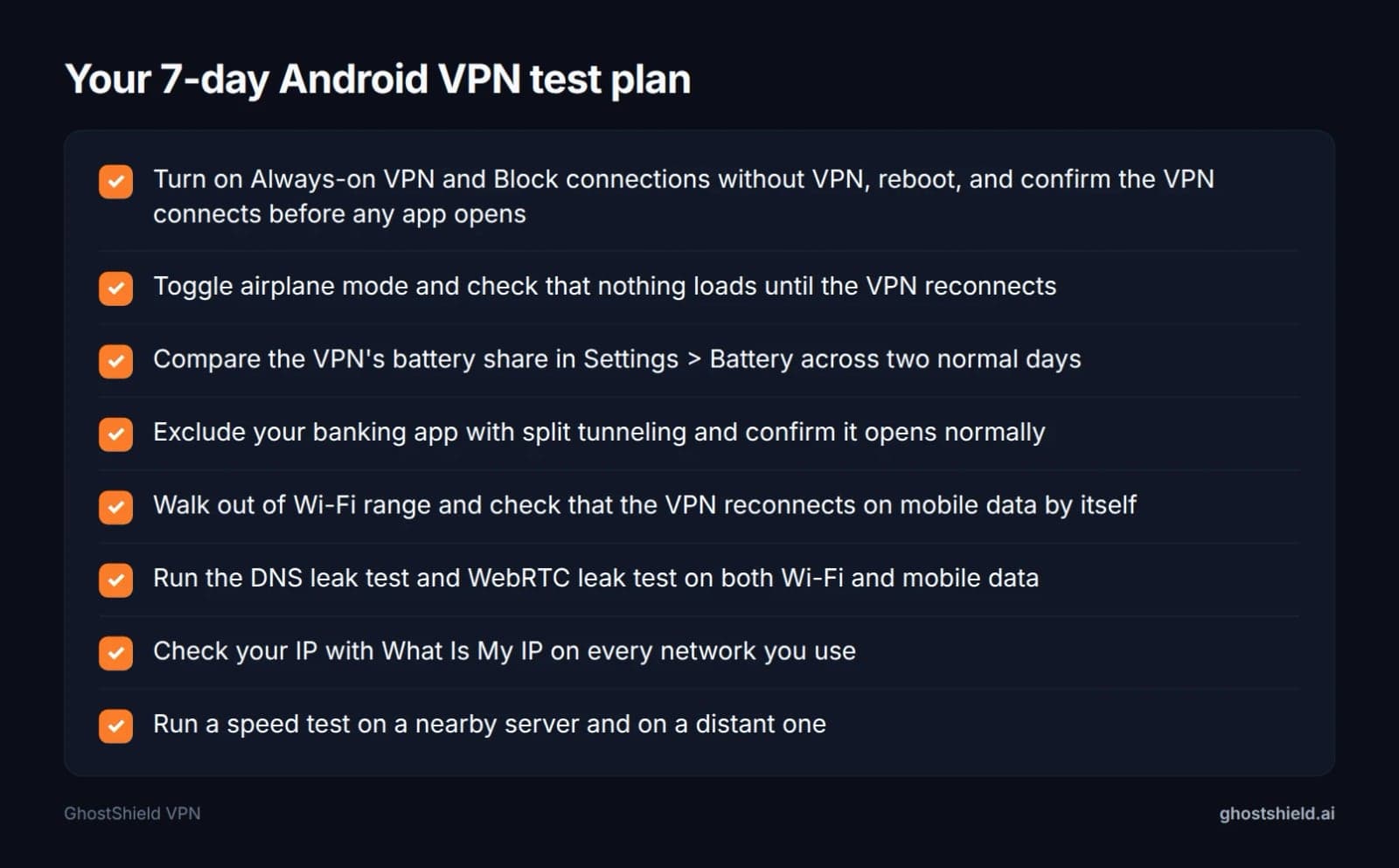 Run each test on Wi-Fi and on mobile data before the trial ends.
1. Always-on VPN and 'Block connections without VPN'
Android lets you set any VPN app as always-on. Go to Settings > Network & internet > VPN, then tap the gear next to the app. The wording and location vary by phone maker, so search your settings for "VPN" if you can't find it.
The test: turn on both Always-on VPN and Block connections without VPN, then reboot the phone. Before you open any app, pull down the notification shade and check that the VPN is already connected (you should see a key icon). If the app does not work with these switches, your phone is exposed every time it restarts.
2. Kill switch: does traffic actually stop?
A kill switch should cut your internet the moment the VPN tunnel drops, so nothing leaks out with your real IP address.
The test: connect to the VPN and open our tool to check your IP address. Turn airplane mode on, then off, and immediately try to load a page. If pages load before the VPN shows as reconnected, the kill switch is not doing its job. Once it reconnects, refresh the IP check and confirm you see the VPN's address again.
3. Battery drain over a normal day
Every VPN uses some battery, because it encrypts all your traffic and keeps a connection open. The question is whether you notice.
The test: Android shows per-app battery use under Settings > Battery (sometimes under "Battery usage"). Run the VPN all day for two normal days and note its share. Compare this with a day without it, keeping your screen time similar. If the VPN sits near the top of the list every day, or your phone needs charging noticeably earlier, that is a real cost you will live with.
4. Split tunneling for banking and work apps
Some banking and work apps refuse VPN connections, because a VPN address can look like a login from another place. Split tunneling lets you exclude those apps while the rest of your phone stays protected.
The test: add your bank app to the VPN's excluded list. Open it and confirm it works normally. Then open your browser and check that it still shows the VPN's IP address. Our guide to the risks of using a VPN for online banking explains why banks react this way.
5. Reconnects when you switch Wi-Fi to mobile data
This is where many phone VPNs struggle. When you leave home, your phone drops Wi-Fi and picks up mobile data, and the VPN has to rebuild its connection.
The test: start loading a page, then walk out of Wi-Fi range. The app should reconnect on mobile data without you tapping anything. Once it does, run the DNS leak test again on mobile data to make sure the switch did not expose you.
A note on protocols: WireGuard is generally known for handling network changes smoothly, which is one reason many modern VPN apps use it. That is a property of the protocol, not a measured result for any one app, so run the test anyway.
6. DNS and WebRTC leaks
A VPN can hide your IP address but still let your DNS lookups (the "address book" requests for every site you visit) go to your carrier. Browsers can also reveal your IP through WebRTC.
The test: run the DNS leak test and the WebRTC leak test on Wi-Fi and on mobile data. You should see only the VPN's servers and IP address, never your carrier's or your home ISP's.
Finally, run a speed test on a nearby server and on a distant one. Some slowdown on far-away servers is normal. A big drop on a nearby server is not.
So what is the downside of a VPN on your cell phone? These tests show it on your own phone: some battery use, some speed loss on distant servers, and the odd app that refuses to work. You find out in a week instead of after paying.
Android VPN comparison: what to check and where GhostShield VPN stands
Here is every check in one place, with how to test it on Android and our own answer for GhostShield VPN. We only list our own product, because we do not describe features of other VPNs.
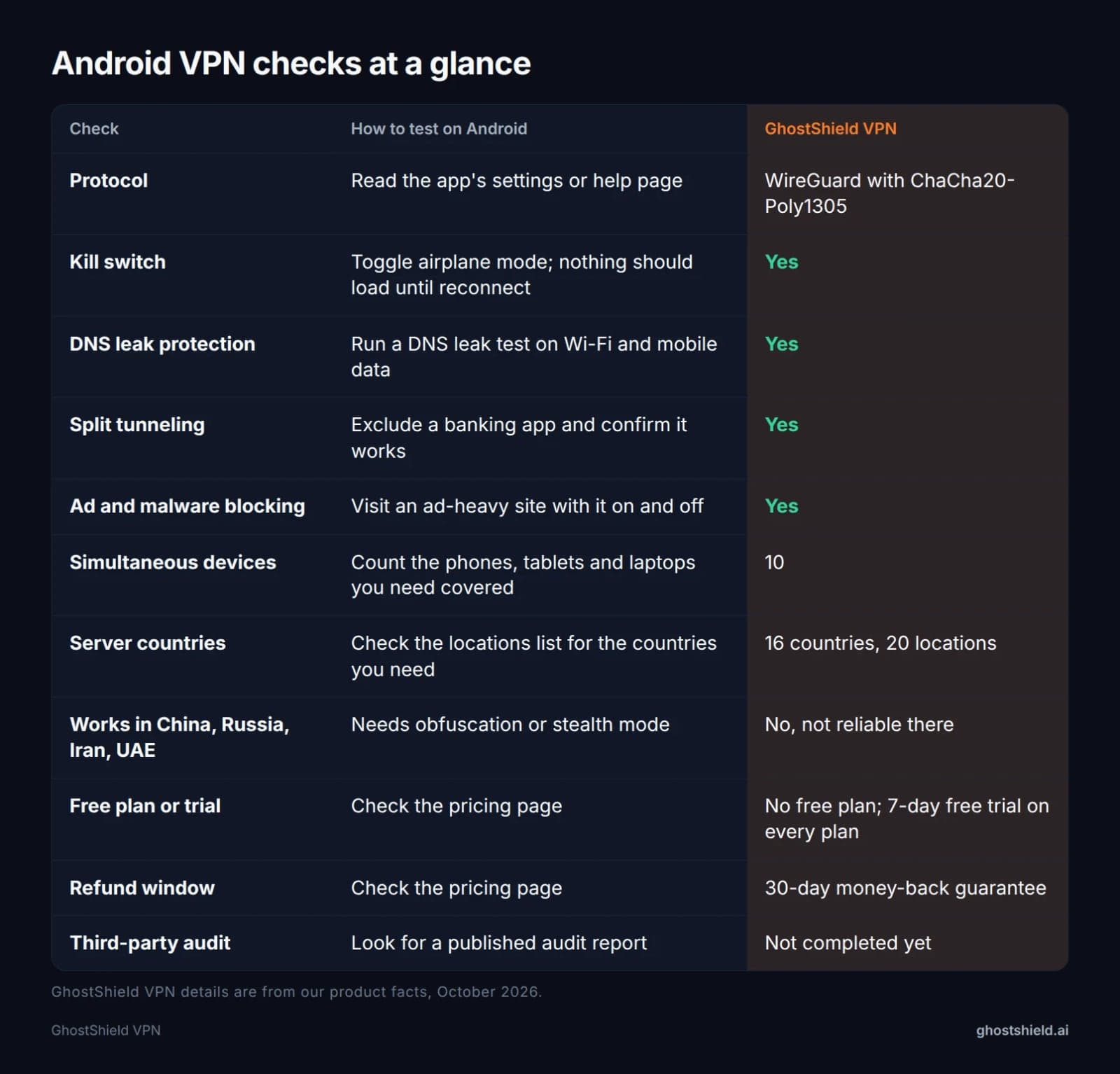 What to check in any Android VPN, and where GhostShield VPN stands on each point.
| Check | How to test on Android | GhostShield VPN |
|---|---|---|
| Protocol | Read the app's settings or help page | WireGuard with ChaCha20-Poly1305 |
| Kill switch | Toggle airplane mode; nothing should load until reconnect | Yes |
| DNS leak protection | Run a DNS leak test on Wi-Fi and mobile data | Yes |
| Split tunneling | Exclude a banking app and confirm it works | Yes |
| Ad and malware blocking | Visit an ad-heavy site with it on and off | Yes |
| Simultaneous devices | Count the phones, tablets and laptops you need covered | 10 |
| Server countries | Check the locations list for the countries you need | 16 countries, 20 locations |
| Works in China, Russia, Iran, UAE | Needs obfuscation or stealth mode | No, not reliable there |
| Free plan or trial | Check the pricing page | No free plan; 7-day free trial on every plan |
| Refund window | Check the pricing page | 30-day money-back guarantee |
| Third-party audit | Look for a published audit report | Not completed yet |
GhostShield VPN details are from our product facts, October 2026.
Two rows deserve a plain word. GhostShield VPN has no obfuscation or stealth mode, so it is not reliable in China, Russia, Iran or the UAE. And no third-party audit has been completed yet. If either matters to you, weigh it honestly. You can also compare VPNs side by side on our comparison page.
Does Android have a built-in VPN?
Android has built-in VPN settings, but not a built-in VPN service. The settings include a client for VPN profiles you configure yourself, plus the Always-on and "Block connections without VPN" switches that work with any VPN app.
What Android does not give you is a server to connect to. A VPN needs a server on the other end to route your traffic through, and that is what a VPN app provides. Some phone makers and carriers bundle their own VPN features, so check your phone's settings and your carrier's terms to see what you already have.
Is there a 100% free VPN for Android?
There are free VPN apps on Google Play, but running VPN servers costs money, and that cost has to be covered somehow. Free apps usually do it through limits on data, speed or server locations, through ads, or by collecting data about you.
Before you install any free VPN, open its Google Play listing and read the Data safety section. It shows what data the app says it collects and shares. If a VPN collects your browsing data, it defeats the reason you installed it.
A free trial is often the better route. It gives you the full product for long enough to run all six tests. GhostShield VPN has no free plan, but every plan starts with a 7-day free trial, and a 30-day money-back guarantee backs it up. Our guide on how to test a VPN during a free trial walks you through it.
Should you use a VPN on your Android phone?
For most people, yes, at least some of the time. Your phone joins more untrusted networks than any other device you own.
 Photo by NordWood Themes on Unsplash
When a VPN helps
- Public Wi-Fi: in cafes, airports and hotels, a VPN encrypts your traffic so others on the same network can't read it.
- Hiding browsing from your carrier or ISP: they see that you are connected to a VPN, not which sites you visit.
- Travel: while abroad, connecting to a server back home can help you reach the streaming library you already pay for. No VPN can guarantee that any streaming service unblocks.
Can your phone still be tracked with a VPN?
Yes. A VPN hides your IP address and encrypts your traffic, but it does not stop every kind of tracking:
- GPS location is still shared with apps that have location permission.
- Your carrier still sees which cell towers your phone connects to.
- Google and app accounts you are signed into still know it's you.
To cut tracking further, see our steps to lock down your phone from tracking.
When you shouldn't use a VPN
- When a bank or work app blocks VPN connections. Use split tunneling to exclude that app instead of turning the VPN off.
- On a work phone where your employer forbids it. Follow your company's rules.
- In countries where VPNs are restricted or illegal. Check local law before you travel. GhostShield VPN has no obfuscation, so it is not reliable in China, Russia, Iran or the UAE. Our guide to VPNs and the Great Firewall when travelling to China covers what to expect there.
The downsides, in short: some battery use, possible speed loss on distant servers, some apps and sites blocking VPN addresses, and a cost once the trial ends.
How to set up GhostShield VPN on Android and run the tests
Setup takes a few minutes. The last step uses Android's own settings, so it works the same way for any VPN app.
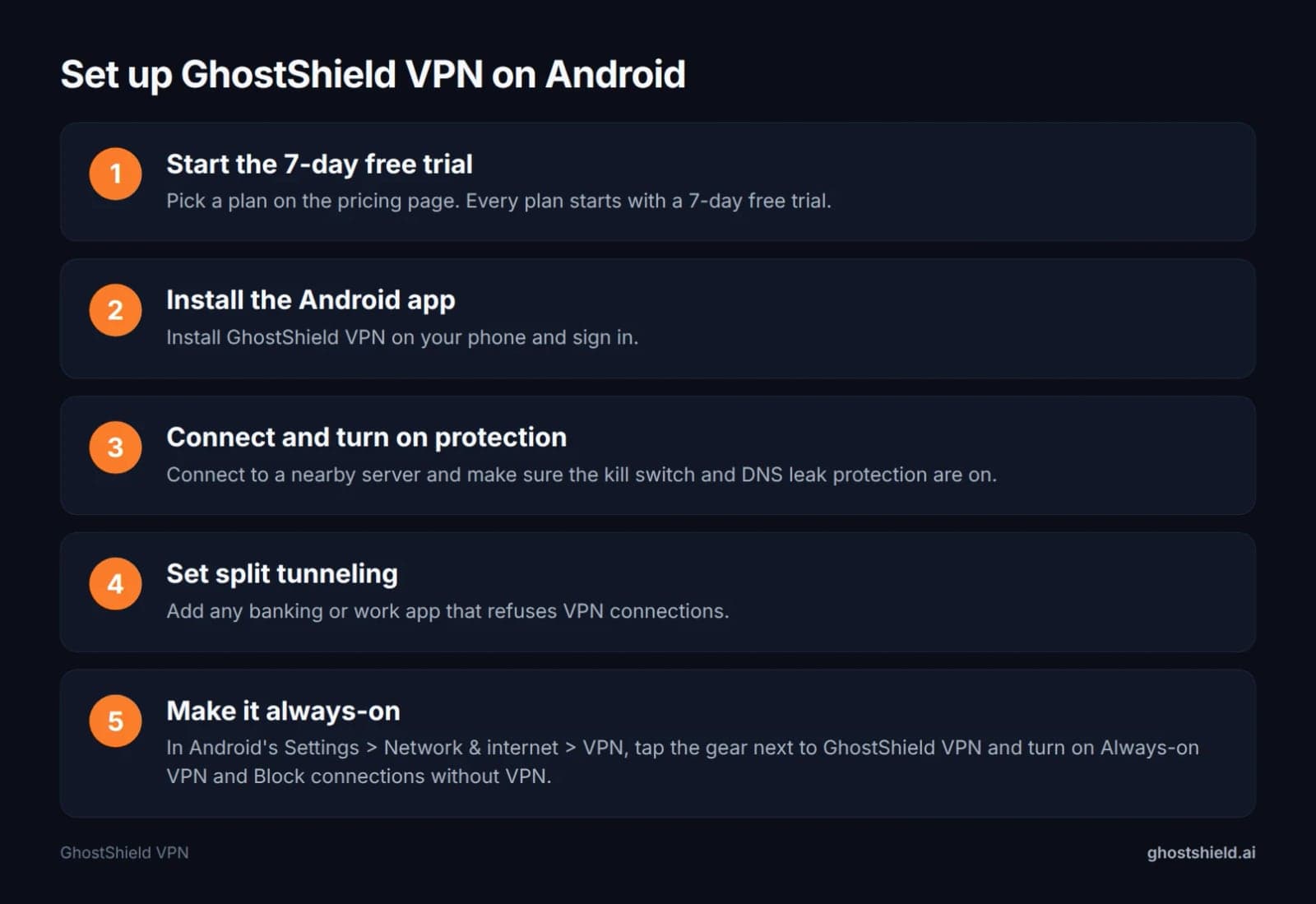 Setup takes a few minutes. Then run the test checklist during your trial.
- Start the 7-day free trial. Pick a plan on the pricing page. Every plan starts with the trial.
- Install the Android app. Install GhostShield VPN on your phone and sign in.
- Connect and turn on protection. Connect to a nearby server and make sure the kill switch and DNS leak protection are on.
- Set split tunneling. Add any banking or work app that refuses VPN connections.
- Make it always-on. In Android's Settings > Network & internet > VPN, tap the gear next to GhostShield VPN and turn on Always-on VPN and Block connections without VPN.
Then work through the six-test checklist during your trial, on Wi-Fi and on mobile data. If GhostShield VPN fails a test on your phone, the 30-day money-back guarantee covers you. If you also use an iPhone or iPad, here are 6 things to check in an iPhone VPN.
GhostShield VPN on Android: the honest pros and cons
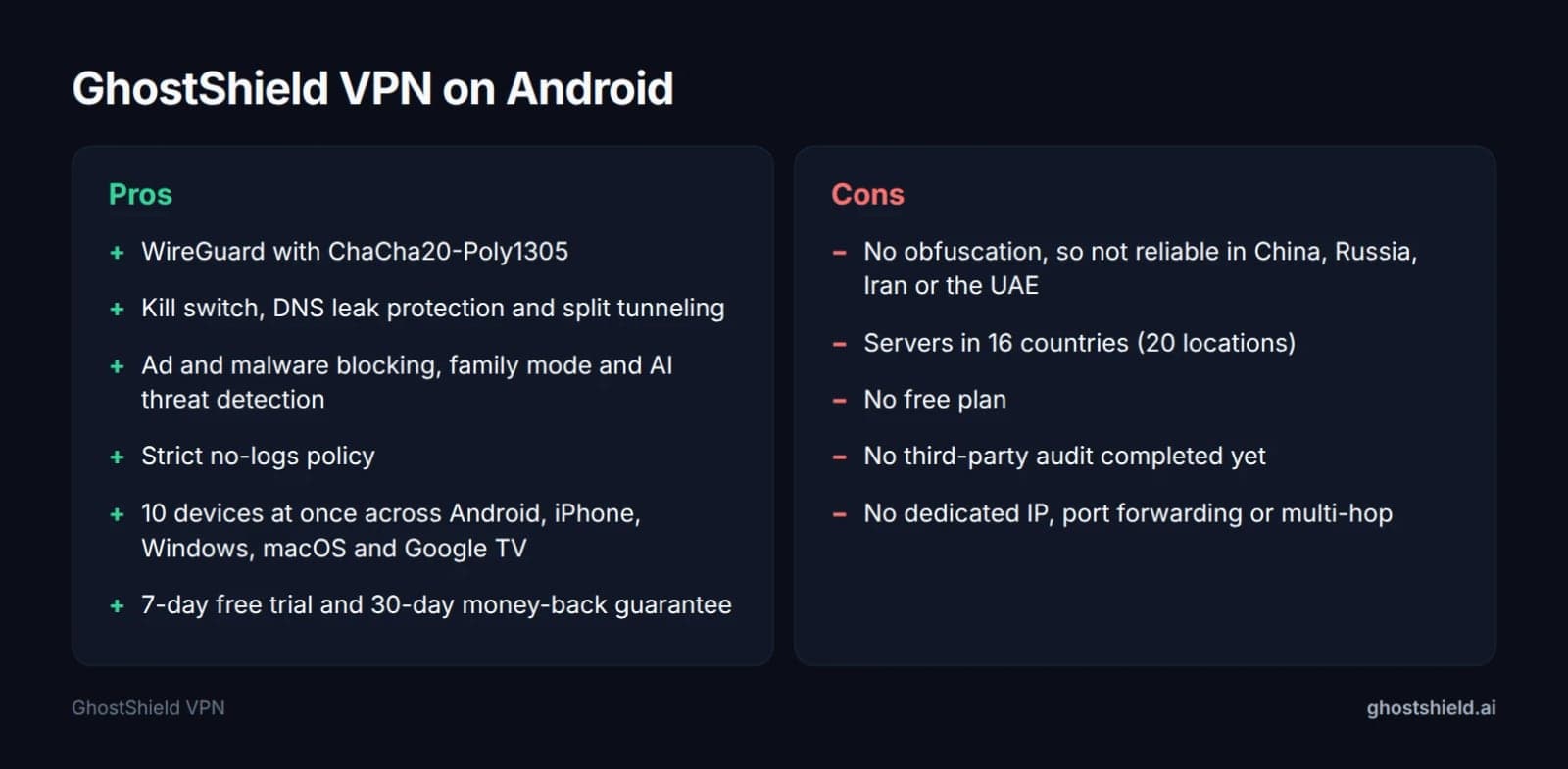 What GhostShield VPN does and does not do, from our product facts.
| Pros | Cons |
|---|---|
| WireGuard with ChaCha20-Poly1305 | No obfuscation, so not reliable in China, Russia, Iran or the UAE |
| Kill switch, DNS leak protection and split tunneling | Servers in 16 countries (20 locations) |
| Ad and malware blocking, family mode and AI threat detection | No free plan |
| Strict no-logs policy | No third-party audit completed yet |
| 10 devices at once across Android, iPhone, Windows, macOS and Google TV | No dedicated IP, port forwarding or multi-hop |
| 7-day free trial and 30-day money-back guarantee |
GhostShield VPN runs on WireGuard with ChaCha20-Poly1305 and includes a kill switch, DNS leak protection, split tunneling, ad and malware blocking, family mode and AI threat detection. It follows a strict no-logs policy, so nothing that passes through the tunnel is stored on our servers. One account covers 10 devices at once across Android, iPhone and iPad, Windows, macOS and Google TV. The yearly plan is $4.99 a month, billed $59.88 a year. You can also choose $3.99 a month on the 3-year plan or $6.99 month to month. Every plan includes a 30-day money-back guarantee, so you can start your 7-day free trial and run all six tests on your own phone first.
FAQ
What is the most trusted VPN for Android?
There is no single most trusted VPN for every Android user. Trust comes from a clear no-logs policy, published audits where they exist, and an app that behaves as promised. Lists from PCMag, TheBestVPN and ProPrivacy each pick differently, so run the six tests in this guide during a free trial and judge on your own phone.
Which VPN is 100% free for Android?
Free VPN apps exist on Google Play, but servers cost money, so free apps usually limit data, speed or locations, show ads, or collect data. Read the Data safety section of any listing before installing. A free trial of a paid VPN lets you test the full product without those limits.
Does Android have a built-in VPN?
Android has built-in VPN settings but no built-in VPN service. You can add VPN profiles yourself and use the Always-on and "Block connections without VPN" switches with any app. You still need a VPN provider with servers to connect to, which is what a VPN app gives you.
Can my phone be tracked if I use VPN?
Yes, your phone can still be tracked with a VPN on. A VPN hides your IP address and encrypts traffic, but GPS location, your carrier's view of nearby cell towers, and accounts you are signed into still identify you. Limit app location permissions and sign out of accounts you don't need.
Does a VPN drain my Android battery?
A VPN uses some battery, because it encrypts your traffic and keeps a connection open in the background. How much varies by app and phone. Check Settings > Battery across two normal days with the VPN on and compare with a day without it. If it tops the list daily, consider another option.
Can I use GhostShield VPN on my Android phone and other devices at the same time?
Yes. GhostShield VPN covers 10 devices at once on one account. Apps are available for Android, iPhone and iPad, Windows, macOS and Google TV, and Linux and routers work through a manual WireGuard configuration. That means your phone, tablet, laptop and TV can all be protected together under the same plan.
Related Topics
Keep Reading
Unblocked at School: The Complete Guide (2026)

Can You Use a VPN on a Work Laptop? How to Stay Safe & Keep Your Job (2026)

How to Bypass VPN Blocks in 2026: Easy Fixes for Russia, Turkey & Iran

Minecraft VPN: How to Hide Your IP and Play Safely in 2026

Best VPNs for Privacy in 2026: 7 Checks to Test Before You Buy