Please Unblock challenges.cloudflare.com to Proceed: 7 Fixes

The message "Please unblock challenges.cloudflare.com to proceed" means the website you are visiting uses Cloudflare to check that you are human, and that check could not load. Your browser has to fetch a short script from challenges.cloudflare.com. If an ad blocker, privacy extension, strict cookie or JavaScript setting, network filter or a Cloudflare outage stops it, you see this message instead of the page. The fastest fixes are to allow the site in your ad blocker, turn on JavaScript and cookies for it, try a private window or another browser, and switch VPN location.
What 'Please unblock challenges.cloudflare.com to proceed' means
Cloudflare is a company that sits in front of many websites and filters the traffic that reaches them. When you visit one of those sites, Cloudflare may ask your browser to prove it is a real visitor before it shows the page. developers.cloudflare.com says it issues these challenges "to protect against malicious activity, such as bot attacks and DDoS attempts".
Most of the time the check runs silently in a second or two. The message appears only when something stops the check from loading. medium.com puts it simply: your browser or network is blocking Cloudflare's challenge domain.
The message is not a virus warning, and it does not mean your device is hacked. It means one check could not finish, and the fixes below are about letting it finish.
Why am I triggering Cloudflare? The 6 causes
You trigger a challenge either because of how your connection looks to Cloudflare, or because something on your device stops the check from running.
Causes Cloudflare lists
developers.cloudflare.com lists the sources of challenges in a table. A high threat score means your IP address scores as high risk. IP reputation means your address has a history of suspicious activity. Bot detection filters traffic that looks automated. Site owners can also write their own WAF (Web Application Firewall) custom rules that target certain regions or traffic, and the Browser Integrity Check confirms your browser meets expected standards.
The sixth item on Cloudflare's list works in your favour. Challenge Passage, with technologies such as Privacy Pass, reduces how often you see repeat challenges once you have passed one.
 Why Cloudflare challenges you, based on developers.cloudflare.com, with the fix on your side.
Causes on your side of the screen
On your own device, the usual culprit is a content blocker or privacy extension that blocks third-party scripts, including the one from challenges.cloudflare.com. Blocked third-party cookies, JavaScript turned off, or an old browser cause the same failure. developers.cloudflare.com notes that challenges do not work at all in Microsoft Internet Explorer.
Your network can be the cause too. DNS filters at work, at school or on a home router can block the challenge domain along with ads or trackers. developers.cloudflare.com also notes that some subdomain requests fail with DNS lookup errors during Turnstile checks, which is normal and not a fault on its own.
If the check keeps reappearing without ever being solved, you are in what developers.cloudflare.com calls a challenge loop. That is almost always a cookie or extension problem: the check passes, but the browser cannot store the proof, so Cloudflare asks again.
Is it you or Cloudflare? Check for an outage first
Before you change any settings, check whether the problem is on Cloudflare's side. On 18 November 2025, the-independent.com reported a Cloudflare fault that left ChatGPT and other sites showing this exact message. Visitors to Bet365 saw an even more alarming one: "Attention needed! Sorry, you have been blocked."
Our numbers show how many people hit it at once. US searches for this phrase jumped from 590 in October 2025 to 301,000 in November 2025, then fell to 2,400 in December and just 70 by September 2026 (DataForSEO, October 2026).
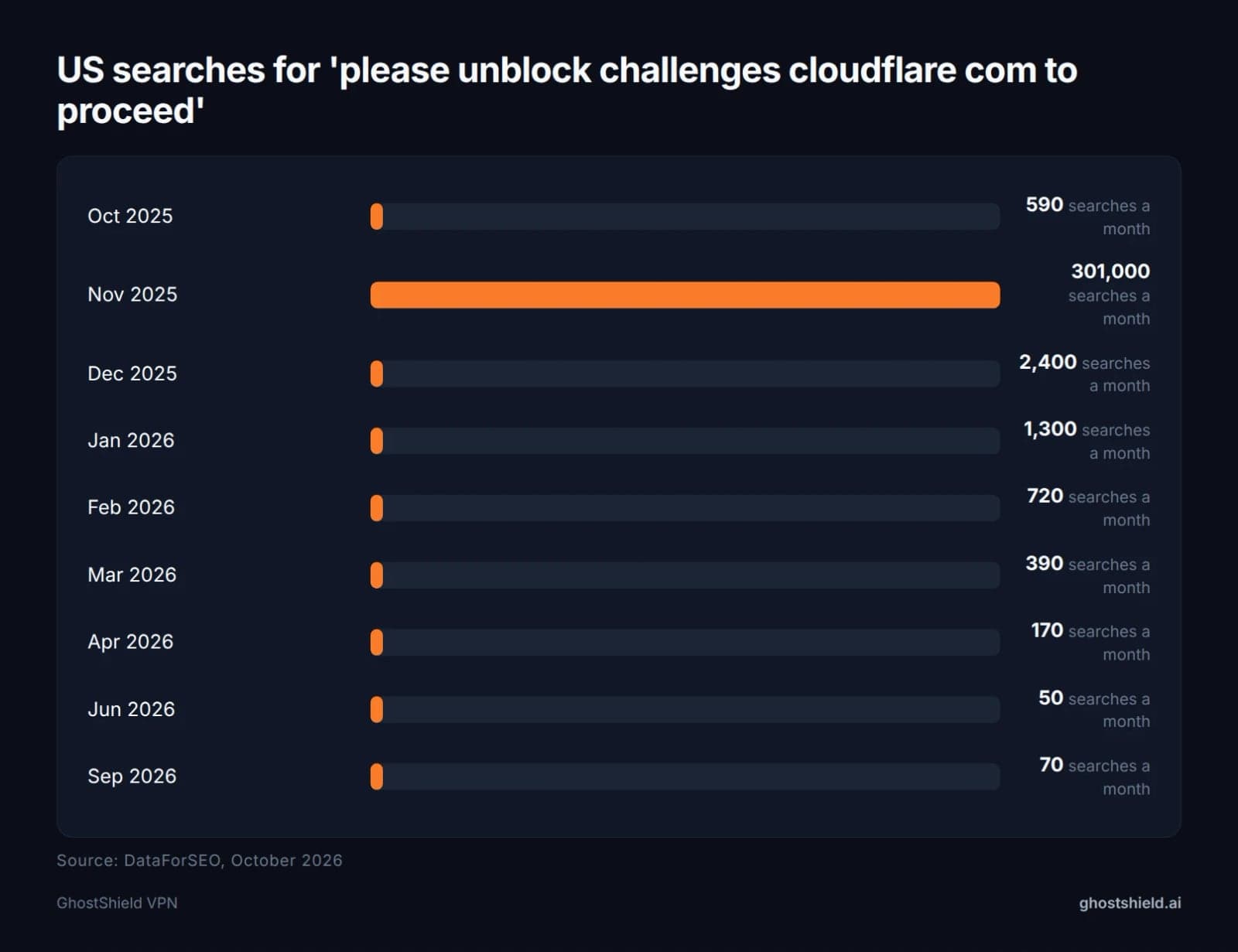 Searches spiked during the November 2025 Cloudflare outage, then fell back.
Cloudflare seems "suddenly everywhere" during these events because it sits in front of a large share of websites. One fault on its side shows up on many unrelated sites at the same moment. Use this table to tell which situation you are in:
Searches spiked during the November 2025 Cloudflare outage, then fell back.
Cloudflare seems "suddenly everywhere" during these events because it sits in front of a large share of websites. One fault on its side shows up on many unrelated sites at the same moment. Use this table to tell which situation you are in:
| What you see | Likely cause | What to do |
|---|---|---|
| Many unrelated sites fail at once | Cloudflare outage | Wait and check Cloudflare's status page |
| One site fails on every device and network | Site owner's rules or outage | Wait, then contact the site |
| Fails in one browser, works in another | Extension, cookie or browser setting | Follow the browser fixes below |
| Fails on home Wi-Fi, works on mobile data | Network or DNS filter | Check your router or ask your network admin |
| Fails only with your VPN on | Shared exit IP reputation | Switch VPN location |
If the site also fails on your phone's mobile data and on another computer, the problem is probably not yours. If it fails on only one browser or device, work through the fixes below.
How to unblock challenges.cloudflare.com: 7 fixes in order
These fixes run from quickest to slowest. Change one thing at a time so you know which fix worked, then turn everything else back on.
- Reload and wait. Reload once and give the check about 10 seconds to finish.
- Pause your ad blocker. Allow the site in any ad, tracker or privacy extension.
- Try a private window. Extensions are usually off there, so if the site works, an extension is the cause.
- Allow JavaScript and cookies. Turn them on for this site, including third-party cookies.
- Update or switch browser. Old or unsupported browsers fail the check.
- Switch VPN location. A shared exit IP may have a poor reputation, so reconnect or pick another location.
- Change network. Try mobile data to rule out a work, school or home DNS filter.
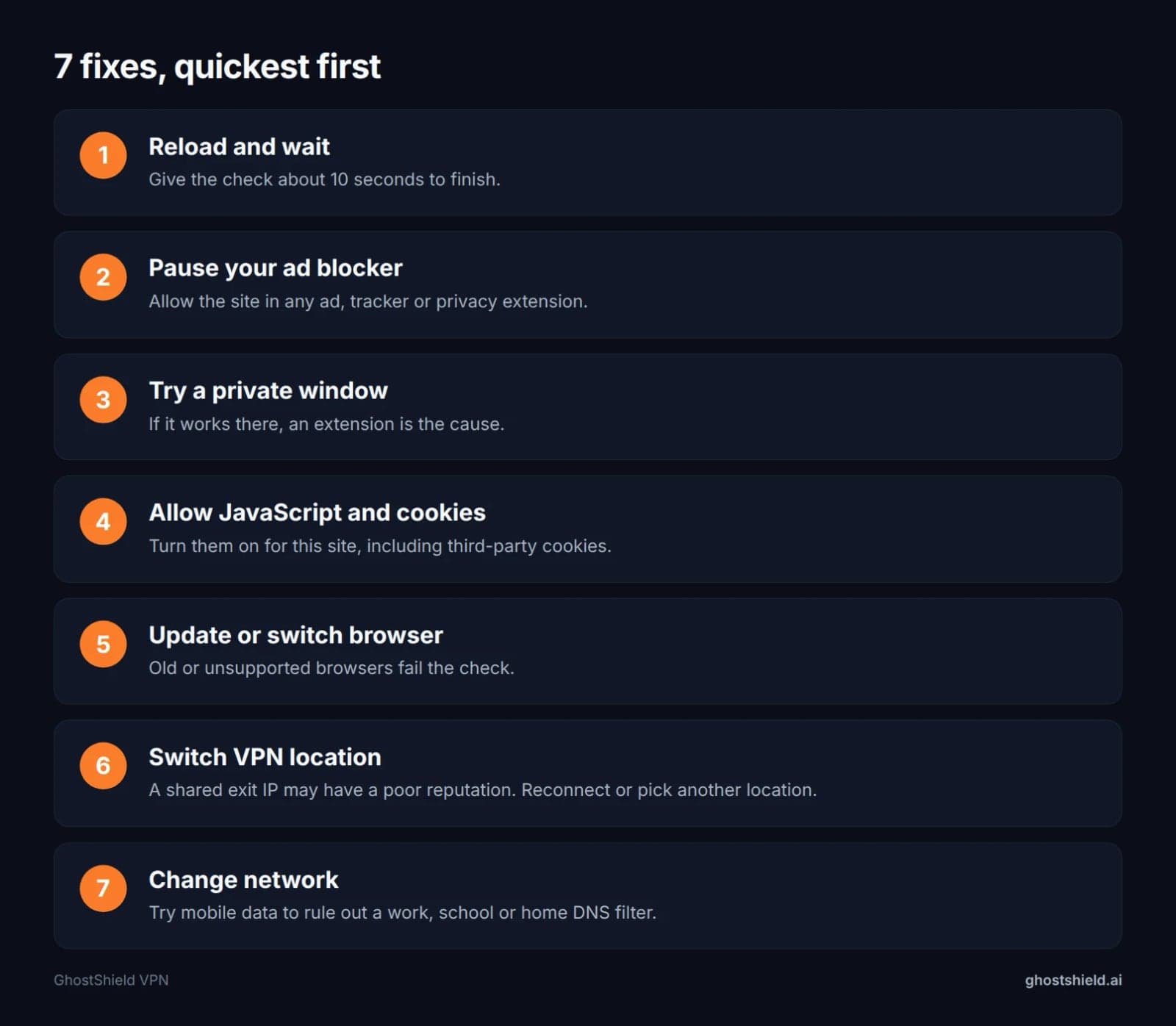 Work down the list and change one thing at a time.
For example, if the site loads in an incognito window but not in your normal one, turn your extensions back on one at a time and reload after each. The one that brings the message back is the one to adjust.
Work down the list and change one thing at a time.
For example, if the site loads in an incognito window but not in your normal one, turn your extensions back on one at a time and reload after each. The one that brings the message back is the one to adjust.
Fixes for each browser
Every major browser has its own privacy setting that can catch the challenge script. This table shows where to look first.
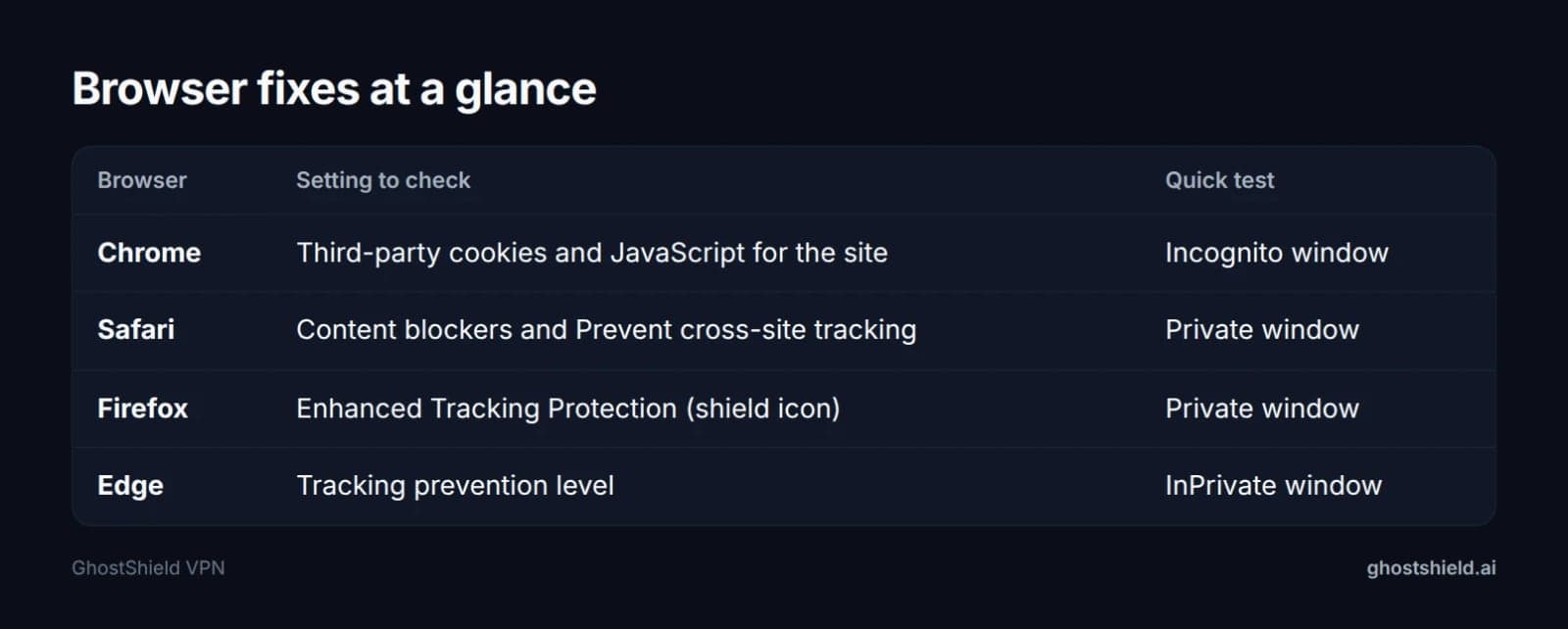 Where to look in each browser.
Chrome
Open Settings, then Privacy and security, and check your third-party cookie setting. Allow third-party cookies for the site you are trying to reach, and make sure JavaScript is allowed in the site settings. Then test in an Incognito window, where extensions are off unless you have allowed them there.
Safari on Mac, iPhone and iPad
A post on r/CloudFlare describes the error starting on macOS while the same site opened fine on another system, which points to a Safari setting. First turn off content blockers for the site. On iPhone and iPad, use the page menu (the "aA" icon) in the address bar. On a Mac, use Settings for This Website.
If that does not help, briefly turn off "Prevent cross-site tracking" in Safari's Privacy settings, reload, then turn it back on once you are through.
Firefox
A support.mozilla.org thread from January 2024 shows Firefox users hitting this message on sites they used every day. Click the shield icon in the address bar and turn off Enhanced Tracking Protection for that site only, then reload. Firefox keeps protection on for every other site.
Microsoft Edge
Edge's tracking prevention has three levels. If yours is set to Strict, try Balanced or add an exception for the site, then reload. You can also test in an InPrivate window.
Using a VPN? Why it triggers Cloudflare and how to fix it
A VPN does not break Cloudflare checks on its own, but it can raise your chances of seeing one.
Shared exit IPs and IP reputation
On a VPN, many people share one exit IP address. If others on that address sent heavy or automated traffic, the address may carry a high threat score or poor IP reputation, two of the causes developers.cloudflare.com lists. Cloudflare then challenges everyone on it, including you. The same idea explains when a VPN helps and hurts with online banking.
Switch server location or reconnect
The fix is to move to a different exit IP. Disconnect and reconnect for a fresh session, or switch to another location. Then check your current IP address to confirm it changed.
GhostShield VPN has 20 locations in 16 countries, including 4 in the United States, so a US reader can move between US locations without changing country. GhostShield VPN uses WireGuard only, so switching protocol is not an option in our app. Switching location is the step to take. For more on getting past blocks with a VPN, see our VPN guide to unblocking sites.
GhostShield VPN also offers split tunneling, which can let one browser use your normal connection while the rest of your device stays on the VPN. That is a quick way to test whether the VPN is the cause.
Network and DNS filters that block the challenge
Any ad, tracker or DNS blocking can catch challenges.cloudflare.com along with the ads. That includes blocking in a browser, on your router, or in a VPN app such as GhostShield VPN's ad and malware blocking. Turn it off briefly to test, then run a DNS leak test to confirm your DNS requests go where you expect.
School and work networks may block the domain on purpose. If you are on a company device, read our guide to using a VPN on a work laptop before you change anything.
The error on ChatGPT, Perplexity and other apps
ChatGPT is where many people first meet this message. community.cloudflare.com has a May 2024 thread from a user who got it on chat.openai.com, and the-independent.com named ChatGPT during the November 2025 outage. Related searches show people also hit it on Perplexity.
 Photo by https://kaboompics.com/ on Pexels
Any site behind Cloudflare can show the message, and the fixes are the same everywhere. The study names ChatGPT, Bet365 and Perplexity, but you usually cannot tell which apps use Cloudflare until a challenge appears.
Photo by https://kaboompics.com/ on Pexels
Any site behind Cloudflare can show the message, and the fixes are the same everywhere. The study names ChatGPT, Bet365 and Perplexity, but you usually cannot tell which apps use Cloudflare until a challenge appears.
If the check fails only inside an app's built-in browser (a WebView), developers.cloudflare.com says the app's WebView settings are the issue. Open the site in your normal browser instead, or update the app. While you are signing in to AI tools, it is worth reading how to use AI chatbots safely.
If you run the website: how to stop Cloudflare blocking real visitors
Visitors cannot turn Cloudflare off for a site; only the site owner can. If you are a visitor, contact the site and send the details in the next section.
If you own the site, developers.cloudflare.com recommends creating a WAF custom rule with the Skip action for known good traffic. The alternative is to add a "not" exclusion, such as an IP list, country code or ASN, to an existing Block or Challenge rule.
Two more points from developers.cloudflare.com are worth checking. If your hostname is proxied through Cloudflare, your own visitors can see challenges on your pages. And CORS preflight (OPTIONS) requests carry no cookies, which is a common reason checks fail inside apps that call your site from another origin.
Still stuck? What to send the site or Cloudflare Support
developers.cloudflare.com advises collecting diagnostic information before you contact the site administrator or Cloudflare Support. Clear details get a faster answer.
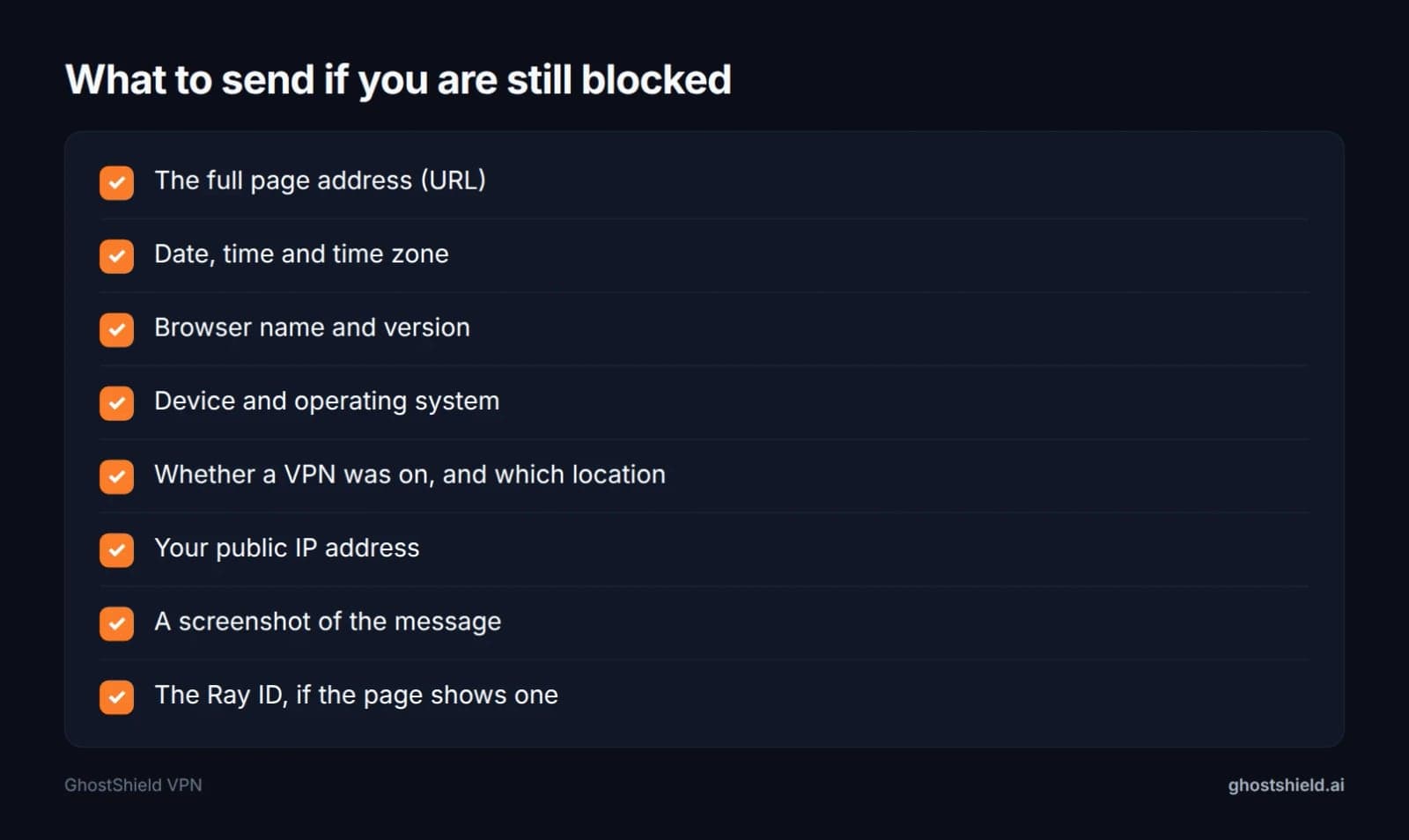 Collect these before you contact anyone, as developers.cloudflare.com advises.
Send the full URL, the date, time and time zone, your browser and version, and your device and operating system. Add whether a VPN was on and which location, and your public IP from our IP checker. Include a screenshot and the Ray ID if the page shows one.
Collect these before you contact anyone, as developers.cloudflare.com advises.
Send the full URL, the date, time and time zone, your browser and version, and your device and operating system. Add whether a VPN was on and which location, and your public IP from our IP checker. Include a screenshot and the Ray ID if the page shows one.
If you open developer tools and see a 401 on a Private Access Token request, do not chase it. developers.cloudflare.com says that on its own it is not a sign of a block.
Keep your privacy without breaking Cloudflare checks
You do not have to choose between privacy and getting past security checks. GhostShield VPN encrypts your connection with WireGuard, keeps a strict no-logs policy, and includes a kill switch, DNS leak protection and split tunneling. It runs on Windows, macOS, Android, iPhone, iPad and Google TV, on up to 10 devices at once. If one location gets challenged, switch to another of our 20 locations and carry on. Every plan starts with a 7-day free trial and a 30-day money-back guarantee, so you can start the 7-day free trial and see how it works with the sites you use. Our guide on how to test a VPN during a free trial shows what to check.
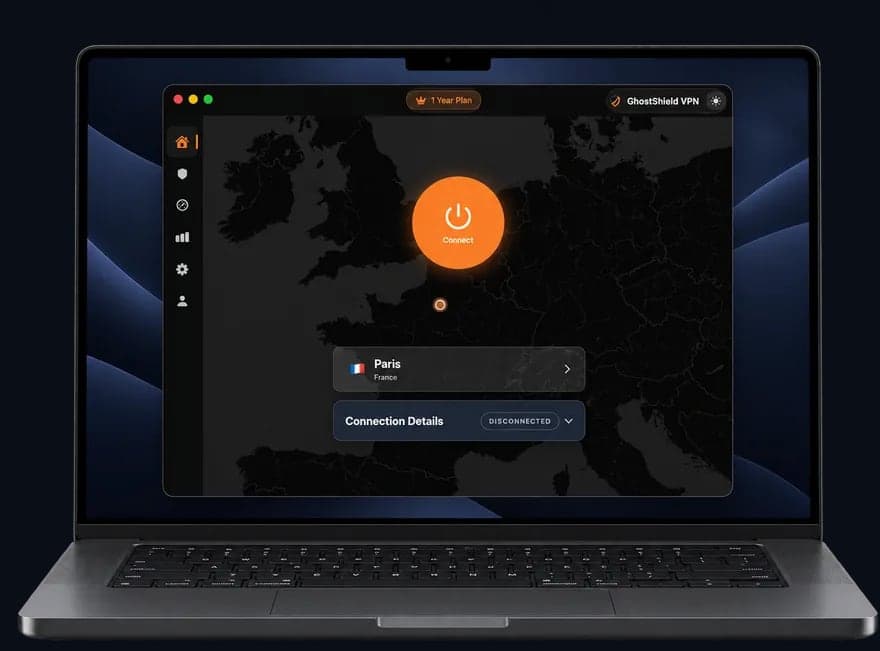 GhostShield VPN app on a MacBook
FAQ
How do I unblock challenges on Cloudflare?
Allow the site in your ad blocker or privacy extension, then turn on JavaScript and third-party cookies for it. If that fails, try a private window, update or switch your browser, change VPN location, or use mobile data. Change one thing at a time so you know which fix worked.
What is Cloudflare and why is it blocking me?
Cloudflare is a company that filters traffic for many websites to stop bots and attacks. It is not blocking you personally. Your browser could not load its human check, usually because an extension, a cookie setting, a network filter or a shared VPN IP got in the way.
Why am I triggering Cloudflare?
You trigger Cloudflare when your IP address has a high threat score or poor reputation, your traffic looks automated, or the site owner's rules target your region. On your side, ad blockers, blocked cookies, disabled JavaScript and outdated browsers stop the check from finishing and show the error.
What does 'please unblock challenges.cloudflare.com to proceed' mean on ChatGPT?
It means ChatGPT's Cloudflare check could not load in your browser. If many sites fail at once, Cloudflare may be down, as the-independent.com reported in November 2025. Otherwise, allow the site in your blocker, enable cookies and JavaScript, or try a private window or another browser.
Can a VPN cause the challenges.cloudflare.com error?
Yes, a VPN can cause it indirectly. Many people share one VPN exit IP, and if others sent automated traffic, Cloudflare may score that address as risky. Reconnect or switch to another location to get a different IP, and briefly turn off any DNS or ad blocking to test.
Is the challenges.cloudflare.com message a virus or scam?
No, the message is not a virus and does not mean your device is infected. It is a normal Cloudflare security check that could not finish loading. Be wary only if a page asks you to download files or paste commands to pass the check, since real Cloudflare checks never do.
Related Topics
Keep Reading

How to Bypass Age Verification Blocks in 2026 Without Uploading Your ID

How to Stop AI Chatbots from Using Your Personal Data in 2026
How to Use AI Chatbots Safely: 7 Simple Rules to Protect Your Data
Is Your AI Account Hacked? Easy Steps to Check & Secure It (2026 Guide)

How to Protect Your Photos from Hackers in 2026: A Simple Step-by-Step Guide