Best VPN Software for Windows 2026: 6 Checks on Your PC
There's no single winner on Google's first page. thebestvpn.com names NordVPN best overall for Windows and Surfshark its cheapest pick. top10vpn.com ranks ExpressVPN first, NordVPN second and PIA as its budget choice. safetydetectives.com calls Proton VPN the best free option. Because the experts disagree, the best VPN software for your Windows PC is the one that passes six checks on your own machine:
- Kill switch holds through sleep, wake and Wi-Fi changes.
- No DNS leak while connected.
- No WebRTC leak in Edge or Chrome.
- Split tunneling works app by app.
- WireGuard runs in the native Windows app.
- Speed on your own connection is good enough for what you do.
All six fit in about 10 minutes of a free trial.
Best VPN software for Windows: the short answer
The rankings below are useful for building a shortlist. They can't tell you how a VPN will behave on your PC, though. thebestvpn.com tested 30 VPNs on a Windows 11 desktop, and top10vpn.com tested 59 on Lenovo T480 and T480s laptops. Your router, Wi-Fi card, browser and apps are different from theirs.
That's why the ranking is only step one. The six checks are step two, and they settle it.
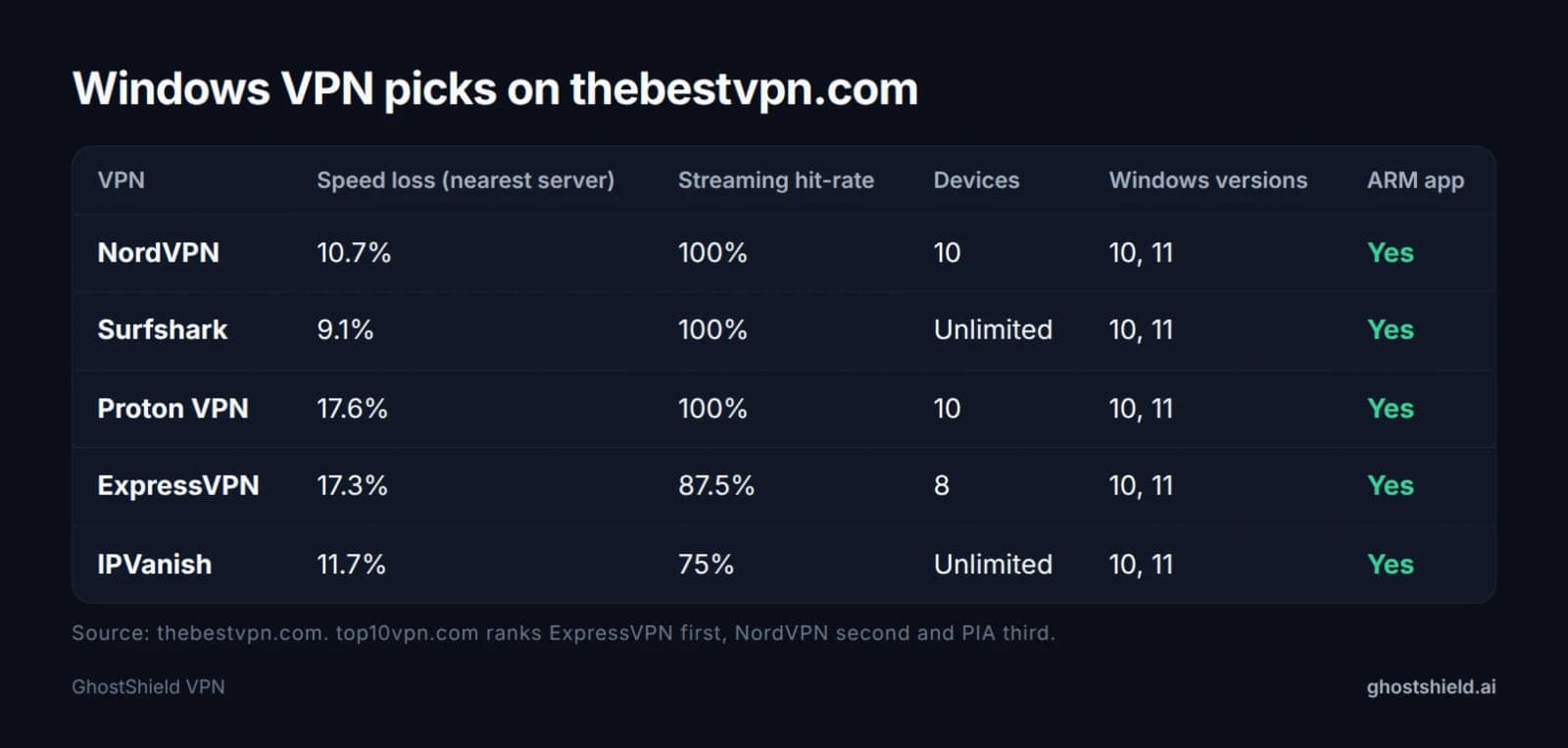 Figures as reported by thebestvpn.com from its Windows 11 test cycle. Other sites rank the same names in a different order.
What the top review sites pick for Windows
Four of the top pages are ranked lists, and they mostly name the same handful of providers. What changes from site to site is the order and the numbers.
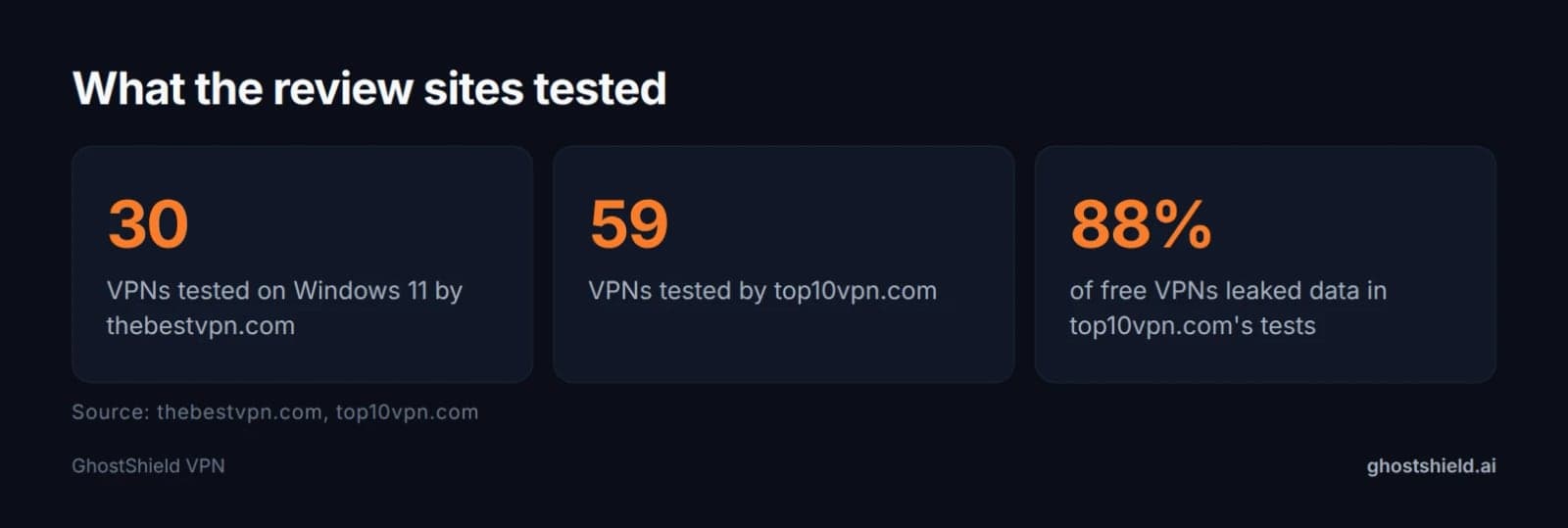 Even big labs test on their own hardware. Your PC is the test that counts.
thebestvpn.com: NordVPN, Surfshark, Proton VPN, ExpressVPN, IPVanish
thebestvpn.com puts NordVPN first. It reports 10.7% speed loss on a nearest-server connection, a 100% streaming hit-rate across its test set and 10 devices. Surfshark comes second, with 9.1% speed loss and unlimited devices. Proton VPN is third at 17.6% speed loss, and the site highlights its open-source Windows client. ExpressVPN shows 17.3% speed loss and 8 devices. IPVanish shows 11.7% and unlimited devices.
All five have Windows 10 and 11 apps and an ARM app, according to the site's table. So if you're asking whether NordVPN or Proton VPN is good for Windows, this site rates both highly. It ranks them for different reasons: features and speed for NordVPN, privacy for Proton VPN.
top10vpn.com: ExpressVPN, NordVPN, PIA
top10vpn.com ranks ExpressVPN first. It notes native ARM64 and x64 support, 10 simultaneous connections and a 2% download speed loss on a local server in its tests. NordVPN comes second, and the site says its Windows app has more advanced features than almost any other but "can feel cluttered". PIA is the cheap pick, though the site says its Windows app "isn't beginner-friendly". The site also checked each VPN's Microsoft Edge extension, alongside testing on Windows 10 and 11.
safetydetectives.com and top50vpn.com
top50vpn.com lists ExpressVPN, CyberGhost, PrivateVPN, NordVPN, Private Internet Access, IPVanish and Surfshark. safetydetectives.com is mostly a free-VPN list. It puts ExpressVPN at the top as a paid pick, then Proton VPN, hide.me, Hotspot Shield and Windscribe as free options.
Even the facts drift between sites. ExpressVPN's server countries appear as 113 on top10vpn.com and 105 on safetydetectives.com. Its device limit is 8 on thebestvpn.com and 10 on top10vpn.com. That's the clearest reason to trust a test on your own PC over any single ranking. If you want a side-by-side of features across providers, you can also compare VPNs on our site.
The 10-minute Windows VPN test: 6 checks to run during a free trial
Run these on the PC you'll actually use, on the network you normally use. Write the results down as you go.
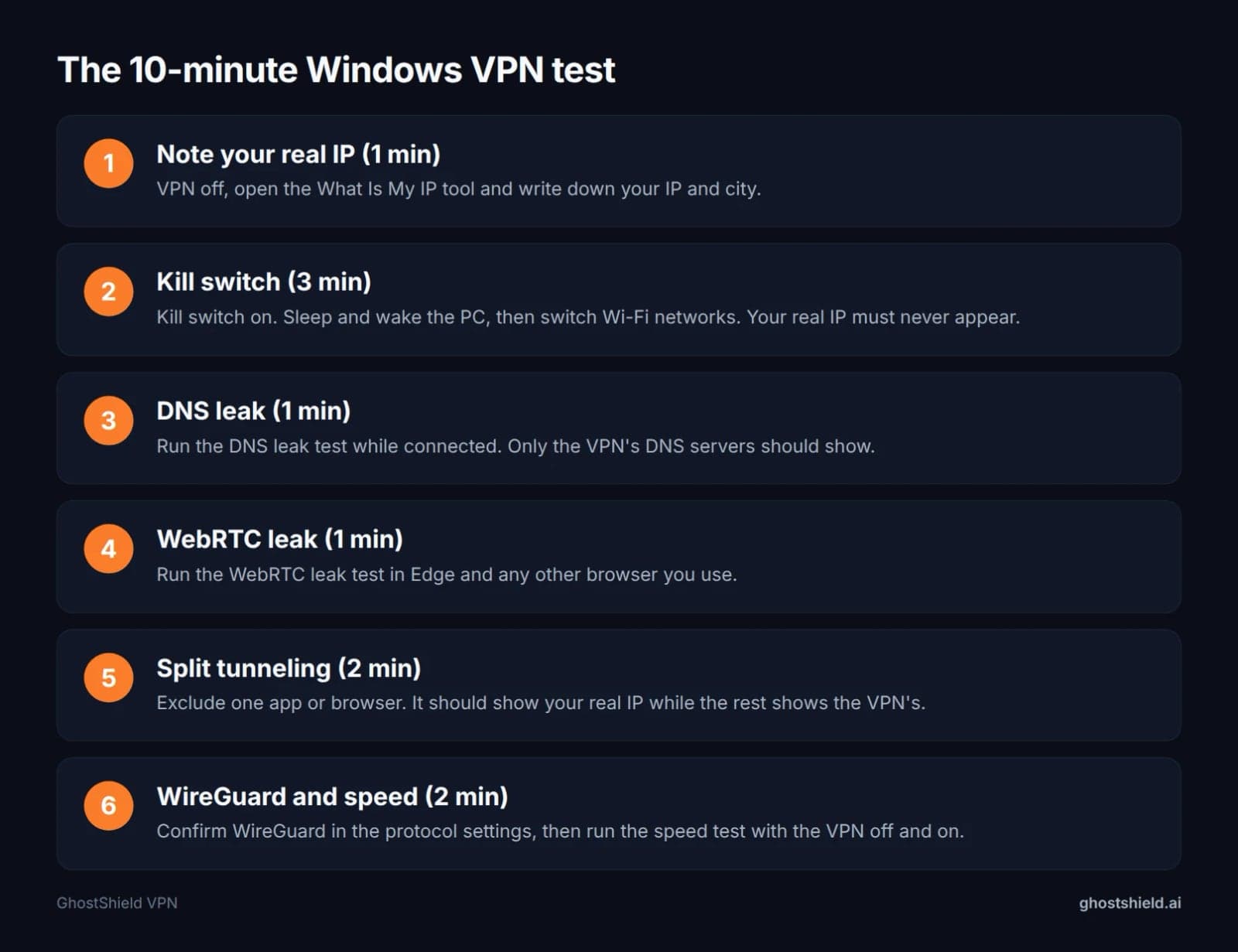 Run all six during a free trial. Total time: about 10 minutes.
Before you start: note your real IP
Turn the VPN off and check your IP address. Write down the IP and the city it shows. Then connect the VPN and reload the page. The IP and location should change. This takes about a minute and gives you something to compare against in every check below.
Check 1: Kill switch through sleep, wake and Wi-Fi changes
Turn the kill switch on in the app. Put the PC to sleep (or close the laptop lid) for a minute, wake it, and reload the IP page straight away, before the VPN has time to reconnect. Then switch from one Wi-Fi network to another, or unplug Ethernet so Windows falls back to Wi-Fi.
Pass: pages fail to load until the tunnel is back, and your real IP never appears. This is the weak spot thebestvpn.com targets too, by timing reconnects across Ethernet-to-Wi-Fi handoffs. Budget about 3 minutes.
Check 2: DNS leaks past Windows' own DNS settings
While connected, run a DNS leak test. Pass: only the VPN's DNS servers show, not your internet provider's.
Run it with your normal settings in place. If you set custom DNS in Windows network settings, or turned on secure DNS in Edge or Chrome, leave those on for the test. That's how you actually browse, so that's the setup that has to hold.
Check 3: WebRTC leaks in Edge and Chrome
Run the WebRTC leak test in Edge and in any other browser you use. Pass: your real IP doesn't appear anywhere on the results.
A full Windows VPN app protects the whole PC. A browser extension only covers the browser it's installed in, which is why top10vpn.com assessed Edge extensions separately. If you rely on an extension, test every browser.
Check 4: Split tunneling per app
Split tunneling lets you send some apps outside the VPN. Exclude one app, such as a second browser, a game launcher or a banking app. Then check your IP in the excluded browser and in a tunneled one.
Pass: the excluded app shows your real IP, and the tunneled one shows the VPN's. People often exclude banking apps because some banks flag VPN logins (see when a VPN helps or hurts online banking). Others exclude games to keep ping low, which we cover in VPNs and gaming lag.
Check 5: WireGuard in the native app
Open the app's protocol setting and confirm WireGuard is available. Alternatively, confirm the provider's own WireGuard-based protocol is the default. thebestvpn.com notes that NordLynx is Nord's WireGuard build. This takes about 30 seconds.
This check matters on Windows for a specific reason. The VPN client built into Windows Settings doesn't support WireGuard, so a WireGuard service needs its own app.
Check 6: Speed on your own connection
Run a speed test with the VPN off, then again connected to the nearest server. Write down both results. Whether the result passes is your call. Video calls and 4K streaming need headroom, while browsing and email need very little. A VPN that keeps your line comfortably above what you use day to day is fine.
Windows 10 vs Windows 11: does it change your pick?
For most people, no. Every VPN in thebestvpn.com's table supports both Windows 10 and 11. Both thebestvpn.com and top10vpn.com tested on both versions. If a VPN passes the six checks on your PC, the Windows version isn't a reason to switch.
Windows on ARM laptops
The real split is the chip inside your PC. If your laptop runs a Snapdragon (ARM) processor, look for a native ARM64 build on the provider's download page. thebestvpn.com lists ARM apps for all five of its picks. top10vpn.com notes native ARM64 support for ExpressVPN and NordVPN.
To check your chip, open Settings, then System, then About, and look at "System type". It will say whether you have an x64-based or ARM-based processor.
Free VPN for Windows: what you give up
A lot of people searching for Windows VPN software want a free one. Free options exist, but each comes with limits, and some come with risks.
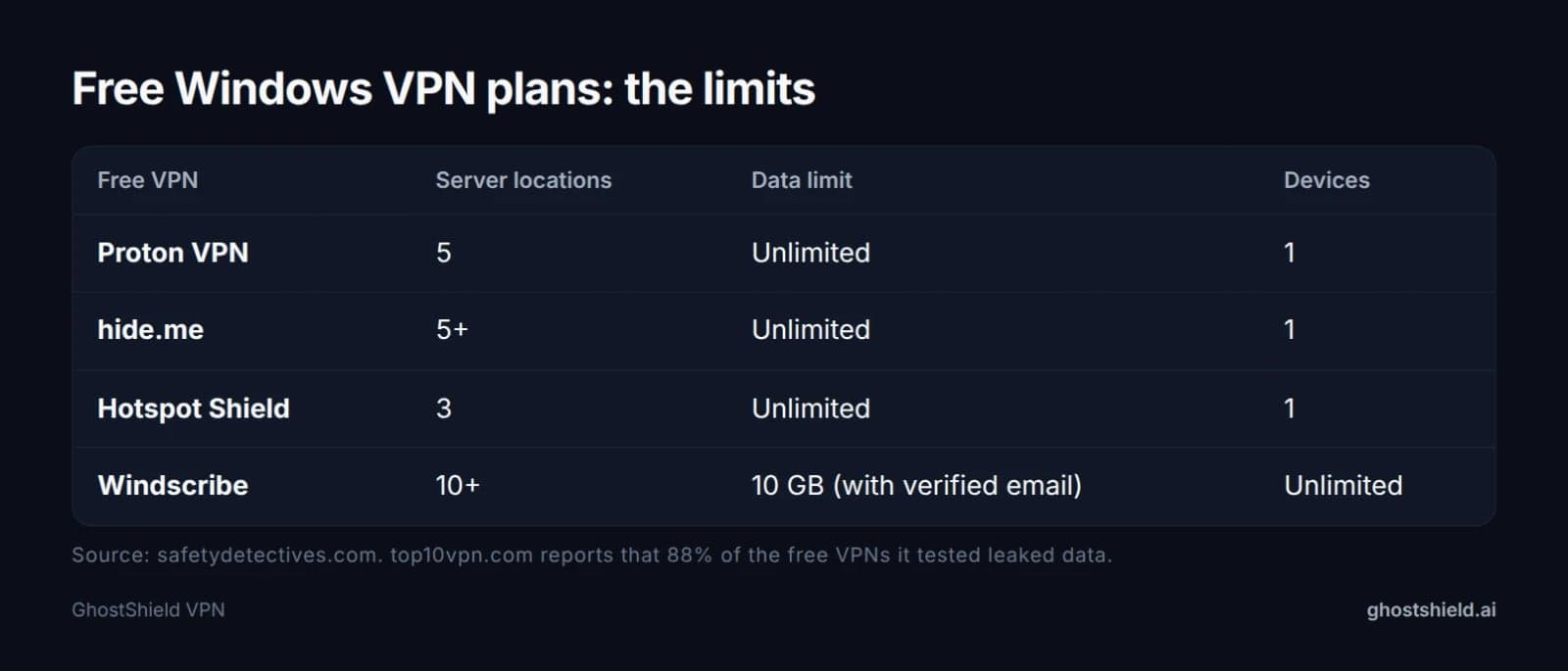 Free plan limits as listed by safetydetectives.com.
Is there a Windows VPN that is completely free?
Yes. safetydetectives.com lists Proton VPN's free plan with servers in 5 countries, unlimited data and 1 device. protonvpn.com says its free PC app includes a kill switch and DNS and IPv6 leak protection. The same list shows Windscribe's free plan capped at 10 GB a month with a verified email. It also notes that Hotspot Shield logs your IP address on its free plan.
The risk is in the free VPNs that don't make these lists. top10vpn.com says 88% of the free VPNs it tested leaked data, including IP addresses and DNS requests. Run the same six checks on any free VPN before you trust it.
Here is how safetydetectives.com sums up free versus paid VPNs for Windows:
| Feature | Free VPNs | Paid VPNs |
|---|---|---|
| Unlimited data | Only a very few | Yes |
| Fast speeds | Rare | Yes |
| Access to all servers | No | Yes |
| Streaming support | Usually no | Yes |
| Simultaneous devices | Most allow 1 | Several |
| Multiple protocol options | No | Yes |
| 24/7 support | No | Yes |
Free trial vs free plan
A free plan is a limited product you can use for as long as you like. A free trial is the full product for a short time, which is exactly what the 10-minute test needs. You want to test the real kill switch, the real split tunneling and the real servers, not a cut-down version.
GhostShield VPN has no free plan. Every plan starts with a 7-day free trial, and there's a 30-day money-back guarantee after that.
How to install and set up a VPN on Windows
The setup is the same on Windows 10 and Windows 11:
- Download the Windows app from the provider's own website, not from a third-party download site.
- Run the installer and allow it to add its network adapter when Windows asks.
- Sign in with your account.
- Turn on the kill switch and auto-connect in the app's settings.
- Press connect, then check your IP address to confirm it changed.
It should feel that simple. protonvpn.com describes its own flow as download, log in, then click Quick Connect.
If you use public Wi-Fi in cafes, hotels or airports, set the app to connect automatically on untrusted networks if it offers that. You'll never sit on an open network unprotected because you forgot to press a button.
If the PC belongs to your employer, check the IT policy first. We explain why in using a VPN on a work laptop.
Your Windows VPN buyer's checklist
This combines the six tests with the buying basics. Work through it during the trial, before the money-back window closes.
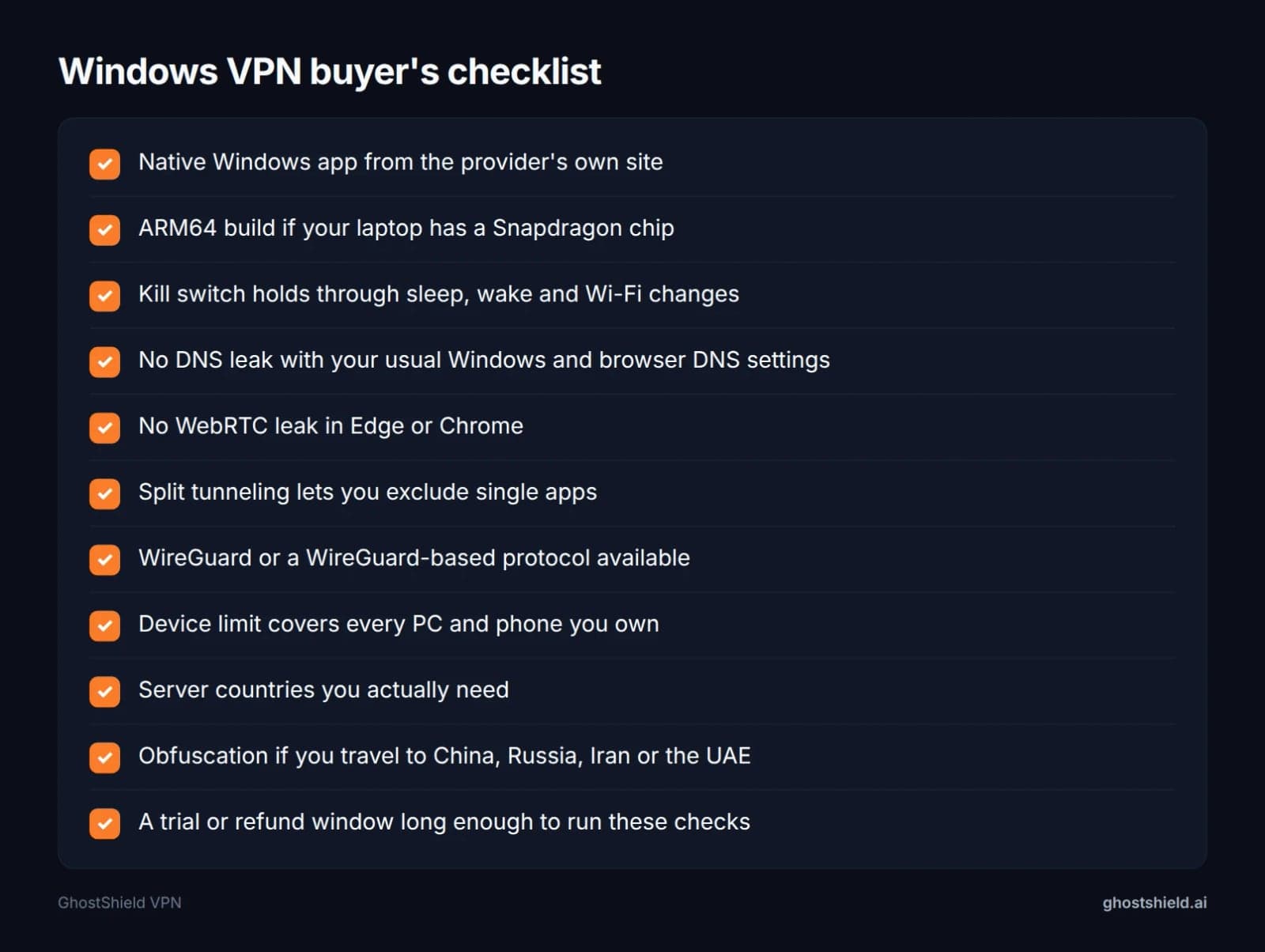 Tick every box during the trial, before the money-back window closes.
Two items catch people out. The first is the device limit: count every PC, laptop and phone in the house before you buy. The second is travel. If you're heading to China, Russia, Iran or the UAE, you need a VPN with obfuscation, so check for it before you pay. If you also use a phone or a Mac, run the same checks for iPhone, our six Android tests or our eight macOS checks. For a privacy-first view, see our privacy checks before you buy.
Tick every box during the trial, before the money-back window closes.
Two items catch people out. The first is the device limit: count every PC, laptop and phone in the house before you buy. The second is travel. If you're heading to China, Russia, Iran or the UAE, you need a VPN with obfuscation, so check for it before you pay. If you also use a phone or a Mac, run the same checks for iPhone, our six Android tests or our eight macOS checks. For a privacy-first view, see our privacy checks before you buy.
GhostShield VPN on Windows: what it does and where it fits
GhostShield VPN has a native Windows app, and it uses WireGuard with ChaCha20-Poly1305 as its only protocol. It includes a kill switch, DNS leak protection, split tunneling, ad and malware blocking, family mode and AI threat detection. It runs under a strict no-logs policy. One account covers 10 devices at the same time, with apps for macOS, Android, iPhone and iPad, and Google TV as well as Windows. Servers sit in 16 countries (20 locations), including 4 in the United States, plus the United Kingdom, Germany, Japan, Canada and Australia.
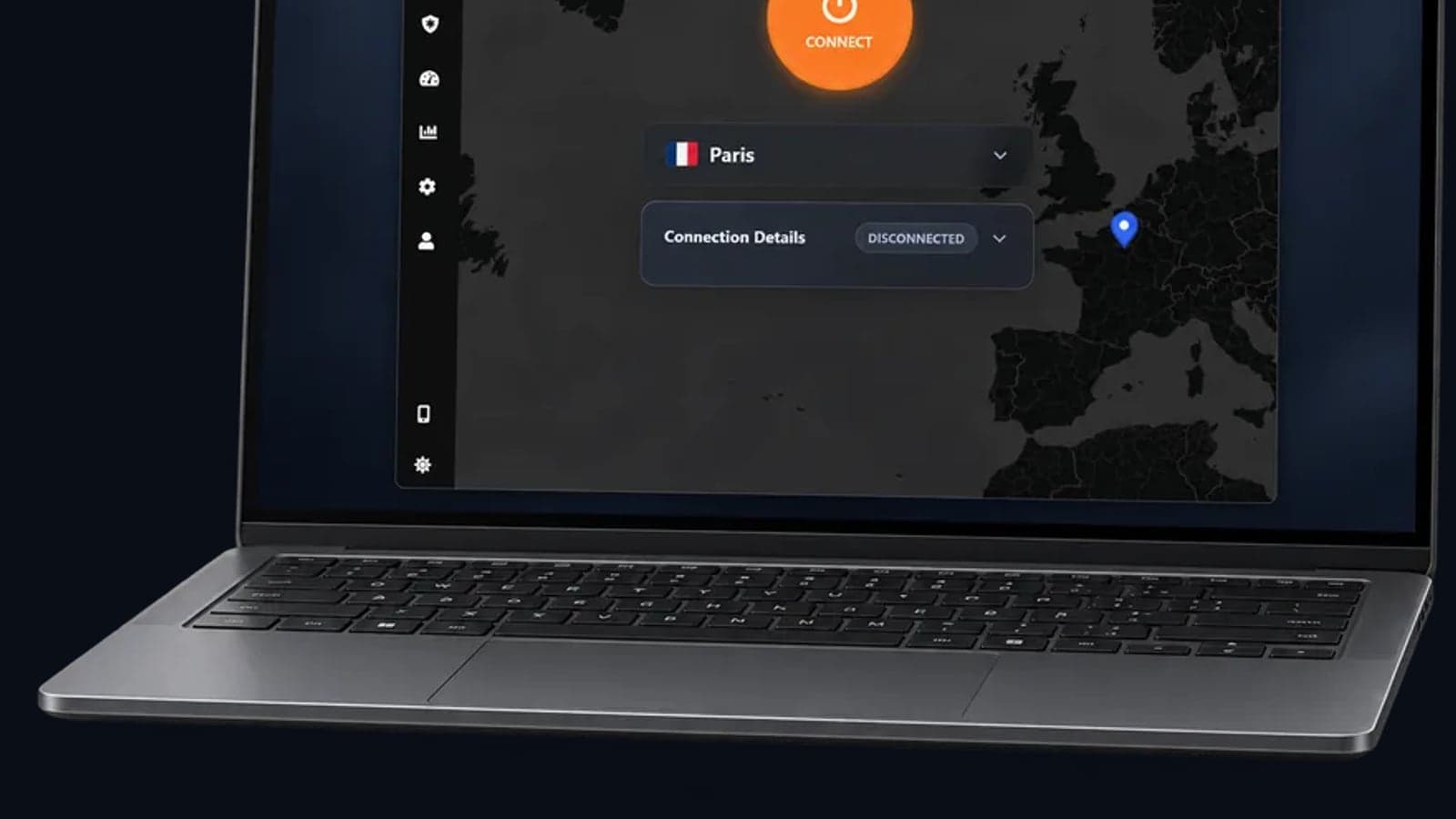
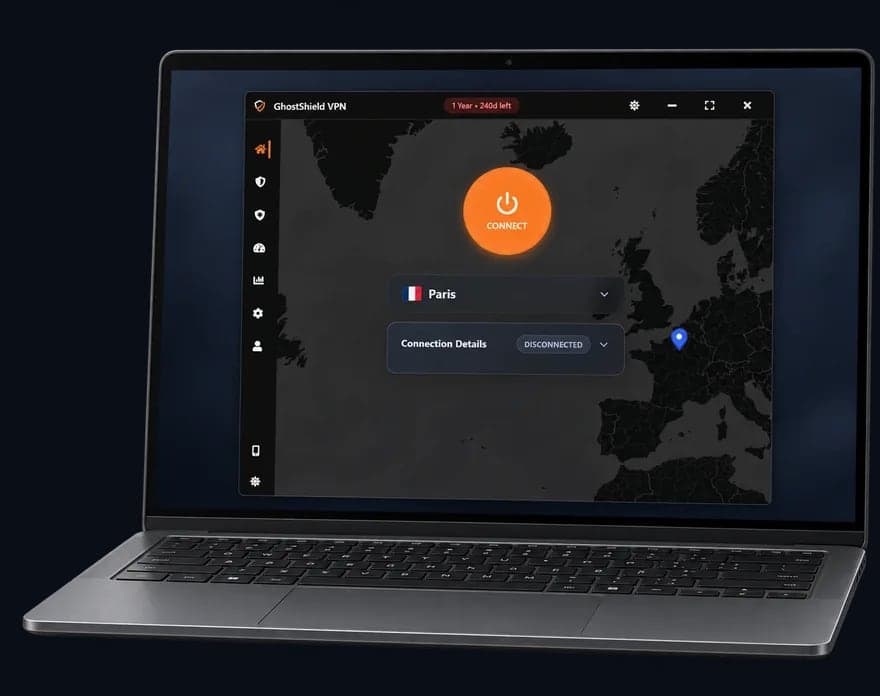 GhostShield VPN app on a Windows laptop
There are limits you should know about before you start. GhostShield VPN has no obfuscation or stealth mode, so it isn't reliable in China, Russia, Iran or the UAE. Our guide to VPNs for China travel explains what you need there. There's also no dedicated IP, port forwarding, double VPN or browser extension. If one of those is your reason for switching providers, see NordVPN alternatives by reason for leaving.
GhostShield VPN app on a Windows laptop
There are limits you should know about before you start. GhostShield VPN has no obfuscation or stealth mode, so it isn't reliable in China, Russia, Iran or the UAE. Our guide to VPNs for China travel explains what you need there. There's also no dedicated IP, port forwarding, double VPN or browser extension. If one of those is your reason for switching providers, see NordVPN alternatives by reason for leaving.
The best way to judge it is the same as any other VPN: run the six checks on your own PC. Every plan starts with a 7-day free trial, and the 1-year plan works out to $4.99 a month. You can start the 7-day free trial, and the 30-day money-back guarantee still applies after that.
FAQ
What's the best VPN for Windows?
There's no single answer, because the top review sites disagree. thebestvpn.com picks NordVPN, top10vpn.com picks ExpressVPN, and safetydetectives.com picks Proton VPN as the best free option. Use their lists as a shortlist, then run the six checks above on your own PC during a free trial.
Is there a Windows VPN that is completely free?
Yes, but every free plan has limits. safetydetectives.com lists Proton VPN's free plan with 5 server countries, unlimited data and 1 device, and Windscribe's free plan with 10 GB a month. Run the DNS, WebRTC and kill switch checks before you trust any free VPN with your traffic.
Does Windows have a built-in VPN?
Windows has a built-in VPN client, but not a VPN service. The client, in Settings under Network and internet, connects to a server you already have details for, such as your workplace VPN. It doesn't support WireGuard and doesn't include any servers, so most people install a provider's own app instead.
How do I set up a VPN on Windows 10?
Download the app from the provider's own website, run the installer and allow its network adapter. Sign in, turn on the kill switch and auto-connect, then press connect. Finish by checking your IP address to confirm it changed. The same steps work on Windows 11, so one guide covers both versions.
Is a free VPN safe on Windows 11?
It depends on the VPN, and many aren't. top10vpn.com reports that 88% of the free VPNs it tested leaked data, including IP addresses and DNS requests. A free VPN from an established provider can be fine. Confirm it with the DNS leak test, the WebRTC leak test and the kill switch check first.
How many devices can I use one Windows VPN on?
It varies by provider and even by review site. thebestvpn.com lists 10 devices for NordVPN and Proton VPN, 8 for ExpressVPN and unlimited for Surfshark and IPVanish. Most free plans allow just 1. GhostShield VPN covers 10 devices at the same time on one account.
Related Topics
Keep Reading

NordVPN Alternatives: Pick by Why You're Leaving (2026)
Best Mac VPN 2026: 8 macOS Checks Before You Buy

Best Android VPN Software 2026: 6 Tests to Run First
Unblocked at School: The Complete Guide (2026)

Can You Use a VPN on a Work Laptop? How to Stay Safe & Keep Your Job (2026)