OpenVPN UDP vs TCP: Which to Use, and When

Use UDP. OpenVPN's default is UDP on port 1194, and it is the right choice for streaming, calls, games and ordinary browsing because it never waits for an acknowledgement. Switch to TCP on port 443 only when a network blocks UDP. openvpn.net puts it the same way: UDP for optimal performance, TCP for compatibility with restrictive networks, where port 443 is used to mimic HTTPS traffic. vpnreviewer.com adds the practical detail: TCP is usually allowed through firewalls on ports 80 and 443, while UDP is often blocked on corporate networks.
OpenVPN UDP vs TCP at a glance
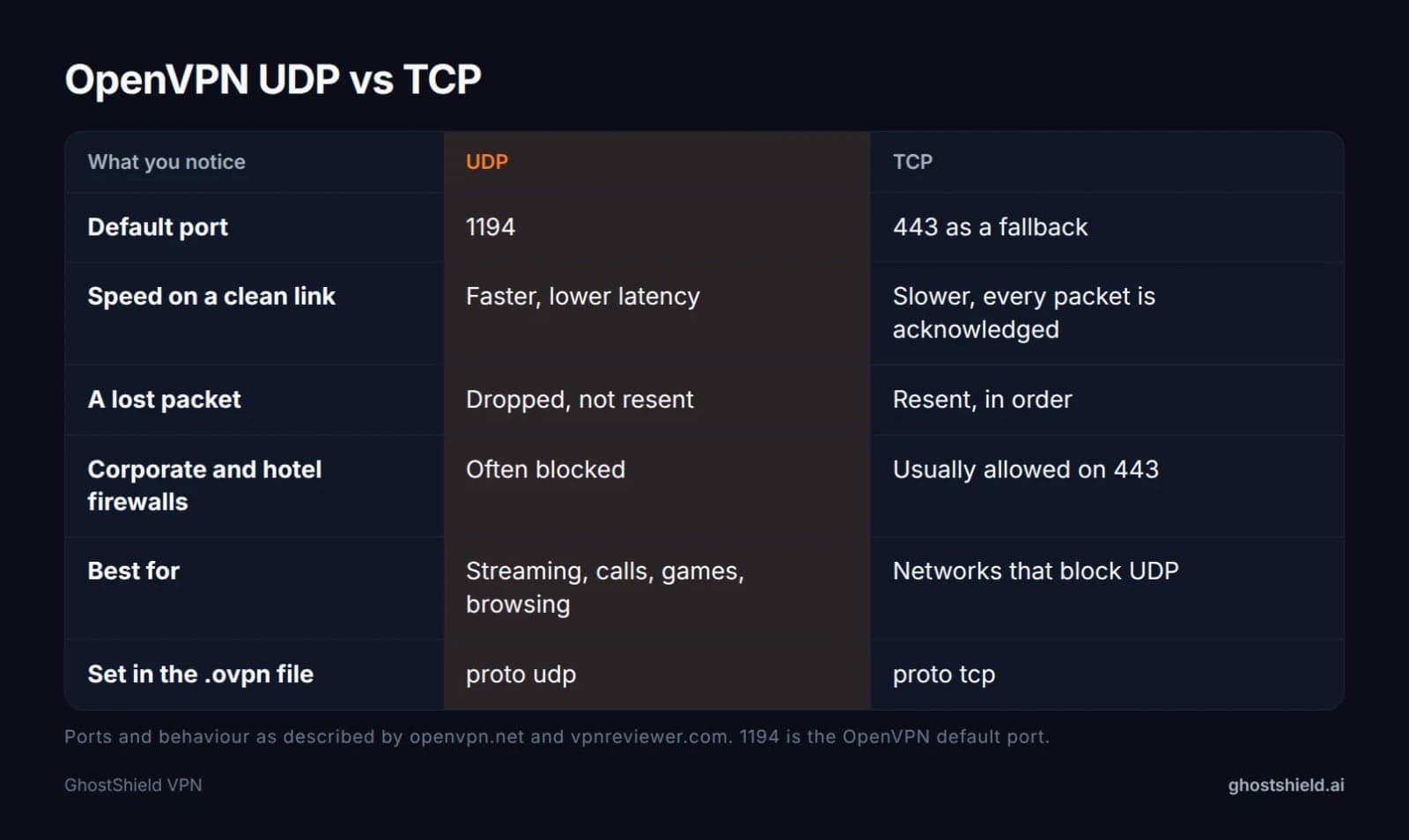 UDP is the fast default. TCP 443 is the fallback for networks that block UDP.
UDP port 1194 is the default because there are no acknowledgements to wait for. Latency stays low, so video calls, games and streaming feel normal. TCP on port 443 exists for one job: getting through networks that allow HTTPS and little else.
The price of TCP is speed. Every packet is acknowledged and put back in order, so a slow link gets slower. On a lossy link the two TCP layers work against each other, which is the meltdown described below.
Neither choice changes encryption. The tunnel is the same TLS channel either way. Only the wrapper underneath it changes, so you are not trading security for compatibility.
What OpenVPN is, and what UDP and TCP actually change
OpenVPN is an open-source VPN protocol, first released in 2001, that builds an encrypted tunnel with TLS and sends your traffic through it. NordLayer describes it as operating at the transport layer of the OSI model, which is exactly why the transport you pick matters.
TCP is the careful one. It numbers every segment, waits for an acknowledgement, resends anything lost and delivers data in order. That is why web pages arrive complete.
UDP is the fast one. It fires datagrams with no acknowledgement and no ordering. A lost packet is simply gone, and the app above decides whether to care.
For a VPN tunnel, gone is usually better than late. Video calls, games and streaming can absorb a missing packet. They cannot un-wait a retransmission stall.
Your own TCP connections already travel inside the tunnel. Adding a second reliability layer on top of them is where the trouble starts. That is also the answer to which protocol is better, TCP or UDP: for a tunnel, UDP, unless a firewall forces your hand.
Why TCP over TCP slows to a crawl
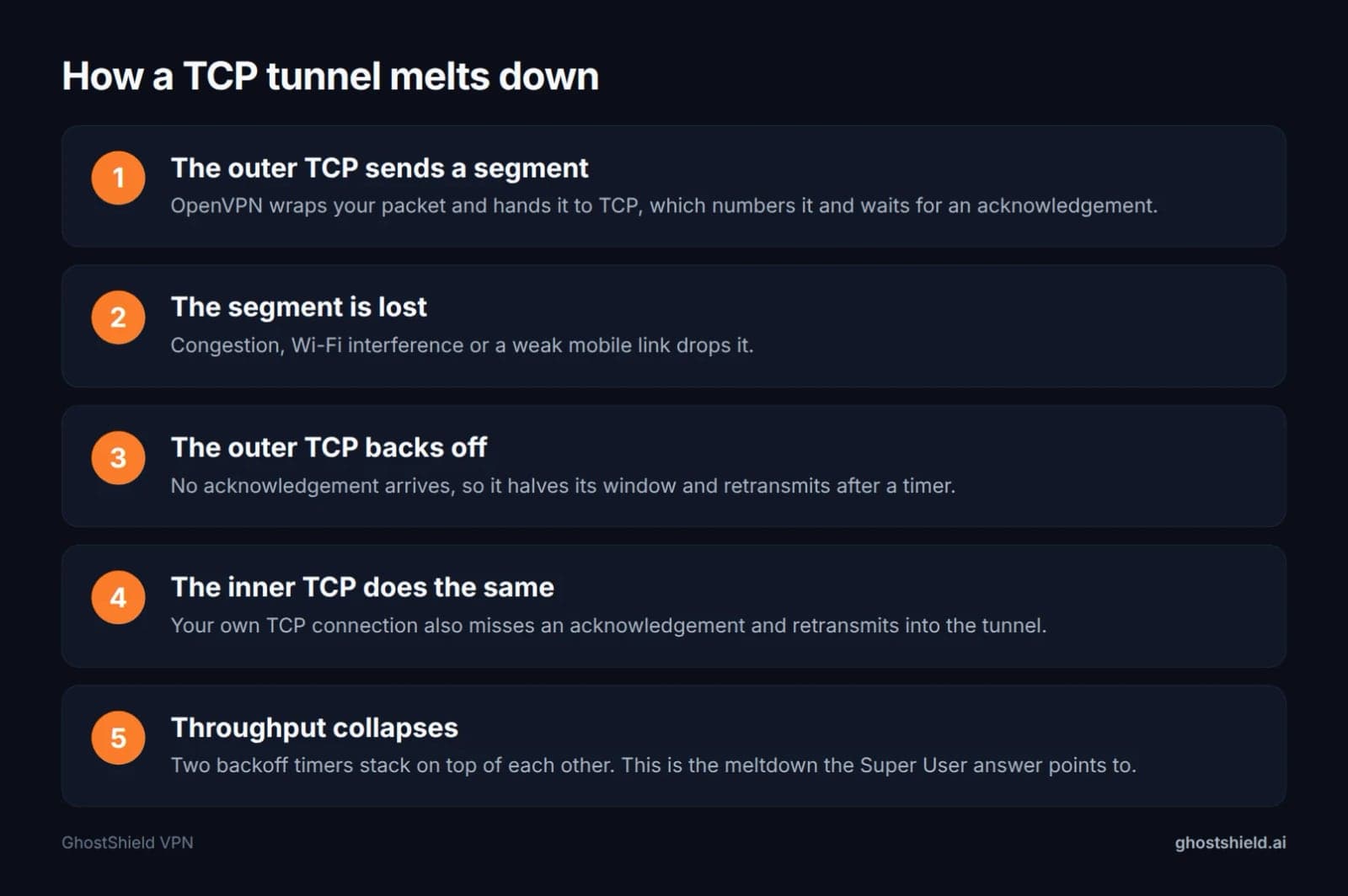 TCP inside TCP: one lost packet starts two retransmission timers, and both layers slow down.
When you run OpenVPN over TCP, each packet you send travels inside two TCP connections at once: your own and the tunnel's. Both have retransmission timers, and both react to the same lost packet.
The outer TCP gets no acknowledgement, halves its congestion window and retransmits after a timer. The inner TCP, which knows nothing about the outer one, does the same. Both back off, then both resend into a link that is already struggling.
This is the TCP meltdown problem. The accepted answer on the Super User question about OpenVPN over TCP or UDP points straight at it, in a scenario with 2% packet loss between the client and the server.
On a clean connection you will barely notice. On hotel Wi-Fi, a train or a crowded mobile network, throughput can fall well below what the same link manages on UDP. Even in the good case TCP adds delay, because each window of data waits for an acknowledgement before the next one opens.
When TCP 443 is the right choice
 Photo by Lukas Blazek on Pexels
Pick TCP when UDP is blocked, not when you want speed. The symptom is specific: the client sits on connecting, retries, and never finishes the handshake, while the same profile works on another network.
Corporate and school firewalls often allow only ports 80 and 443. openvpn.net notes that TCP 443 is used to mimic HTTPS traffic, which those firewalls usually allow through. Hotels, airports and conference Wi-Fi behave the same way.
If the network makes you click through a login page, it is inspecting and filtering traffic, and UDP is the first thing it drops. Some home ISPs also throttle or shape UDP, and TCP 443 gets around a bad UDP path at the cost of speed.
Treat it as a fallback, not an upgrade. If TCP works and UDP does not, you have found a firewall, not a better protocol. Our unblock guide covers networks that filter harder than this.
What port should I use for OpenVPN?
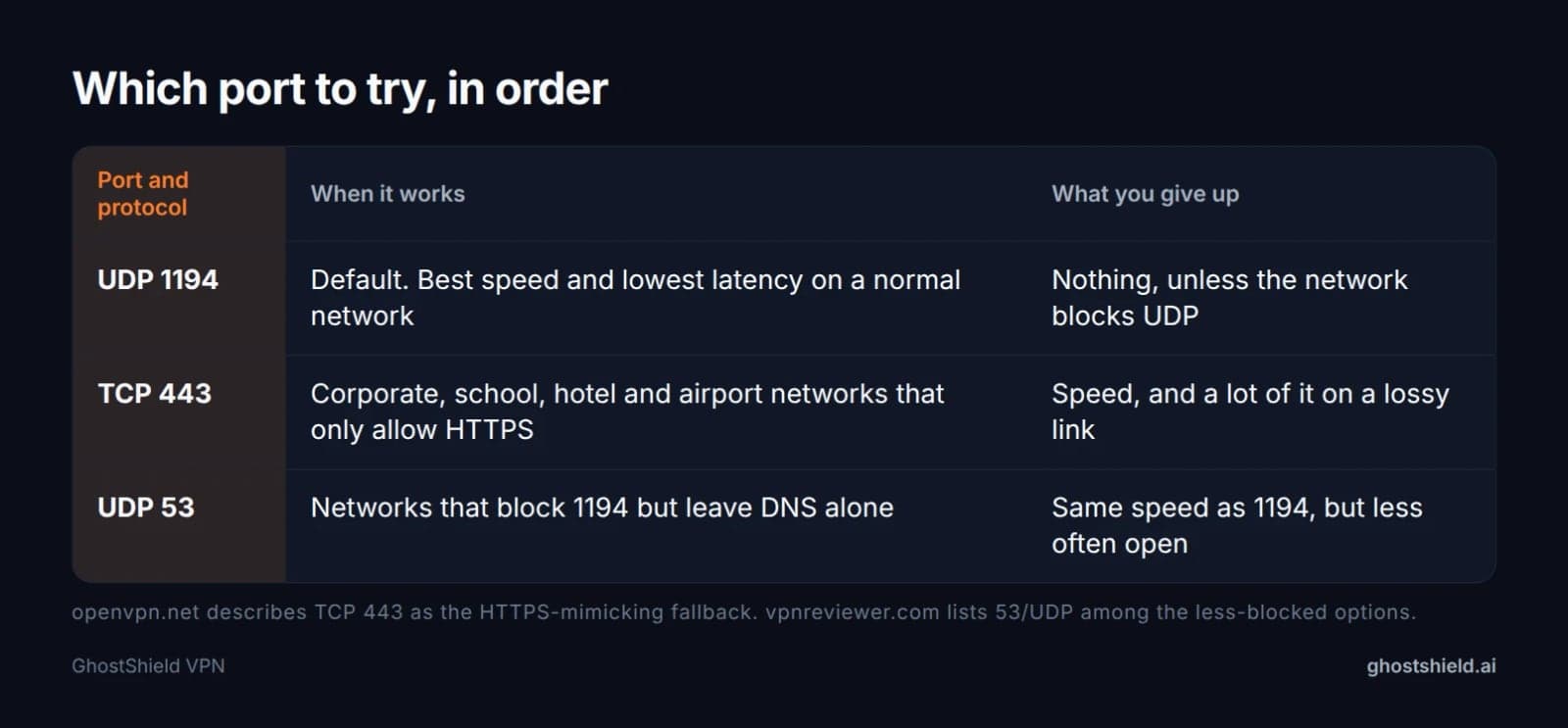 Three ports cover almost every network you will meet.
UDP 1194 is the OpenVPN default and the right first choice. The number is not magic, it is simply what OpenVPN picked, so most networks that pass UDP at all will pass it.
TCP 443 is the fallback that gets through almost everything, because blocking it would break ordinary HTTPS browsing. UDP 53 sometimes works when 1194 does not, because it is the DNS port and networks are cautious about blocking it. vpnreviewer.com lists 53/UDP among the less-blocked options.
Changing the port does not weaken the encryption and does not hide the tunnel from deep packet inspection. It changes what the firewall sees first.
If you run your own server, configure it to listen on more than one port and protocol. Clients then have a fallback without needing a new profile.
How to switch OpenVPN from UDP to TCP
The protocol lives in the profile, not in a slider. OpenVPN reads two lines from the .ovpn file: proto and port. Open the file in a plain text editor.
- Find the line starting with
proto. Changeproto udptoproto tcp. - Find the port line and change
1194to443. - Save the file and import it into your OpenVPN client again.
- Keep the original profile so you can switch back on a friendly network.
- On a server you control, make the same two changes in the server configuration. The client must match or the handshake fails.
| Line in the profile | UDP default | TCP fallback |
|---|---|---|
proto | udp | tcp |
port | 1194 | 443 |
| Encryption | unchanged | unchanged |
| When to use it | normal networks | firewalls that block UDP |
If the tunnel drops after a network change rather than a firewall block, our guide to a VPN keeps disconnecting covers the other causes.
Phones, hotels and networks that keep changing
 Photo by Darlene Alderson on Pexels
A phone changes networks all day: home Wi-Fi, mobile data, hotel Wi-Fi at night. A tunnel that has to survive a filtering firewall is the case where UDP goes quiet and the app reconnects.
If your VPN drops every time you join a hotel or office network but works fine on mobile data, test the same account over TCP 443 before you blame the app. On iPhone, our iPhone VPN not connecting fixes follow the same order.
Captive portals are the other trap. Finish the login page in your browser first, then connect, or the portal will never load.
A quick speed test on each network tells you whether the slowdown is the tunnel or the Wi-Fi itself.
Where GhostShield VPN fits
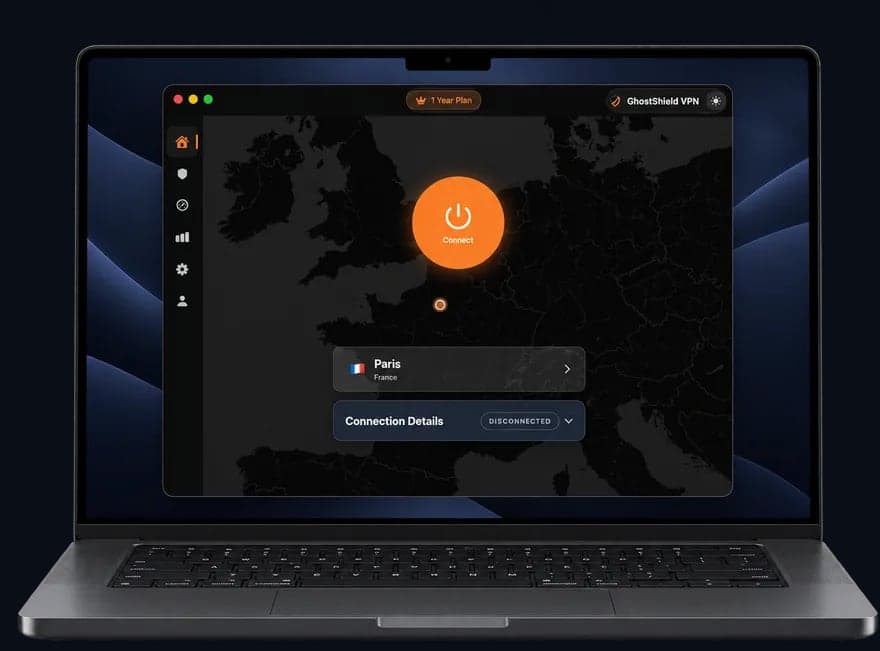 GhostShield VPN app on a MacBook
GhostShield VPN is WireGuard only, with ChaCha20-Poly1305, and nothing else. There is no OpenVPN profile to edit and no TCP 443 fallback to switch to.
That is a deliberate trade. WireGuard is small, fast and runs over UDP, which is why it feels quick on a normal connection and why it has nothing to fall back on when UDP is blocked.
There is no obfuscation or stealth mode, so GhostShield VPN is not reliable in China, Russia, Iran or the UAE. If you are travelling to one of those places, read the country guides before you rely on it.
Apps cover Windows, macOS, Android, iPhone, iPad and Google TV, with a kill switch, DNS leak protection, split tunneling and 10 devices at once. Linux and routers use a manual WireGuard configuration.
The 1-year plan is $4.99 a month ($59.88 billed yearly) and the 3-year plan is $3.99 a month ($143.64). Every plan starts with a 7-day free trial, and there is a 30-day money-back guarantee.
Nothing that passes through the tunnel is stored: no browsing activity, no traffic content, no DNS queries and no real IP addresses.
The honest limit: on a network that blocks UDP, GhostShield VPN cannot connect. That network is the one case where an OpenVPN TCP profile still earns its place.
Is OpenVPN obsolete, and what is better?
 Photo by Brett Sayles on Pexels
No. OpenVPN is still maintained and still supported by most VPN services, and it is the common protocol with a TCP mode, which is why it survives on locked-down networks.
WireGuard is newer, far smaller in code and usually faster, and it is built into the Linux kernel. It is UDP only, so it cannot do the one thing OpenVPN over TCP can. That is the real answer to what is better than OpenVPN: better for speed, worse for hostile networks.
OpenVPN itself is open source and free to use. Paid products built around it are separate from the protocol, so nothing about TCP or UDP changes what you pay. As for which VPN is better, NordVPN or OpenVPN, that compares a service with a protocol. NordVPN is a VPN service and OpenVPN is a protocol that services can run. The fair comparison is OpenVPN against WireGuard, and the answer depends on whether you need TCP.
Pick by network, not by reputation: UDP or WireGuard for daily use, TCP 443 for the network that fights you. Our TLS VPN vs IPsec piece covers where WireGuard sits among the other tunnel types, and the VPN comparison guides cover how services differ.
FAQ
Should I use TCP or UDP for OpenVPN?
Use UDP. It is the default on port 1194 and gives lower latency because nothing waits for an acknowledgement. Choose TCP only when the network blocks UDP, which usually shows up as a connection that never finishes its handshake while the same profile works elsewhere.
What port should I use for OpenVPN?
Start with UDP 1194, the OpenVPN default. If that fails, try TCP 443, which firewalls almost always allow because it looks like ordinary HTTPS. UDP 53 is a third option on networks that block 1194 but leave DNS traffic alone.
Is OpenVPN obsolete?
No. It is still maintained and widely supported, and it remains the common protocol that offers a TCP mode for restrictive networks. WireGuard is faster and leaner, but it is UDP only, so OpenVPN still has a job on corporate, school and hotel networks.
Which protocol is better, TCP or UDP?
For a VPN tunnel, UDP is better on normal networks because it avoids retransmission delays. TCP is better only when a firewall blocks UDP, because port 443 gets through. TCP inside TCP also causes the meltdown problem, where both layers back off at once.
Is OpenVPN still free?
Yes. OpenVPN is open-source software, free to download and use. A paid VPN service that offers OpenVPN is a separate product, so the price you pay is for the service, not for the protocol, and switching between TCP and UDP costs nothing.
Why is OpenVPN over TCP so slow?
Because your traffic travels inside two TCP connections, yours and the tunnel's. One lost packet makes both layers retransmit and halve their windows. The timers stack, throughput collapses, and the effect gets worse as packet loss rises.
Related Topics
Keep Reading
TLS VPN vs IPsec: Key Differences and Where WireGuard Fits
Best VPN With No Logging: How to Check the Claim (2026)
Best VPN Software for Windows 2026: 6 Checks on Your PC

NordVPN Alternatives: Pick by Why You're Leaving (2026)

Best Mac VPN 2026: 8 macOS Checks Before You Buy