VPN Best Paid in 2026: What $3 to $15 a Month Buys You
Most readers should take a 1-year plan and expect to pay $2 to $15 a month for it. The range comes from the three sites that quote prices most precisely: security.org, which reviewed 50+ VPNs, says prices typically range from $3 to $15 per month; CyberInsider draws its budget line at under $4 a month; CNET reports deals from about $2 a month when you pay upfront. Pay month to month and security.org's five ranked services run $11.95 to $25.29. Below is what the money buys, eight checks to run before you pay, and how to test a plan for a week at no risk.
What the best paid VPNs cost in 2026
On the five services security.org ranks, the cheapest monthly price lands between $1.98 and $3.49, and the most expensive between $11.95 and $25.29. Same apps, same servers. What moves the number is the billing term.
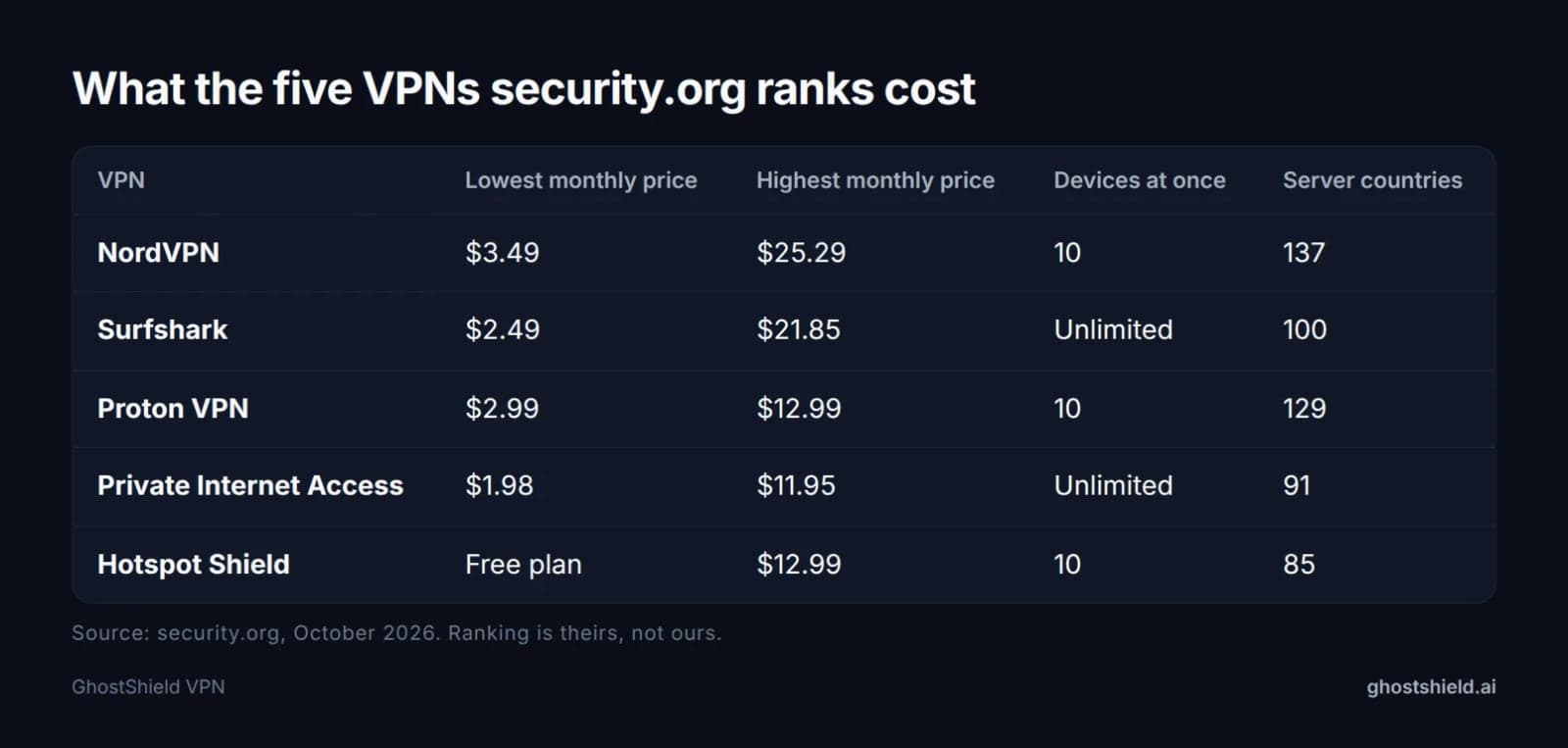 Prices as published by security.org in October 2026. The lowest figure needs a long plan paid upfront.
Where the $2 figure comes from
The lowest numbers belong to long terms. Surfshark's $2.49 is a two-year rate; Private Internet Access lists $1.98 without a stated term. CNET's $2 headline comes from the same place, a larger upfront payment for one or two years.
CyberInsider calls the gap between the intro price and the month-to-month rate the renewal trap. To get those rock-bottom prices you pay for a year or two in advance, and the price can move when the term ends. Read the renewal price as carefully as the intro price.
Why the monthly price looks so different
CyberInsider's table puts NordVPN Basic at $14.99 a month, Complete at $19.99 and Prime at $29.99. On the two-year term the same three tiers are $3.49, $4.49 and $7.49 a month.
Nothing about the app changes with the term. A monthly plan buys flexibility, since you can leave after 30 days. A long commitment trades that flexibility for a lower monthly figure.
Free vs paid: what the money actually buys
Free options exist: security.org lists a free plan for Hotspot Shield, and Mashable covers Proton VPN Free. The buying guides on the first page still rank paid plans, because the features people pay for are the ones free tiers cut first.
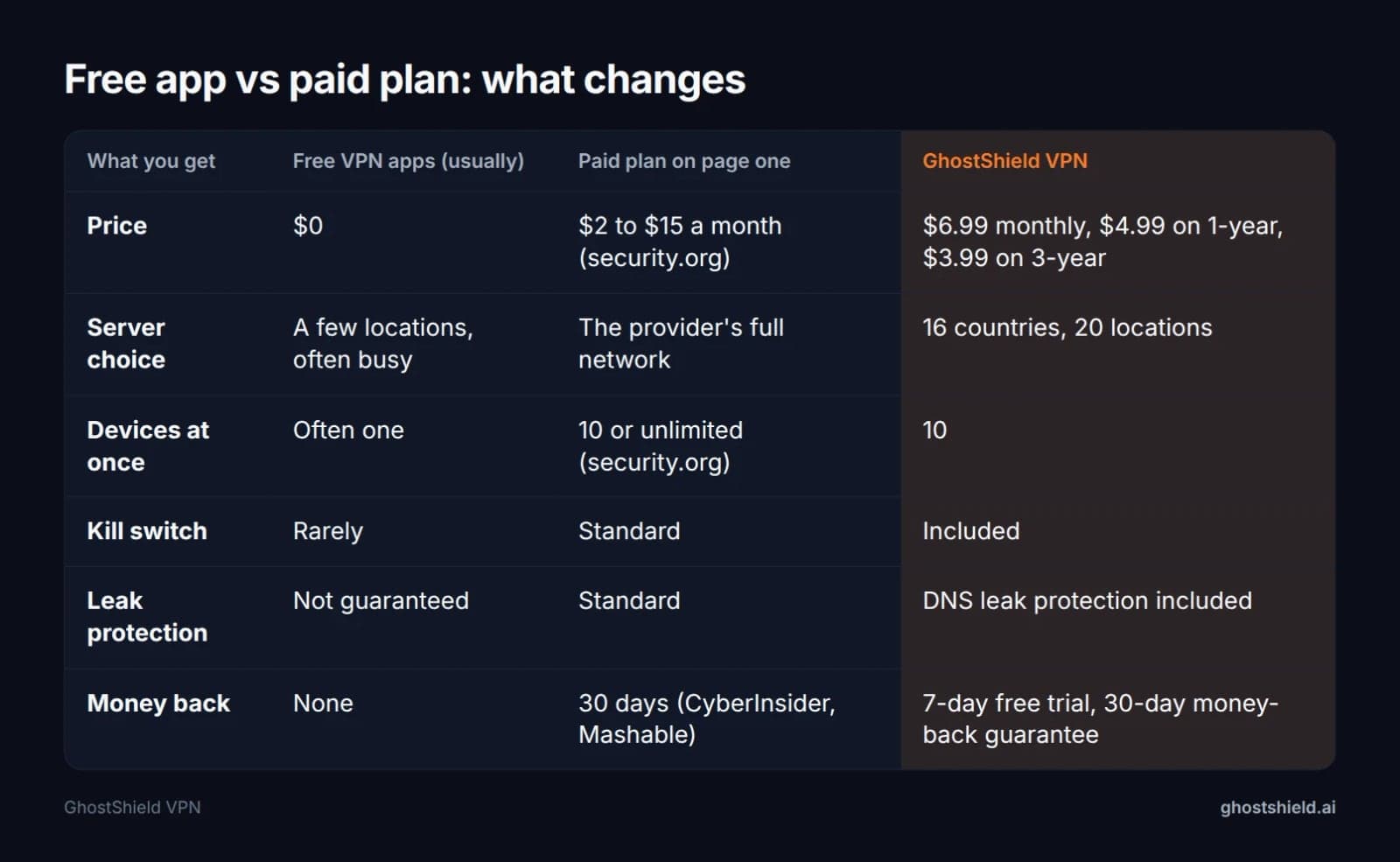 The four rows that decide whether a plan is worth the money.
What a free app usually leaves out
Four things separate a paid plan from a free one, and you can check all four in ten minutes: a kill switch, DNS leak protection, enough devices connected at once, and a refund window if the service disappoints. Those are the features the paid tiers advertise and the free tiers do not.
Treat a free tier as a demo, not a plan. If you want to try a paid service without paying, use its trial and refund window instead of settling for the cut-down app.
Are free VPNs safe to use?
Mashable asks that question directly and answers it with paid plans, calling Proton VPN the safest bet it tested; its free tier appears there as a downgrade for people who leave. The safety features the guides describe, a kill switch, leak protection, a written no-logs policy, come with the paid tier. Free is reasonable for a one-off connection, not for everyday use.
Devices, not just price
Device limits matter more than price for a family. security.org's table lists 10 connections for NordVPN, Proton VPN and Hotspot Shield, and unlimited for Surfshark and Private Internet Access. Ten sounds generous until four people in one house each want a phone and a laptop online.
GhostShield VPN has no free plan. Every plan starts with a 7-day free trial and carries a 30-day money-back guarantee, which is the no-cost test we offer.
The eight checks to run before you pay for any VPN
Run these against the checkout page, not against the review you just read.
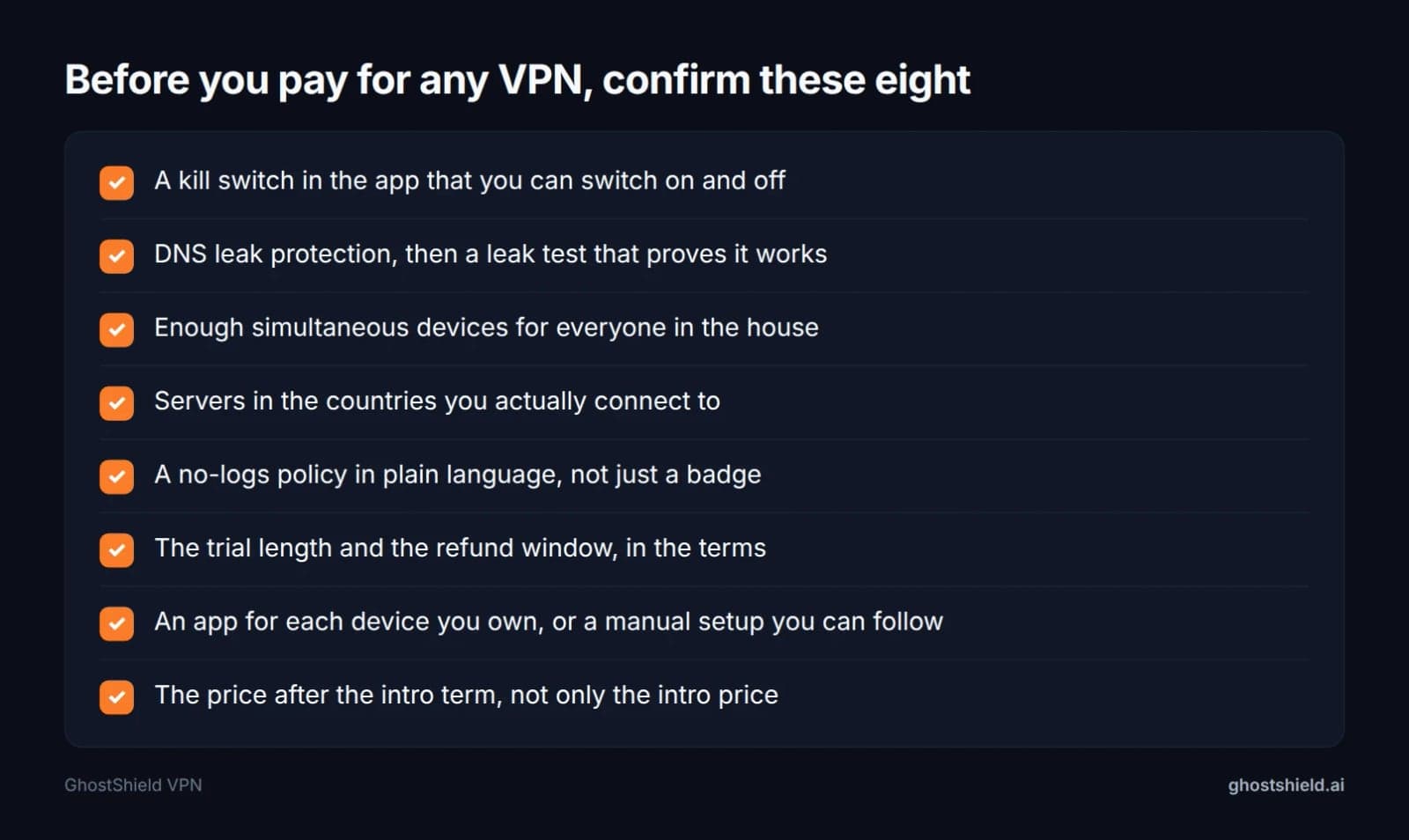 Print it, or keep it open while you read the checkout page.
- Kill switch. Confirm it is in the app and that you can switch it on and off. Then test it by dropping the connection on purpose.
- DNS leak protection. Switch it on, then prove it with our free DNS leak test while the VPN is connected.
- Devices. Count phones, laptops and the TV before you choose, not after.
- Countries. Pick a provider with servers where you actually connect. GhostShield VPN has servers in 16 countries across 20 locations, including four in the United States.
- Logs. Read the policy, not the badge. Our guide to the best VPN with no logging shows the wording that matters and the wording that does not.
- Refund terms. 30 days is the standard in the page-one reviews, from CyberInsider and Mashable, but check when the clock starts and how you ask.
- Apps. One for each device you own, or a setup guide you can follow.
- The price after the intro term, because that is what you will pay in year two and year three.
For the longer version of this list, our 7 checks to test before you buy covers each one with what a bad answer looks like.
How to test a paid VPN in a week without risking your money
 Photo by Stefan Coders on Pexels
A trial plus a refund window gives you two chances to say no: seven days free, then thirty days to change your mind. Use both. Test the boring things, because leaks, speed and whether your banking app still loads decide whether a plan stays, not a server count.
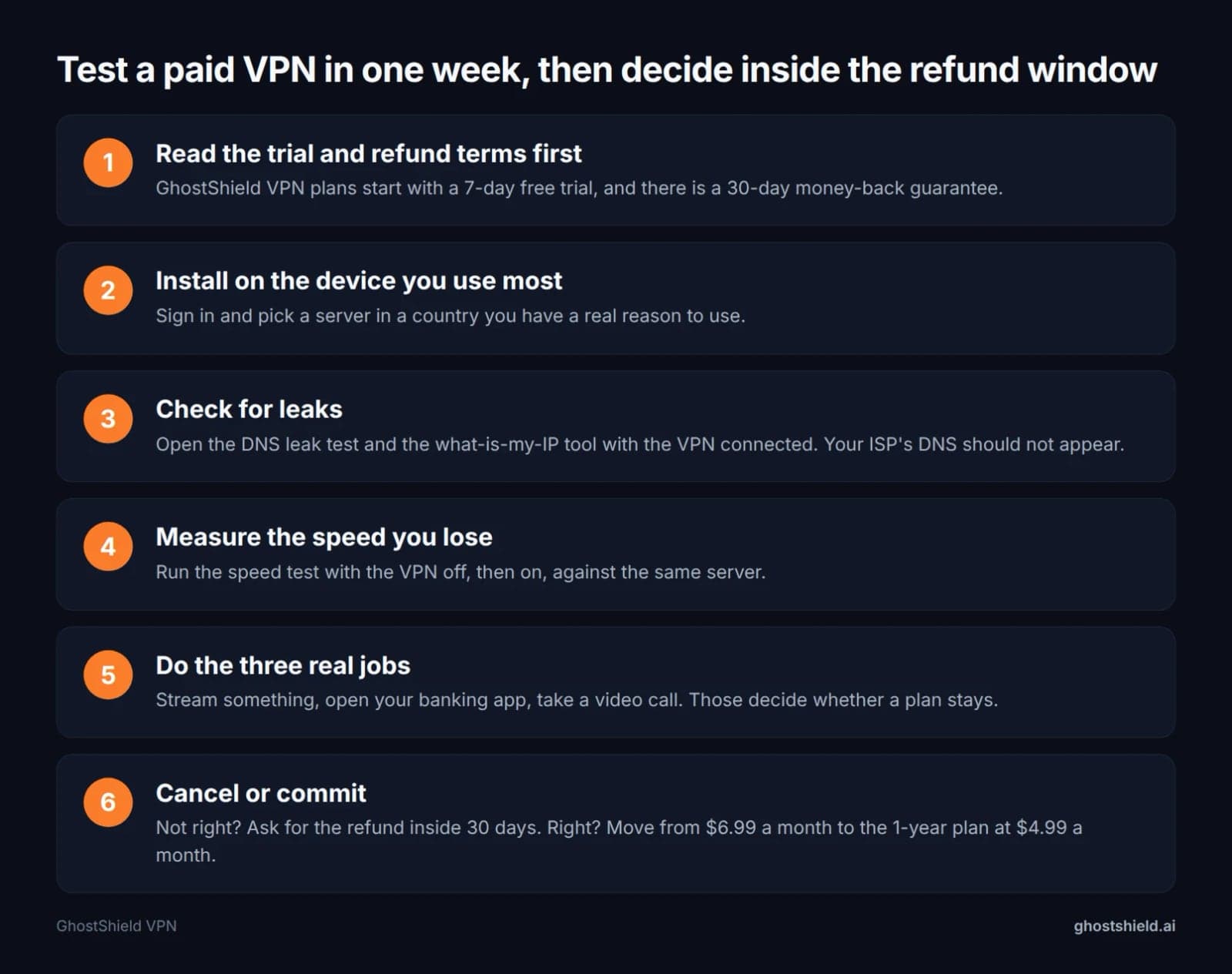 Seven days free, thirty days to change your mind. Use both.
Day one: install on the device you use most and pick a server in a country you have a real reason to use. Then open our DNS leak test and our what is my IP tool with the VPN connected. Your ISP's DNS server should not appear anywhere in the results.
Day two or three: run the speed test with the VPN off, then on, against the same server. Write both numbers down. A drop you can measure is easier to accept than one you imagine.
Then the three real jobs: stream something, open your banking app, take a video call. Cancelling inside the window is a normal request, not a favour. Ask in writing, keep the reply and note the date you sent it.
Monthly, 1-year or 3-year: what each term really costs
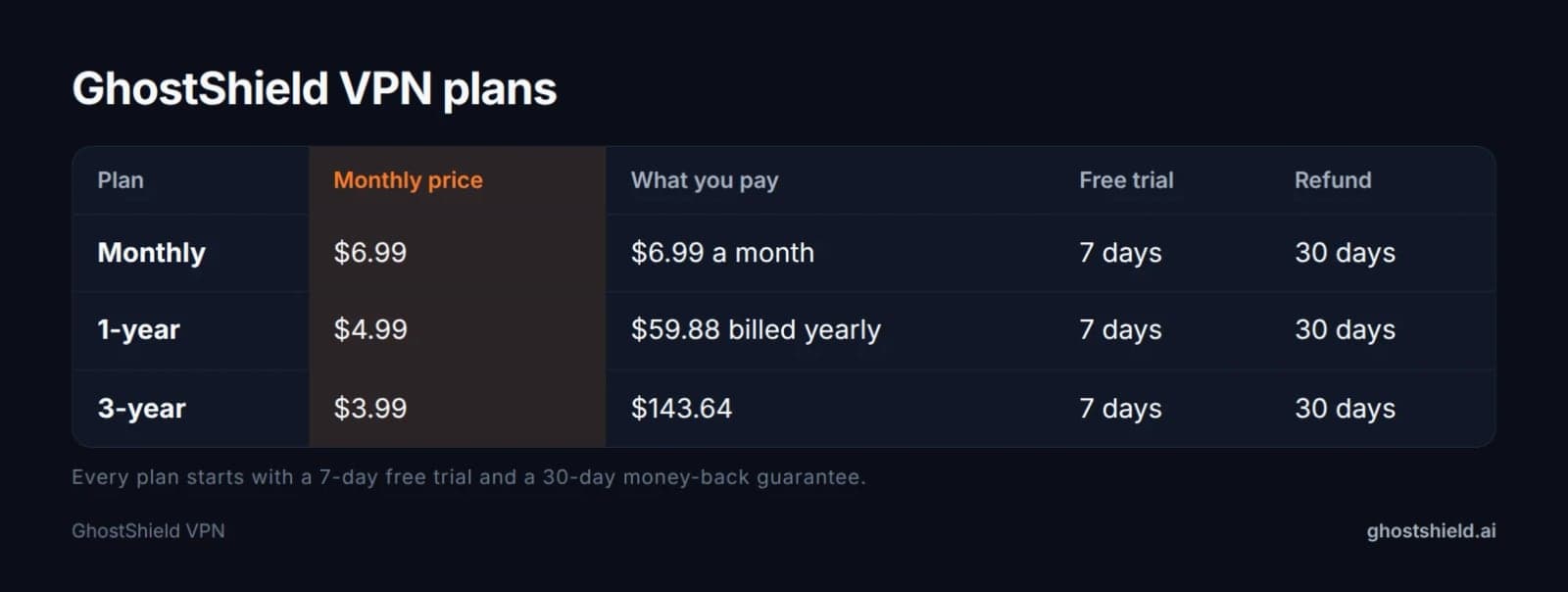 A year at the monthly price would be $83.88. The 1-year plan is $59.88.
GhostShield VPN is $6.99 a month, $4.99 a month on the 1-year plan ($59.88 billed yearly) or $3.99 a month on the 3-year plan ($143.64).
Twelve months at the monthly price is $83.88. The 1-year plan bills $59.88 for the same year. The 3-year plan works out at $3.99 a month, but you pay $143.64 on day one. Do that only after the app has earned it.
Start on the trial or the monthly plan if you are unsure, then move to the longer term once the app has proved itself on your devices. CyberInsider's warning applies to every provider, ours included: the advertised price is the upfront price, and the renewal can be higher. If you are weighing two providers side by side, compare VPN plans on the same term before you look at the monthly figure.
Best paid VPN for iPhone and Android: what to check
On iPhone, always-on VPN is limited and split tunneling works at app level, according to security.org's iOS and Android comparison. The kill switch is supported on both platforms. On Android, always-on VPN and full split tunneling are supported, which makes Android the easier phone for per-app routing.
Battery life is the same story on both: WireGuard is the lighter protocol, and GhostShield VPN runs on WireGuard with ChaCha20-Poly1305. Turn the kill switch on before you trust a public network.
Our iPhone VPN checks and Android VPN tests go deeper on both platforms, including the settings people miss on the first day.
Is a paid VPN legal, and what are the downsides?
How a VPN works in one sentence
A VPN builds an encrypted tunnel from your device to a server in another city or country, so the sites you visit see that server's IP address instead of your home one, and your ISP sees encrypted traffic rather than the pages you open. That is the whole trick. Everything else is about how well it is built.
Where VPN use is restricted
Using a VPN is legal in the US, the UK and most of Europe. Some countries restrict or ban it, including China, Russia, Iran and the UAE. GhostShield VPN does not work reliably in those four, because there is no obfuscation. If you are travelling to one of them, plan around it rather than buying a plan that will not connect.
The honest downsides
Speed is the price you notice first. security.org measured download losses from 3.17 percent to 8.18 percent across its top five, with upload loss as high as 84.26 percent for one of them.
| VPN (security.org ranking) | Download speed loss | Upload speed loss |
|---|---|---|
| Hotspot Shield | 3.17% | 80.03% |
| Private Internet Access | 4.84% | 84.26% |
| NordVPN | 5.78% | 4.11% |
| Surfshark | 7.76% | 49.98% |
| Proton VPN | 8.18% | 4.08% |
Some sites block known VPN addresses, which is a reason a connection fails rather than a reason the VPN is broken. And a VPN is not anonymity: Mashable makes the point that even the best VPNs cannot make you 100 percent anonymous online. On GhostShield VPN, torrenting and peer-to-peer file sharing are not allowed, so do not buy it for that.
Where GhostShield VPN fits
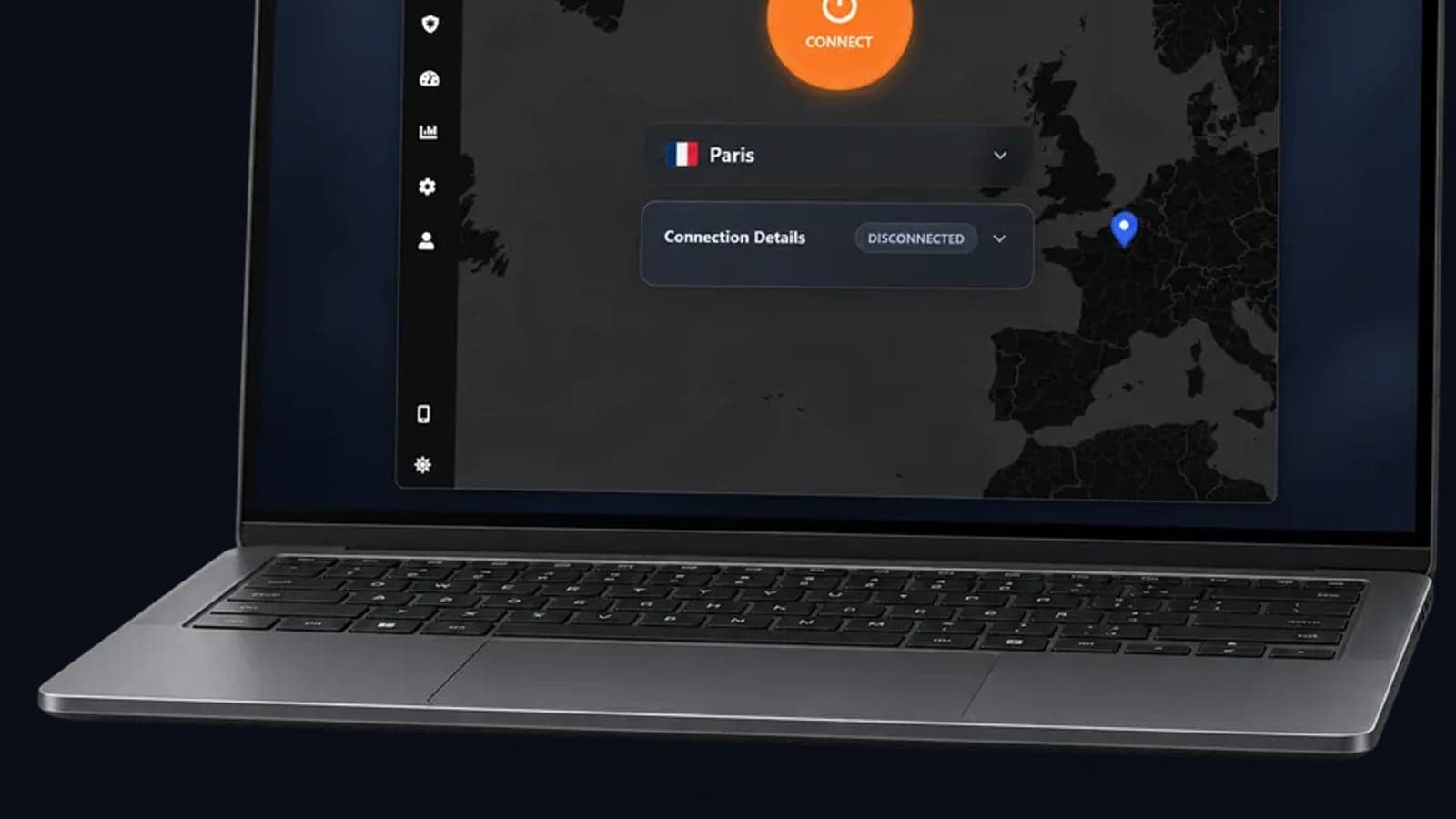
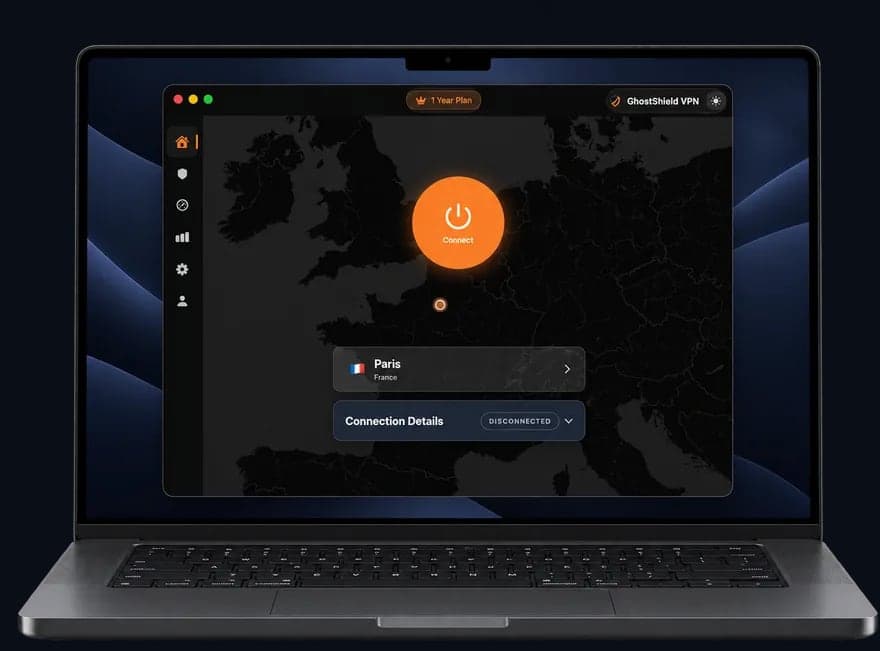 GhostShield VPN app on a MacBook
GhostShield VPN is paid only: $6.99 a month, $4.99 a month on the 1-year plan or $3.99 a month on the 3-year plan. Every plan starts with a 7-day free trial, and there is a 30-day money-back guarantee. Current prices are on the pricing page.
You get WireGuard with ChaCha20-Poly1305, a kill switch, DNS leak protection, split tunneling, ad and malware blocking, family mode, AI threat detection, a strict no-logs policy and 10 devices at once.
Servers are in 16 countries across 20 locations. If the country you need is not on that list, we are not the right buy, and we would rather tell you here than after you pay.
Apps run on Windows, macOS, Android, iPhone and iPad, and Google TV. Linux and routers work through a manual WireGuard configuration. There is no browser extension. There is no dedicated IP, no port forwarding and no multi-hop, so if those are on your list, keep looking.
If you want the cheapest honest way to try it, start the 7-day free trial, run the leak and speed tests, and decide inside the 30-day window.
FAQ
Why avoid NordVPN?
Price is the usual reason. CyberInsider's table puts NordVPN's monthly Basic plan at $14.99 and Prime at $29.99, so the cheap headline needs a two-year payment upfront. If your reason is something other than money, our guide to NordVPN alternatives, picked by why you are leaving sorts the options by the problem you want solved.
What are the top 3 VPNs?
The published top three differ by site. security.org ranks NordVPN first, Surfshark second and Proton VPN third out of the 50+ it reviewed. Mashable's three picks are led by Proton VPN, with ExpressVPN named for travel. Treat any top three as one site's ranking, not a fact.
What are the top 10 best VPNs for Android?
No page-one review publishes a stable top 10. Mashable names three, CyberInsider five, and security.org ranks five out of the 50+ it reviewed, so most top-10 lists repeat the same handful of names in a different order. On Android, check the app itself: always-on VPN and full split tunneling are supported, according to security.org.
Can the FBI track a VPN?
A VPN hides your IP address from the sites you visit, not from a court order. A judge can require a provider to hand over the records it holds. A provider with a strict no-logs policy has little to give, and GhostShield VPN keeps a strict no-logs policy.
What are the four types of VPN?
Most explainers name four: remote access, site to site, mobile and cloud VPNs. Remote access connects one person to an office network, site to site links two offices, and a consumer app such as GhostShield VPN is a remote access tunnel for a device. The labels overlap, so check what a source means by each.
What is more powerful than a VPN?
More powerful at what matters. For hiding who you are, Tor sends traffic through three relays, which a single-hop VPN does not. For reaching a blocked site in a country that blocks VPN traffic, a proxy can work when a plain VPN fails. For ordinary privacy from your ISP, a VPN is usually enough.
Related Topics
Keep Reading

NordVPN Alternatives: Pick by Why You're Leaving (2026)

OpenVPN UDP vs TCP: Which to Use, and When
TLS VPN vs IPsec: Key Differences and Where WireGuard Fits
Best VPN With No Logging: How to Check the Claim (2026)
Best VPN Software for Windows 2026: 6 Checks on Your PC