VPN Protocol Ports: Full List and How to Test Yours
There is no single VPN port. Each protocol has its own defaults, and the ones you will meet most often are UDP 51820 for WireGuard, UDP 1194 or TCP 443 for OpenVPN, and UDP 500 and UDP 4500 for IKEv2/IPsec. Zenarmor names 500 and 4500 as the two IPsec ports, and NordVPN's own support page lists TCP 443 and UDP 1194 for OpenVPN plus a second range, TCP 1231 to 1234. Here is every major protocol in one place.
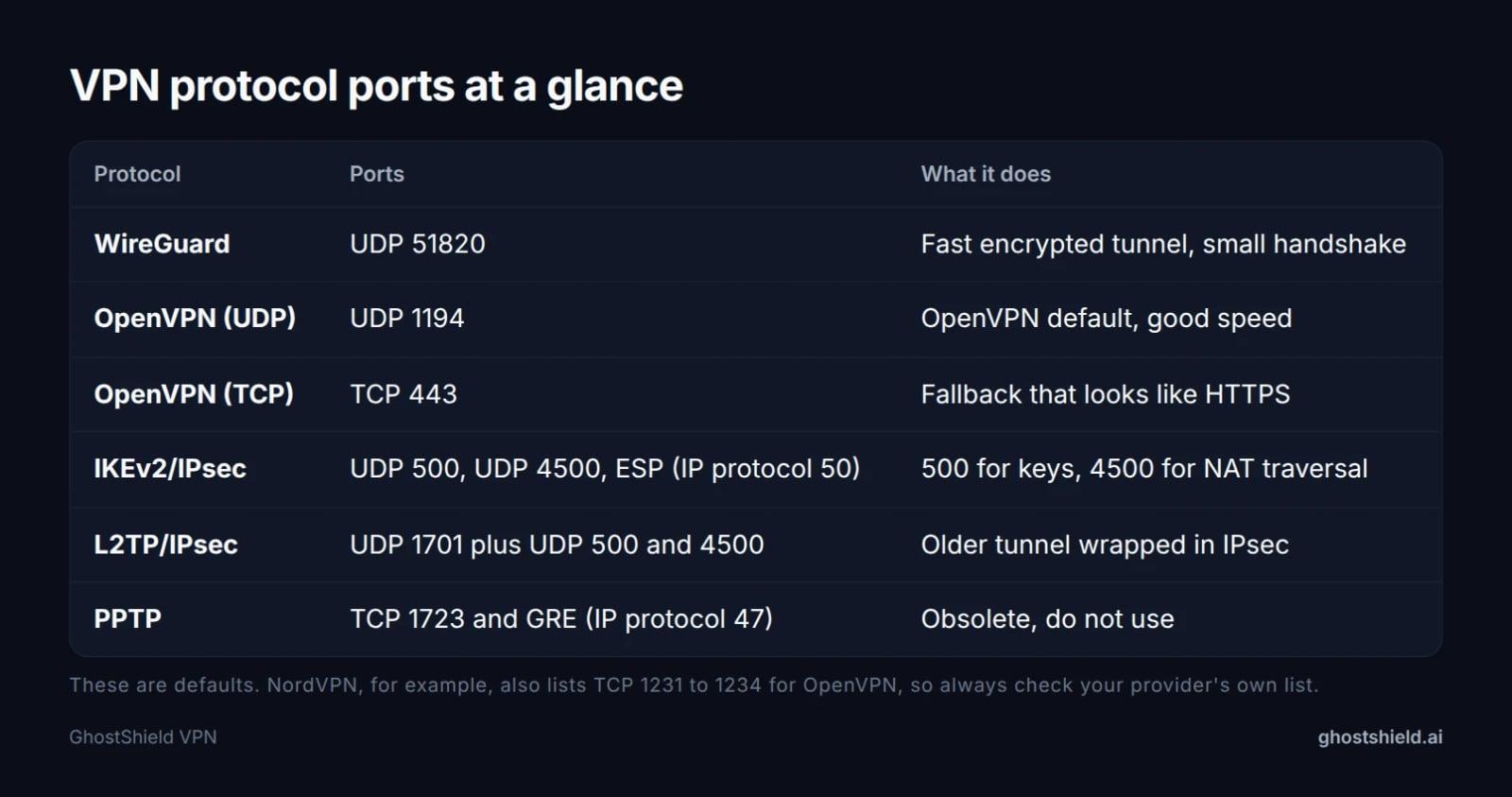 Default ports by protocol. A server can be configured to listen on another port.
A port is just a number from 0 to 65535 that tells a computer which program an incoming packet belongs to. Port 443 defaults to HTTPS, port 25 to mail, port 51820 to WireGuard. All of the numbers above are defaults. A server can be told to listen on a different port, which is why your provider's own list is the only one that matches your account.
VPN protocol ports, protocol by protocol
WireGuard: UDP 51820
WireGuard sends its encrypted packets over UDP, and 51820 is the default port. The handshake is a couple of small packets, which is why the tunnel comes up quickly on a good connection. There is no fallback port built in, so if a network drops UDP 51820 the app simply waits with nothing to report.
OpenVPN: UDP 1194, or TCP 443
OpenVPN uses UDP 1194 out of the box. When a network drops UDP, the same tunnel can run over TCP 443, the port HTTPS uses, and on the wire it looks like ordinary browsing. NordVPN's support page puts its OpenVPN TCP option on 443 and its UDP option on 1194, with a second range of 1231 to 1234 for both. Which mode to pick is a speed question, and our OpenVPN UDP vs TCP walkthrough covers when the TCP fallback is worth the cost.
IKEv2/IPsec: UDP 500 and 4500
IPsec does not use one port. IKE key exchange goes over UDP 500, NAT traversal over UDP 4500, and the encrypted payload travels as IP protocol 50 (ESP), which has no port number at all. Zenarmor describes 500 as the port IKE uses to handle keys and 4500 as the NAT traversal port. That missing port on ESP is the reason 4500 exists, and it is the detail most port lists leave out.
L2TP/IPsec: UDP 1701 plus 500 and 4500
L2TP carries the tunnel on UDP 1701 and is almost always paired with IPsec, so you also need 500 and 4500 open. Zenarmor draws the same split: 1701 for the L2TP layer, 500 and 4500 for the IPsec wrapper around it. Three ports and an older, slower design is a poor trade in 2026.
PPTP: TCP 1723 and GRE 47
PPTP uses TCP 1723 for the control channel and IP protocol 47 (GRE) for data, as SpeedGuide sets out. GRE is dropped by most firewalls today, which is one reason PPTP is obsolete. Do not use it for anything.
None of these numbers decide how safe you are. Encryption strength comes from the protocol design, not the port. The port only decides whether the tunnel can be built at all, which is why a blocked port looks like a broken VPN.
Port 443: the questions people mix up
Port 443 is the HTTPS port. TCP 443 carries TLS, the protocol that replaced SSL, so "is 443 TLS or SSL" has a short answer: TLS. SSL is the older name people still use for the same job.
Port 443 is both TCP and UDP. TCP 443 is ordinary HTTPS. UDP 443 carries QUIC, the transport HTTP/3 runs on, which is why a filter that only inspects TCP can miss some traffic. So "is 443 TCP or UDP" depends on what is running on it, and the honest answer is both.
What VPN uses port 443? OpenVPN, when it is set to TCP mode, and that is the common case. Any OpenVPN server can be pointed at 443, and it will look like a normal HTTPS connection to the network in between. What protocol runs on 443? HTTPS on TCP, QUIC on UDP. Neither is a VPN protocol, and that is exactly why VPNs borrow the port: a firewall that blocks it blocks the web.
8443 is the usual second HTTPS port. It exists so one machine can serve a public site on 443 and an admin page or app on 8443. It is a second door on the same building, not a security upgrade.
| Port | Transport | Typical use | Gets through a strict firewall? |
|---|---|---|---|
| 443 | TCP | HTTPS, and OpenVPN in TCP mode | Yes, the most likely to pass |
| 443 | UDP | QUIC and HTTP/3 | Sometimes, if UDP is not filtered |
| 8443 | TCP | Second HTTPS site, admin panels | Only if the VPN server is set up for it |
Port 8443 does not make a VPN harder to detect or harder to block. If plain TCP 443 is blocked, you are on a network that wants no encrypted traffic at all, and almost every protocol will fail there. For the wider comparison of the two families, see TLS VPN vs IPsec.
How to test whether your Wi-Fi blocks VPN ports
A blocked port usually looks like a VPN stuck on "connecting". UDP has no handshake that fails loudly, so the app waits with nothing useful to show you. Work through the steps below in order and you will know within a few minutes whether the network or your device is the problem.
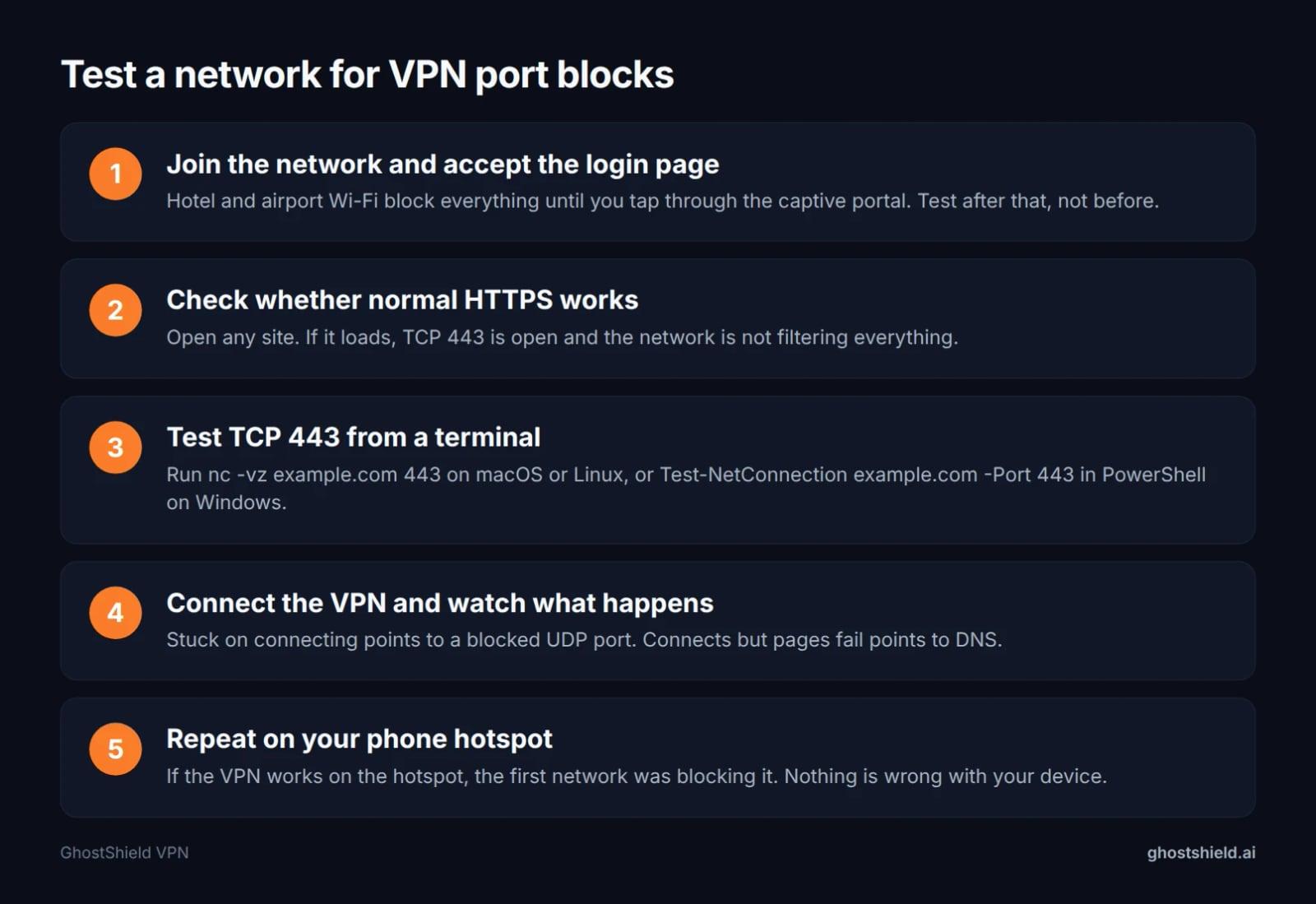 Run the test in this order and you will know within a few minutes whether the network or the app is the problem.
Accept the captive portal first. Hotel and airport Wi-Fi block everything until you tap through the login page, and that includes port tests, so a test run before the login page proves nothing.
Then test TCP 443 from a terminal. Run the command for your system and read the result:
nc -vz example.com 443
Test-NetConnection example.com -Port 443
The first line is macOS or Linux, the second is Windows PowerShell. If a normal site loads but this test fails, the network is filtering far more than VPN ports and no protocol will save you.
If 443 passes and the VPN still hangs, a blocked UDP port is the likely cause. The quickest real-world test is your phone's hotspot, which uses a completely different network and a different set of rules. If the VPN connects there, nothing is wrong with your device.
Once it connects, run our speed test to see what the network is actually giving you before you blame the protocol.
Which protocols survive a locked-down network
On hotel, airport and office networks the pattern is fairly consistent: TCP 443 gets through, unusual UDP ports do not.
OpenVPN over TCP 443 is the most likely to connect on a hostile network, at a cost in speed, because TCP retransmits lost packets inside a tunnel that is already reliable. WireGuard on UDP 51820 is faster but easy to block: the port is unusual and the traffic is recognizable, so one firewall rule stops it. IKEv2/IPsec often works because UDP 500 and 4500 are allowed for corporate VPNs, and some offices block them for exactly the same reason.
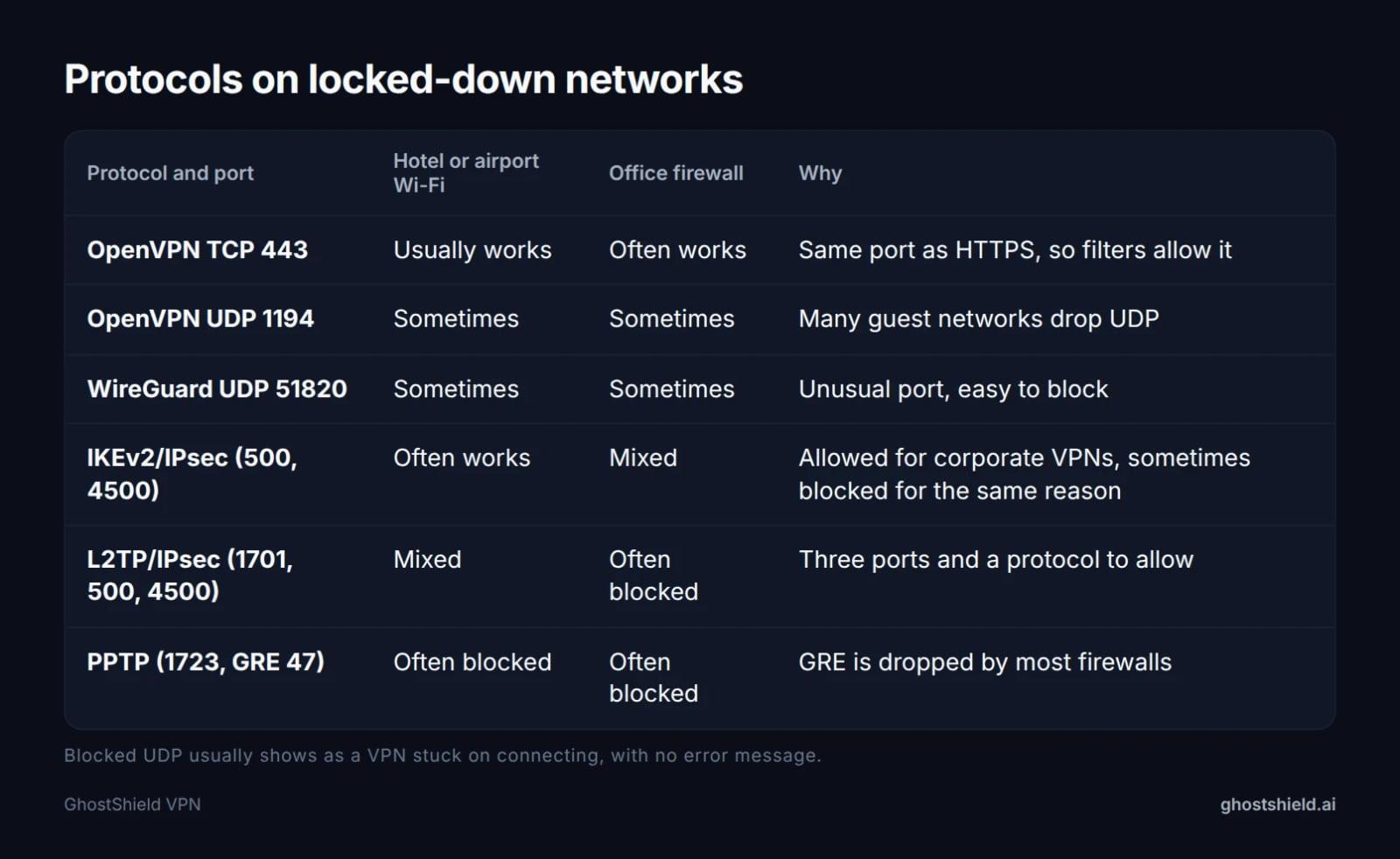 What usually happens on guest and corporate networks. Rules vary, so treat this as a starting point.
L2TP/IPsec and PPTP need extra protocols, 1701 and GRE 47, that most guest networks drop entirely. The table above is a guide to what usually happens, not a guarantee. Networks change rules without warning, and the same hotel chain can behave differently in two cities.
IPsec, NAT-T and port forwarding
NAT traversal exists because ESP (IP protocol 50) has no port number, so a home router cannot track which device a packet belongs to. Wrapping ESP inside UDP 4500 gives NAT a port to follow, which is why 4500 appears next to 500 on every IPsec list.
If you run your own IPsec server behind a router, forward both UDP 500 and UDP 4500 to it. Forwarding only 500 gets the handshake through and then the tunnel dies, which is a confusing failure to debug.
 Photo by Brett Sayles on Pexels
"VPN port forwarding" is a different idea: an incoming port on the VPN server mapped to your device so peers can reach you from outside. Some providers offer it, some do not, and it is unrelated to the outbound port the tunnel uses. Port forwarding and a VPN are not either/or. Forwarding opens one door to one device; a VPN encrypts the whole connection.
Types of VPN, and where ports fit
Two splits matter. By protocol: PPTP, L2TP/IPsec, IKEv2/IPsec, OpenVPN and WireGuard, each with its own ports, as listed above. By setup: a remote-access VPN connects one device to a server, which is what a consumer VPN app does, while a site-to-site VPN links two networks, such as an office and a branch, and stays on all the time.
Corporate VPNs lean on IKEv2/IPsec or OpenVPN TCP 443 because those ports are already open on most firewalls. Consumer apps can pick any protocol the operator supports, which is why the menu in a consumer app is longer than the one in a work laptop.
The port does not change what a VPN protects. Everything inside the tunnel is encrypted either way; the port only decides whether the tunnel can be built at all.
If your VPN will not connect: a short checklist
Work down the list before you change any setting. Most failed connections are one of these seven things.
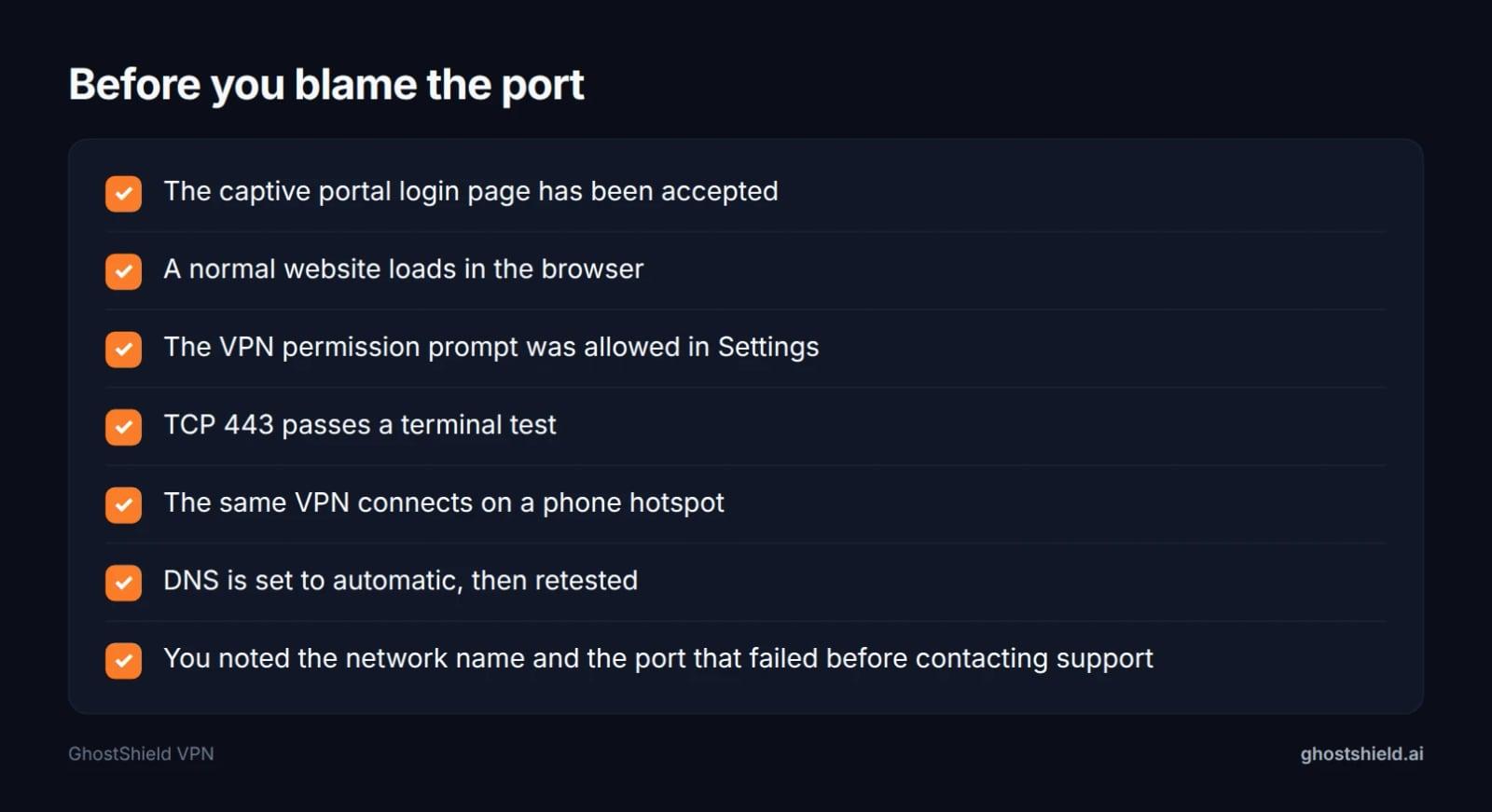 Work down this list first. Most 'blocked port' problems are one of these.
A VPN that connects but loads nothing is usually a DNS problem, not a port problem. Our DNS leak test shows which resolver your device is actually using. iPhone and Android also ask permission the first time a VPN is installed, and a denied prompt looks exactly like a blocked port, so check Settings before you blame the network.
GhostShield VPN sends WireGuard traffic with no obfuscation, so a network that blocks UDP 51820 will stop it. In that case change network, or read our unblock guide for the options that exist. For device-specific fixes, see VPN iPhone not connecting and why a VPN keeps disconnecting.
Where GhostShield VPN fits
GhostShield VPN runs WireGuard with ChaCha20-Poly1305 and nothing else, so the port in play is UDP 51820. That means one fast modern tunnel and no protocol menu to second-guess, and it also means no obfuscation. GhostShield VPN is not reliable in China, Russia, Iran or the UAE, because a network that blocks WireGuard traffic will block ours. We would rather say that than sell you a plan that fails at the border.
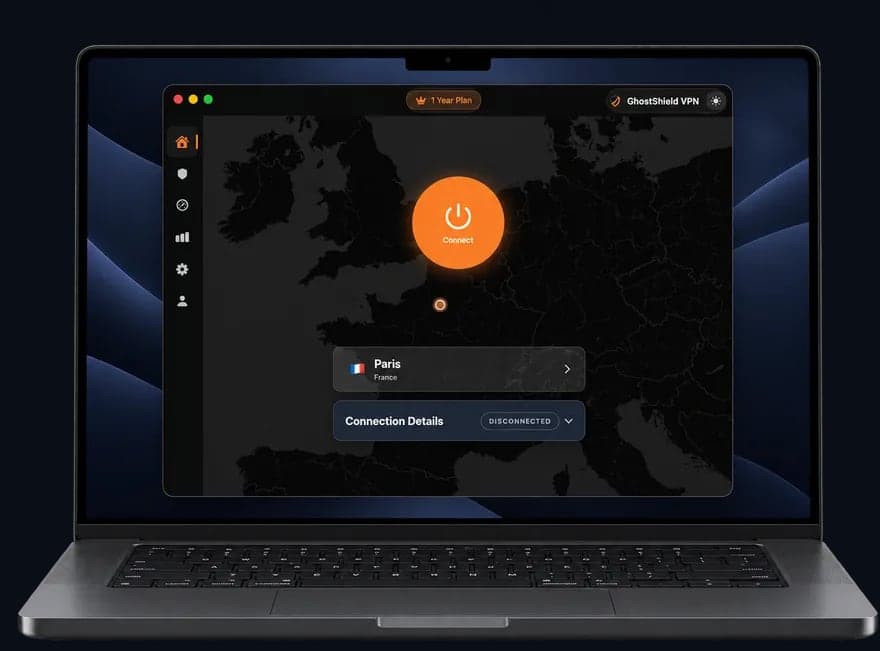 GhostShield VPN app on a MacBook
There is no port forwarding and no dedicated IP, so if a game, camera or home server needs an open port back to you, GhostShield VPN will not do it. What it does have: servers in 16 countries across 20 locations, apps for Windows, macOS, Android, iPhone, iPad and Google TV, 10 devices at once, a kill switch, DNS leak protection, split tunneling and ad and malware blocking. Linux and routers work through a manual WireGuard configuration.
Plans are $4.99 a month on the 1-year plan ($59.88 billed yearly), $3.99 a month on the 3-year plan ($143.64), or $6.99 monthly. Every plan starts with a 7-day free trial, and there is a 30-day money-back guarantee. You can start the 7-day free trial and test the tunnel on the networks you actually use.
If you are travelling somewhere that filters the internet, read the censorship guide for 50 countries and the UAE WhatsApp guide before you leave.
FAQ
What port number is used for IPSec?
IPsec uses UDP port 500 for key exchange and UDP port 4500 for NAT traversal, with the encrypted payload carried as ESP, IP protocol 50, which has no port number. If you are opening a firewall for IPsec, allow 500, 4500 and ESP together.
Does OpenVPN use port 443 or 1194?
Both, depending on the mode. OpenVPN uses UDP 1194 by default and TCP 443 when it needs to get through a firewall, because 443 is the HTTPS port that networks rarely block. NordVPN's support page lists both, plus a second TCP range of 1231 to 1234.
Is port 443 TCP or UDP?
Both. TCP 443 carries HTTPS, which is most web traffic, and UDP 443 carries QUIC, the transport behind HTTP/3. A firewall rule that only checks TCP 443 can therefore miss QUIC traffic, and a VPN on TCP 443 looks like ordinary browsing.
What are the different types of VPNs available?
They split two ways. By protocol there are PPTP, L2TP/IPsec, IKEv2/IPsec, OpenVPN and WireGuard. By setup there are remote-access VPNs, which connect one device to a server, and site-to-site VPNs, which link two networks such as an office and a branch and stay connected all the time.
Can the FBI see through VPNs?
Not through the encryption itself, but a VPN does not make you invisible. Police can ask the provider for account and connection records, and can ask the sites you use for their own logs. A strict no-logs policy limits what a provider has to hand over.
Why use port 8443 instead of 443?
Because 443 is usually already taken. One server address can serve a public site on 443 and an admin page or app on 8443, so the second port is a second door on the same building. It is not more private, and it is not harder for a firewall to block.
Related Topics
Keep Reading

Best Mac VPN 2026: 8 macOS Checks Before You Buy
Best Android VPN Software 2026: 6 Tests to Run First
Unblocked at School: The Complete Guide (2026)

Can You Use a VPN on a Work Laptop? How to Stay Safe & Keep Your Job (2026)

How to Bypass VPN Blocks in 2026: Easy Fixes for Russia, Turkey & Iran