VPN for Fubo: Watch Your US Plan While Traveling (2026)

Yes, a VPN can work for Fubo, but it is not guaranteed. Fubo is a live TV streaming service that plays only in the regions it serves. The How to Unblock Fubo guide on Google's first page lists those as the US, Canada and Spain. Travel outside them and Fubo stops playing. A VPN connects you to a server back in one of those regions, so Fubo sees that server's location instead of yours. Fubo does fight back. A Google-hosted community answer on the first page says Fubo detects and blocks VPN IPs to enforce regional restrictions.
Does Fubo work with a VPN?
This guide is for you if you already pay for Fubo in the US and want to keep watching while you're away. It is not about getting around paying for Fubo.
And yes, Fubo is streaming: it's a live TV service you watch over the internet on phones, laptops, browsers and TV devices, with no cable box. That's exactly why it checks your location so closely.
Here's the honest limit up front. No VPN, GhostShield VPN included, can promise that Fubo will play on a given day. The rest of this post explains why, what to set up before you travel, and what to try when Fubo flags your connection.
How Fubo checks where you are
Fubo doesn't rely on a single check. It looks at several signals, and a VPN only changes some of them.
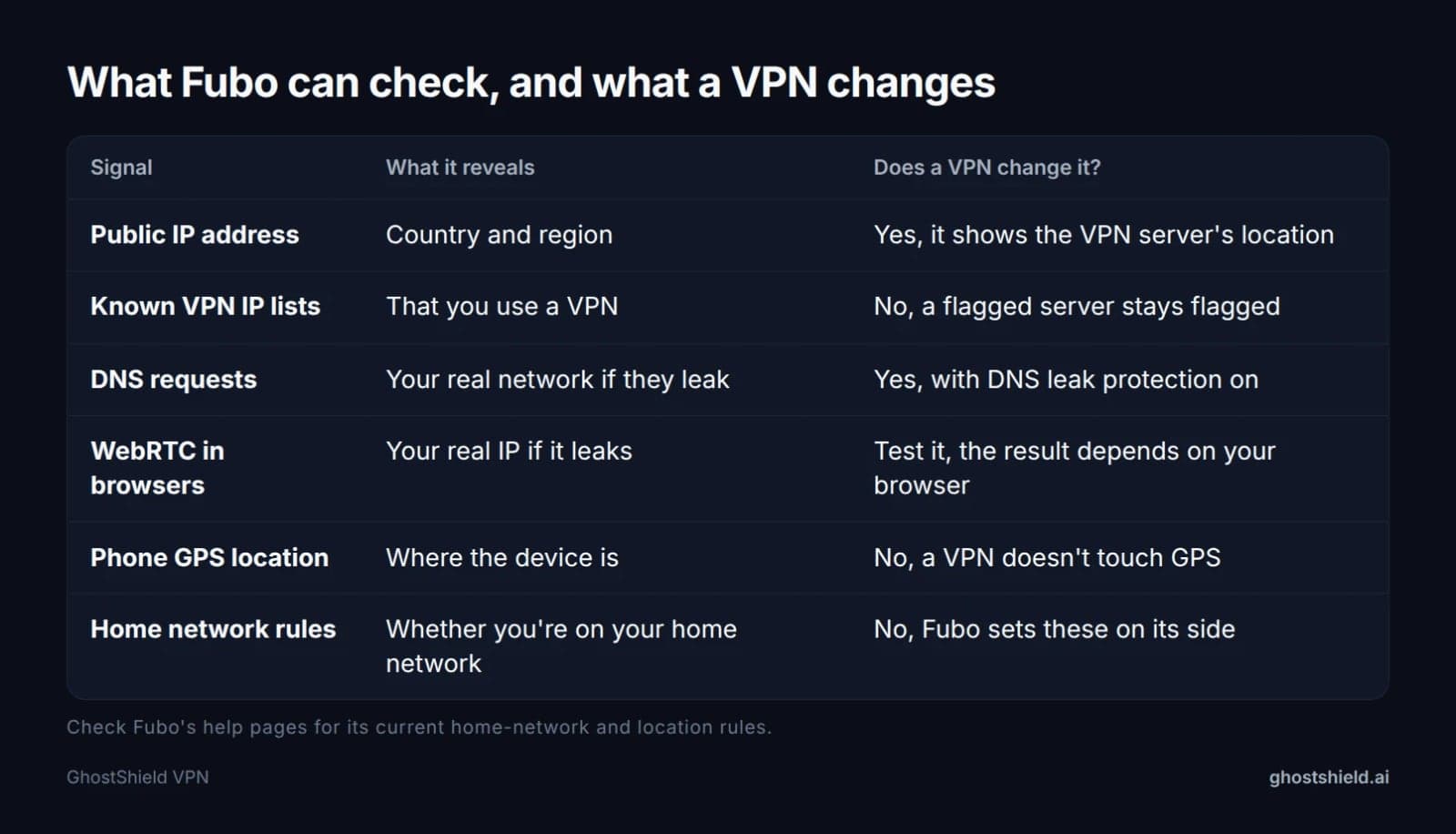 A VPN changes your IP address. It does not change everything Fubo can see.
Your IP address
Every connection shows a public IP address, and Fubo matches that address to a country and a region. To see what Fubo sees, check what IP address Fubo sees with your VPN off, then again with it on. The second result should show the VPN server's country.
Streaming services also keep lists of IP addresses known to belong to VPNs, and block them. The community answer on Fubo's first page says Fubo does this to enforce regional rules. If the server you pick is on one of those lists, Fubo will refuse to play, however good your connection is.
Leaks can give you away even with a working server. The How to Watch FuboTV with a VPN guide on the first page warns about leaking DNS or IP information that could be detected. In plain words: your device may still send DNS requests (the lookups that turn "fubo.tv" into an address) through your hotel's network, or a browser feature called WebRTC may reveal your real IP. Either one can show your true location. Run a DNS leak test and a WebRTC leak test before you open Fubo.
Home network and device location
Fubo ties some features to your home area, and phones can report GPS location to apps that have permission. A VPN changes your IP address. It does not touch GPS or anything Fubo checks on its own side.
Fubo's home-network rules can change, so check Fubo's own help pages for the current policy before you travel. That way you know what your plan allows away from home.
Why sports blackouts are a separate rule
Local and regional sports blackouts follow your detected location inside the US, based on who holds the broadcast rights for a game. A VPN does not remove those rights limits. If a game is blacked out for your account, treat that as a Fubo and rights-holder rule, not a connection problem.
What a VPN can and can't fix for Fubo
So, can you use a VPN for streaming services? Yes, VPNs are widely used with streaming services, and our guide to streaming with a VPN covers the general picture. With Fubo, though, you should know exactly where the help stops.
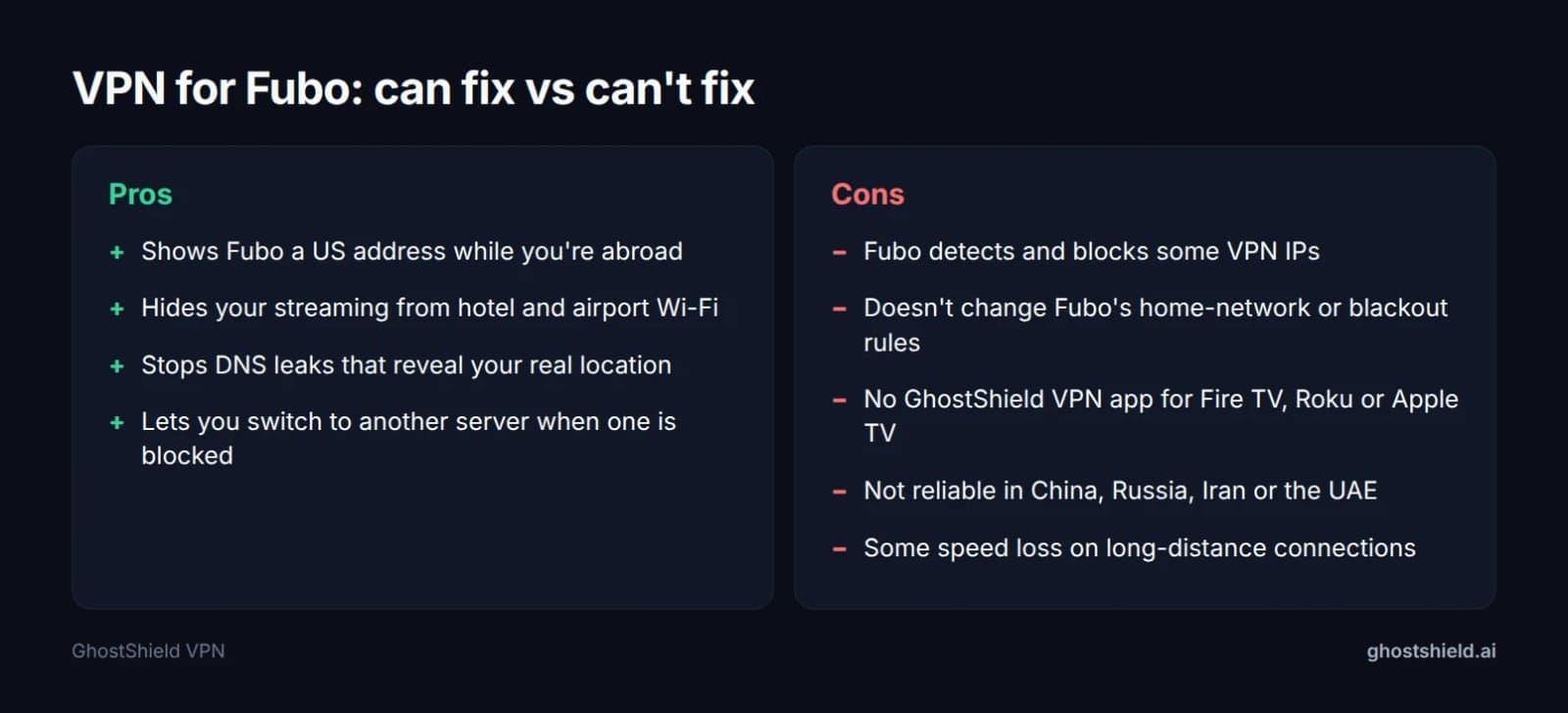 What a VPN can and can't do for a traveling Fubo subscriber.
What a VPN can fix:
- Being abroad on a US Fubo account. Connect to a US server and Fubo may see a US address instead of your hotel's.
- Privacy on hotel and airport Wi-Fi. The network operator can't see what you stream or which sites you visit.
- DNS leaks. With DNS leak protection on, your lookups go through the VPN instead of the local network.
What a VPN can't fix:
- A flagged IP. If Fubo has already marked an address as a VPN, you can switch servers, but nothing beats detection every time.
- Fubo's own rules. Payment, account and home-network rules sit on Fubo's side.
- Devices with no app. GhostShield VPN has no app for Fire TV, Roku or Apple TV. It has apps for Windows, macOS, Android, iPhone and iPad, and Google TV.
- Countries that block VPNs. GhostShield VPN has no obfuscation or stealth mode, so it isn't reliable in China, Russia, Iran or the UAE. Read our guide to countries that block VPNs before you go.
Which server to pick for Fubo
Match the server to the country of your Fubo account. For a US account, use a US server. Connecting to Spain won't help a US account, because Fubo shows each region its own channels.
| Fubo region | GhostShield VPN locations | Use it when |
|---|---|---|
| United States | 4 | Your Fubo account is a US account |
| Canada | 1 | Your Fubo account is a Canadian account |
| Spain | 1 | Your Fubo account is a Spanish account |
Fubo's regions as listed by a first-page guide. No location is guaranteed to unblock Fubo.
The four US locations are your main advantage. If one gets flagged, try another. GhostShield VPN has no dedicated IP, so you share addresses with other users, and a shared address can be flagged because of traffic that isn't yours. Switching location gives you a different set of addresses to try.
How to watch Fubo with GhostShield VPN while traveling
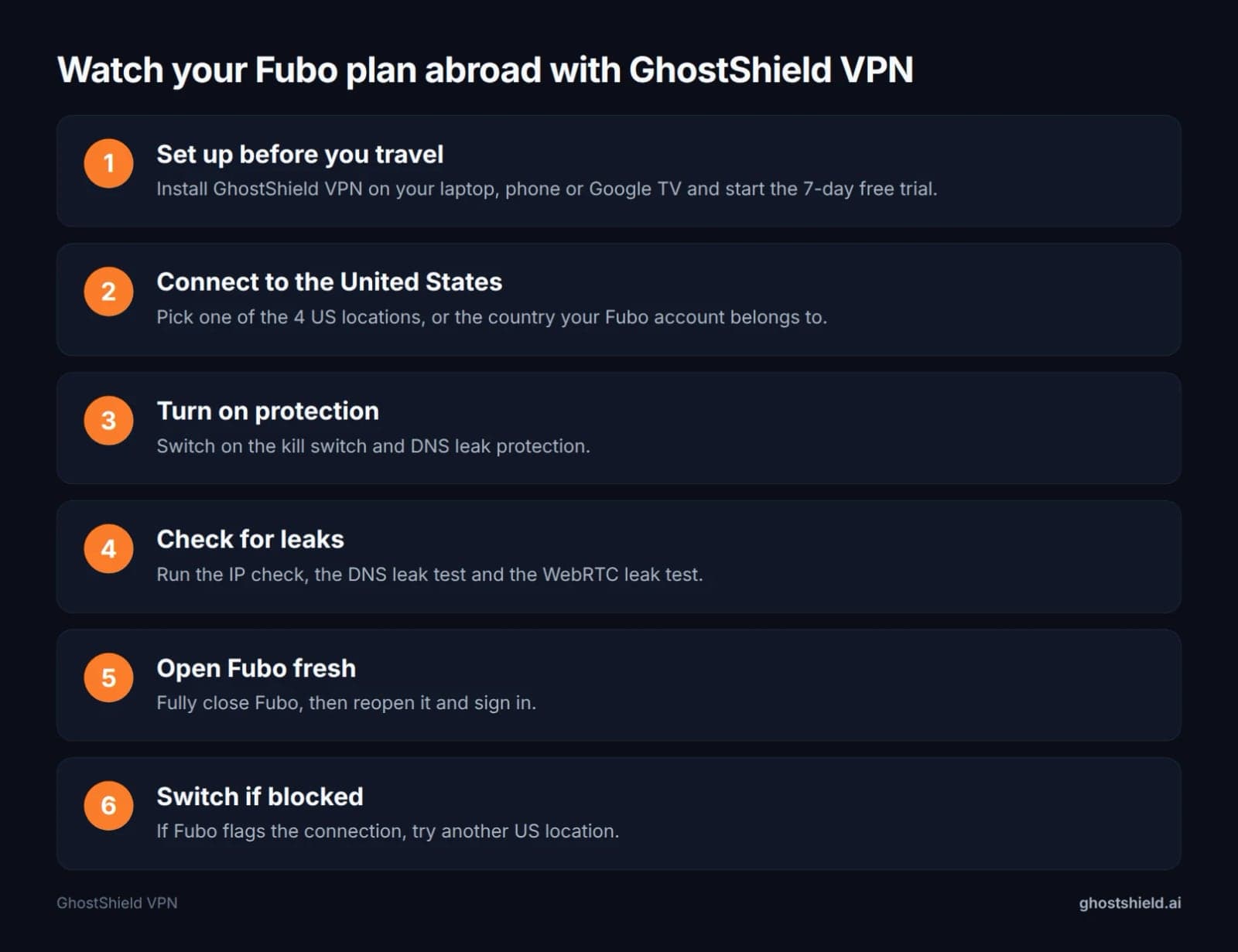 Run these steps in order, and test before game day.
Before you leave home
Sign in to Fubo at home, on your normal network, on every device you plan to bring. Then install GhostShield VPN on those devices and start the 7-day free trial while you still have time to test it. Finding a problem on Tuesday is far better than finding it ten minutes before kickoff on Sunday.
While you're still at home, test your connection speed with the VPN on, so you have a baseline to compare against on the road.
On a laptop or phone
- Open GhostShield VPN and choose one of the United States locations.
- Connect, then switch on the kill switch and DNS leak protection. The kill switch stops traffic if the VPN drops, so your real address doesn't slip out mid-game.
- Check what IP address Fubo sees, then run the DNS and WebRTC leak tests.
- Fully close Fubo, then reopen it and sign in.
- If Fubo flags the connection, disconnect, pick another US location and repeat.
GhostShield VPN also has split tunneling. It lets you send only your streaming app through the VPN and keep local apps, such as maps or banking, on your normal connection. That's handy abroad, where a local banking or ride app may expect a local address.
On a phone, turn off location services for the Fubo app if your phone allows it. That's general phone advice: any app with location permission can read GPS, and a VPN can't change GPS.
On a Google TV
Install the GhostShield VPN Google TV app, connect to a US location, then open Fubo. If you need help with the TV side, here's how to set up a VPN on your smart TV.
For Fire TV, Roku or Apple TV there is no GhostShield VPN app. Stream from a phone, laptop or Google TV instead. If you're comfortable with networking, routers can run GhostShield VPN through a manual WireGuard configuration, which covers every device behind that router.
Fubo blocked your VPN? A troubleshooting checklist
How do you unblock a blocked VPN? There's no single switch. You work through the likely causes one at a time, starting with the quickest.
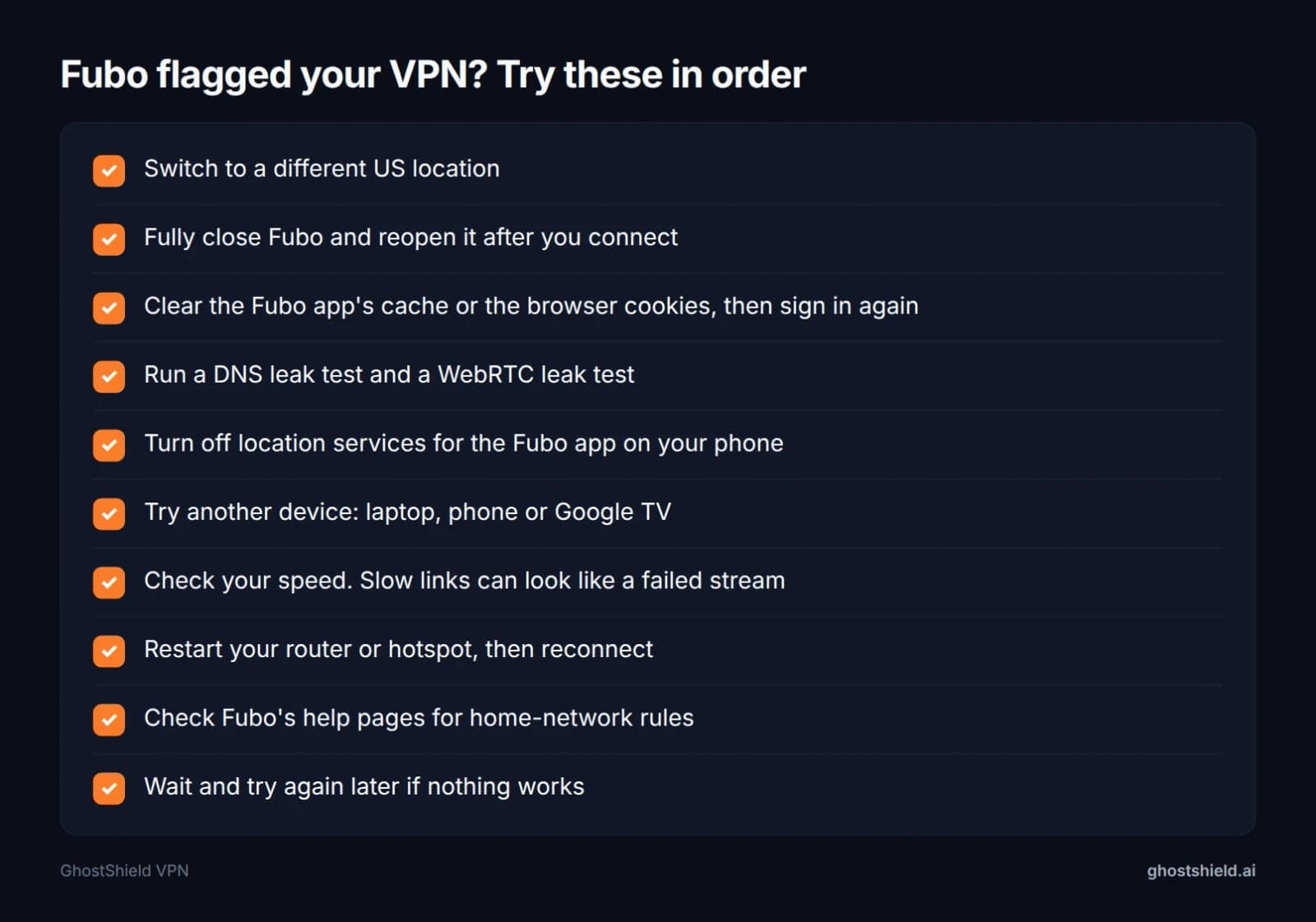 Work down the list. If nothing works, Fubo may be blocking that address range for now.
- Switch to a different US location.
- Fully close Fubo and reopen it after you connect, so it reads your new address.
- Clear the Fubo app's cache or your browser cookies, then sign in again.
- Run the DNS and WebRTC leak tests again.
- Turn off location services for the Fubo app on your phone.
- Try another device: laptop, phone or Google TV.
- Check your speed. A slow link can look like a failed stream.
- Restart your router or hotspot, then reconnect.
If the VPN itself keeps dropping, read why your VPN keeps disconnecting. The same steps apply to other services too, and our unblock guides and post on how to watch Peacock abroad follow a similar pattern.
If it still won't play, Fubo may be blocking that address range for now. Wait and try again later, or try a different device. We won't pretend there's a guaranteed fix, because there isn't one.
Free VPNs and Fubo APKs: what to avoid
"Free VPN for Fubo" is a common search, and it usually ends badly. Free VPNs often share a small pool of addresses across many users, and streaming services are quick to flag those. Some also log or sell your data to cover their costs. Here's how to check a no-logs claim before you trust any provider.
Fubo APKs from unofficial sites are a bigger risk. A modified app file can carry malware, and you'd be handing it your Fubo login. Install Fubo only from the official app store for your device.
GhostShield VPN has no free plan either. Instead, every plan starts with a 7-day free trial and comes with a 30-day money-back guarantee, so you can test it with Fubo before you commit.
Is using a VPN for Fubo legal?
Is using a VPN illegal in the US?
No. VPNs are legal to use in the US, and millions of people use them for work and privacy. A VPN doesn't make an illegal act legal, though. The law applies to what you do, not the tool.
Have any states banned VPNs?
We know of no US state that bans ordinary VPN use. Some states have debated rules around online age checks, and those debates sometimes touch on VPNs. Laws change, so check the current rules where you live if you're unsure.
Will Fubo or Netflix ban you for using a VPN?
Breaking a streaming service's terms of use is a contract matter, not a crime. Netflix typically shows a proxy error and refuses to play, rather than banning accounts. Fubo's response is set by Fubo, so read Fubo's terms of service for how it treats VPN use.
What a VPN hides, and what it doesn't
Can a VPN see what you're searching? A VPN provider can see which sites you connect to, but HTTPS hides the page content, including what you type into a search box. GhostShield VPN keeps a strict no-logs policy: no browsing activity, traffic content, DNS queries or real IP addresses are stored.
Can the FBI see through a VPN? A VPN hides your traffic from your internet provider and the local network. It doesn't hide you from an account you're signed in to, from malware on your device, or from lawful requests made to the services you use. Fubo, for example, still knows it's your account watching.
What's the downside of using a VPN? Expect some speed loss, especially on long-distance connections such as Europe to the US. Streaming services may block some addresses, and some sites show extra CAPTCHAs or Cloudflare challenge pages. And a good VPN costs money.
Try GhostShield VPN for Fubo on your next trip
 Photo by Sezer Uzunoğlu on Pexels
GhostShield VPN runs on WireGuard and has 4 US locations, plus Canada and Spain for Fubo's other regions. It has apps for Windows, macOS, Android, iPhone and iPad, and Google TV, covers 10 devices at once, and includes a kill switch and DNS leak protection. The 1-year plan is $4.99 a month ($59.88 billed yearly). Every plan starts with a 7-day free trial and comes with a 30-day money-back guarantee, so start your 7-day free trial and test Fubo well before game day. We can't guarantee Fubo will play on every server, every day, and the trial is the honest way to find out.
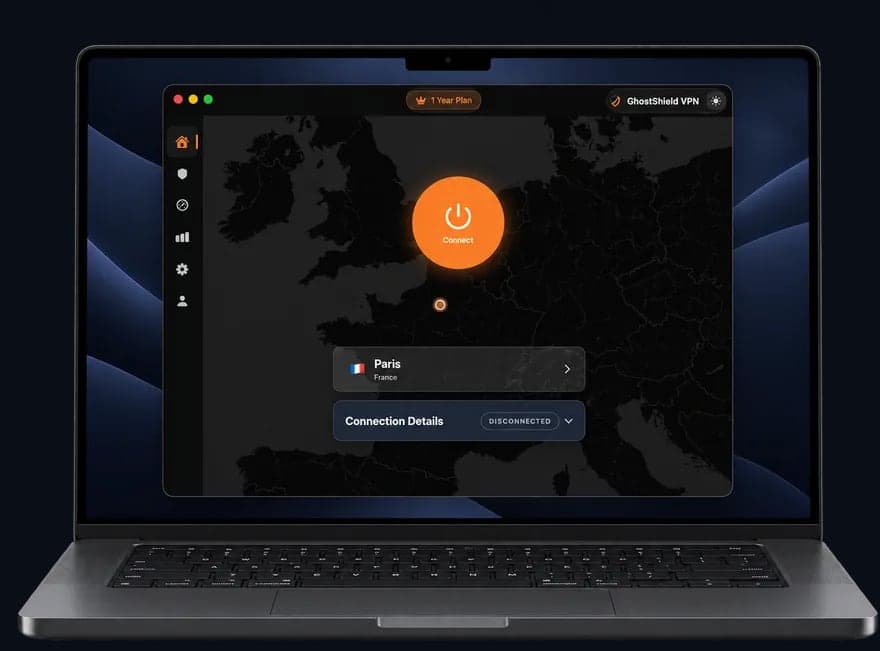 GhostShield VPN app on a MacBook
FAQ
Can I use a VPN for streaming services?
Yes, you can use a VPN with streaming services, and it's legal in the US. It lets a traveler show an address back home, so the service may play the library they already pay for. Results vary, because services like Fubo detect and block some VPN addresses. Test before you rely on it.
Will Netflix ban me if I use a VPN?
Netflix typically doesn't ban accounts for VPN use. It usually shows a proxy error and refuses to play until you turn the VPN off or switch servers. Using a VPN against a service's terms is a contract matter, not a crime. Read each service's terms, including Fubo's, for its own rules.
Is using a VPN illegal in the US?
No, using a VPN is legal in the US. People use them every day for work, privacy and public Wi-Fi. A VPN doesn't make an illegal act legal, though, and streaming services can set their own terms. We know of no US state that bans ordinary VPN use.
Does Fubo work with a free VPN?
Rarely, and not reliably. Free VPNs often share a small pool of addresses, which streaming services are quick to flag, and some log or sell your data. GhostShield VPN has no free plan, but every plan starts with a 7-day free trial and a 30-day money-back guarantee.
Why does Fubo say I'm using a VPN or proxy?
Fubo has recognized your IP address as a VPN or proxy address, or a leak has revealed your real location. Switch to another US location, run a DNS and WebRTC leak test, fully close and reopen Fubo, and clear its cache. If it still fails, try again later.
Can I use GhostShield VPN with Fubo on Fire TV or Roku?
Not directly. GhostShield VPN has no app for Fire TV, Roku or Apple TV. Watch Fubo on a phone, laptop or Google TV with the GhostShield VPN app instead. If your router supports WireGuard, a manual configuration can cover devices behind it, including those without an app.
Related Topics
Keep Reading
How to Watch Meta’s AI Shows Early with a VPN in 2026 (Step-by-Step Guide)
How to Watch Avengers: Doomsday Early Without Spoilers Using a VPN
How to Watch Peacock Abroad in 2026: Easy VPN Steps

How to Stop Loud Streaming Ads in 2026: California’s Law & Easy Fixes
How to Preorder GTA 6 Early and Save Money Using a VPN