Download a Free VPN for Mac: What's Real in 2026

Every result for this search is a download, because macOS has no built-in VPN service. System Settings supports VPN connections, but you still need a server and an app to reach it. GhostShield VPN has no free plan: every plan starts with a 7-day free trial. Here is what the free VPN downloads for Mac on page one actually include, and where to get each one:
- Proton VPN free: unlimited data, 5 countries, 1 device, kill switch, macOS 10.12 Sierra, per the free-VPN roundup ranking on page one. Download from protonvpn.com.
- hide.me free: unlimited data, 5+ countries, 1 device, kill switch, macOS 10.12 Sierra, same roundup. Download from hide.me.
- Hotspot Shield free: unlimited data, 3 countries, no kill switch, macOS 10.12 Sierra. Download from hotspotshield.com.
- TunnelBear free: 2 GB a month across 47 countries, macOS 11 Big Sur. Download from tunnelbear.com.
- PrivadoVPN free: 10 GB a month, from PrivadoVPN's own page. Download from privadovpn.com.
- Tunnelblick: a free, open-source OpenVPN client with no server of its own. Download from tunnelblick.net.
The other Mac pages on page one are paid apps offering a refund window, not a free plan. So the honest free routes are a capped free tier, or a free client pointed at a server you already have.
What you can actually download free on a Mac
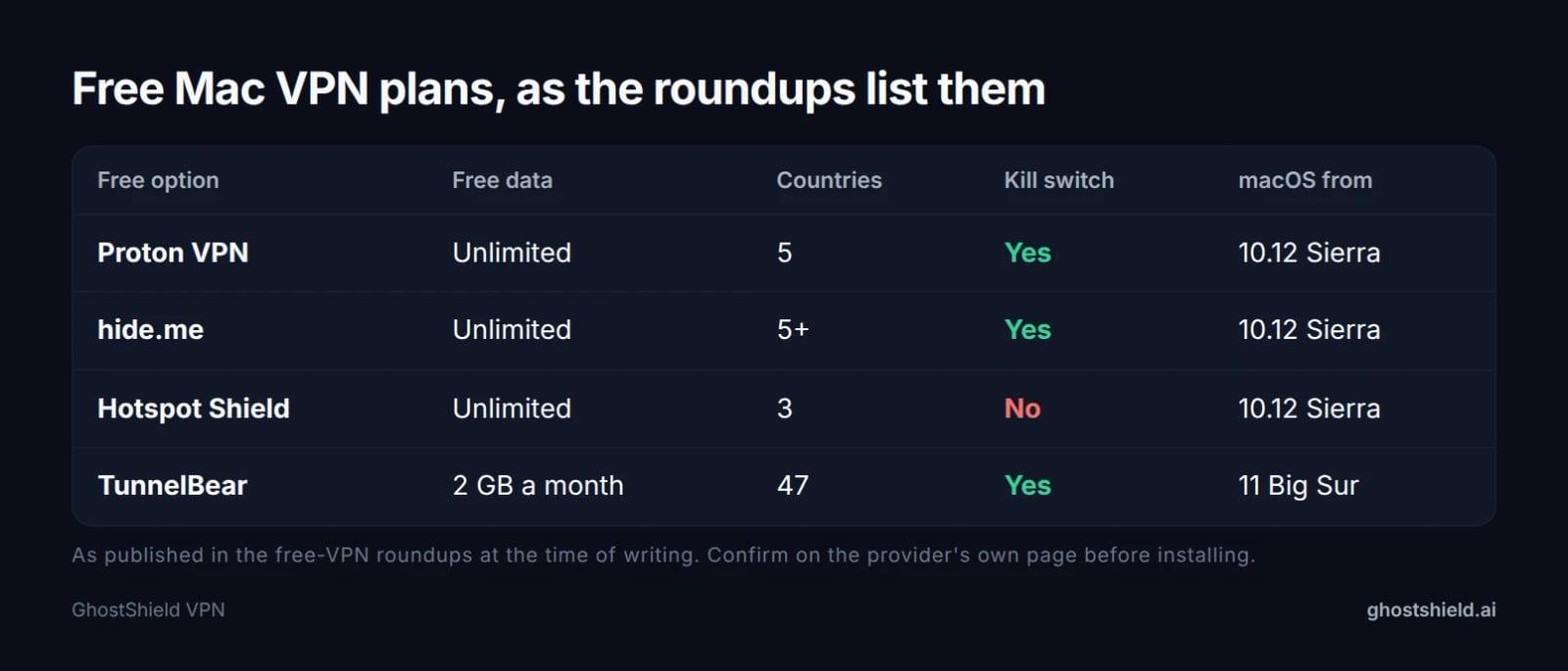 Free Mac plans as the current roundups list them. Caps and countries change, so check the provider's page before you download.
Free tiers from paid providers
The roundup's table is the most useful thing on page one, because it puts the limits side by side. Proton VPN free and hide.me free both reach back to macOS 10.12 (Sierra), Hotspot Shield free stops at 3 countries and has no kill switch, and TunnelBear's 2 GB a month is the only hard cap in the group. PrivadoVPN's own page puts its free account at 10 GB a month.
Those are real downloads with real apps. They are also built to be limited: one device, a short country list, and in TunnelBear's case a data cap you can spend in an evening of video.
Free clients that need a server
Tunnelblick is a different thing. It is a free, open-source OpenVPN client, and its page says it carries no ads, no affiliate marketers and no tracking, but it includes no server. It works only if you already run an OpenVPN server.
The other downloads on page one are paid apps, not free plans. IPVanish's Mac page says a free VPN won't cut it and offers a 30-day refund; Surfshark offers 30 days to ask for your money back rather than a free tier.
Free versus paid on a Mac: what the cap costs you
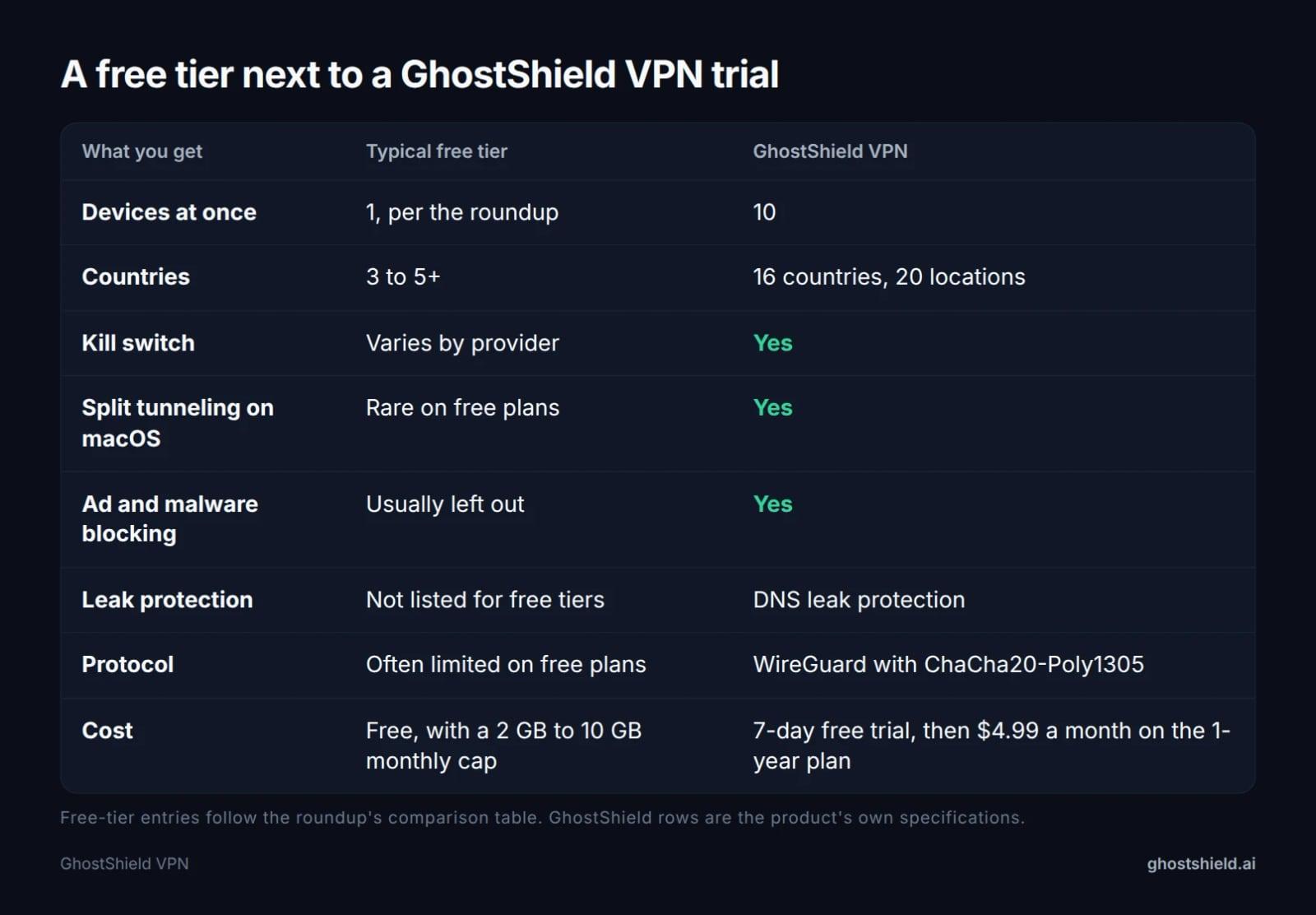 What a capped free tier tends to include, next to what the trial gives you for seven days.
The roundup's table scores free VPNs lower on protocol choice, ad and tracker blocking, unlimited data, 24/7 support, streaming and split tunneling on macOS. Some of that is marketing. The gap in data and devices is real.
Most free Mac VPNs allow a single connection, the same page says, so a Mac and a phone cannot both be covered at once. A 2 GB or 10 GB monthly cap does not last long with video and cloud backups. When it runs out, so does the protection, unless you upgrade.
Free tiers are also thin on locations: 3 to 5 countries in the roundup's table. That matters if you need one specific country for a site or a stream, and it is the first thing to check before you download.
GhostShield VPN has no free plan at all. It gives you 10 simultaneous devices and 20 locations in 16 countries, with the 7-day free trial on every plan. That last number is worth holding next to 3 to 5, because it decides whether the app can reach the site you care about. To see how the paid tiers line up, compare the plans.
The honest test: a free trial, not a free tier
A free tier is built to be limited, so it tells you what a provider gives away, not what the paid app does on your Mac. Every GhostShield VPN plan starts with a 7-day free trial, so the question becomes whether the app works on your Mac, on your Wi-Fi and across your devices.
Here is what the plans look like.
| Plan | Price a month | What you pay up front | Trial |
|---|---|---|---|
| 1-year | $4.99 | $59.88 billed yearly | 7 days free |
| 3-year | $3.99 | $143.64 | 7 days free |
| Monthly | $6.99 | $6.99 | 7 days free |
A 30-day money-back guarantee sits on top of that, so a trial that goes badly is not the end of it. If price is your whole question, start with what $3 to $15 a month buys in 2026.
How to download and install a VPN on macOS
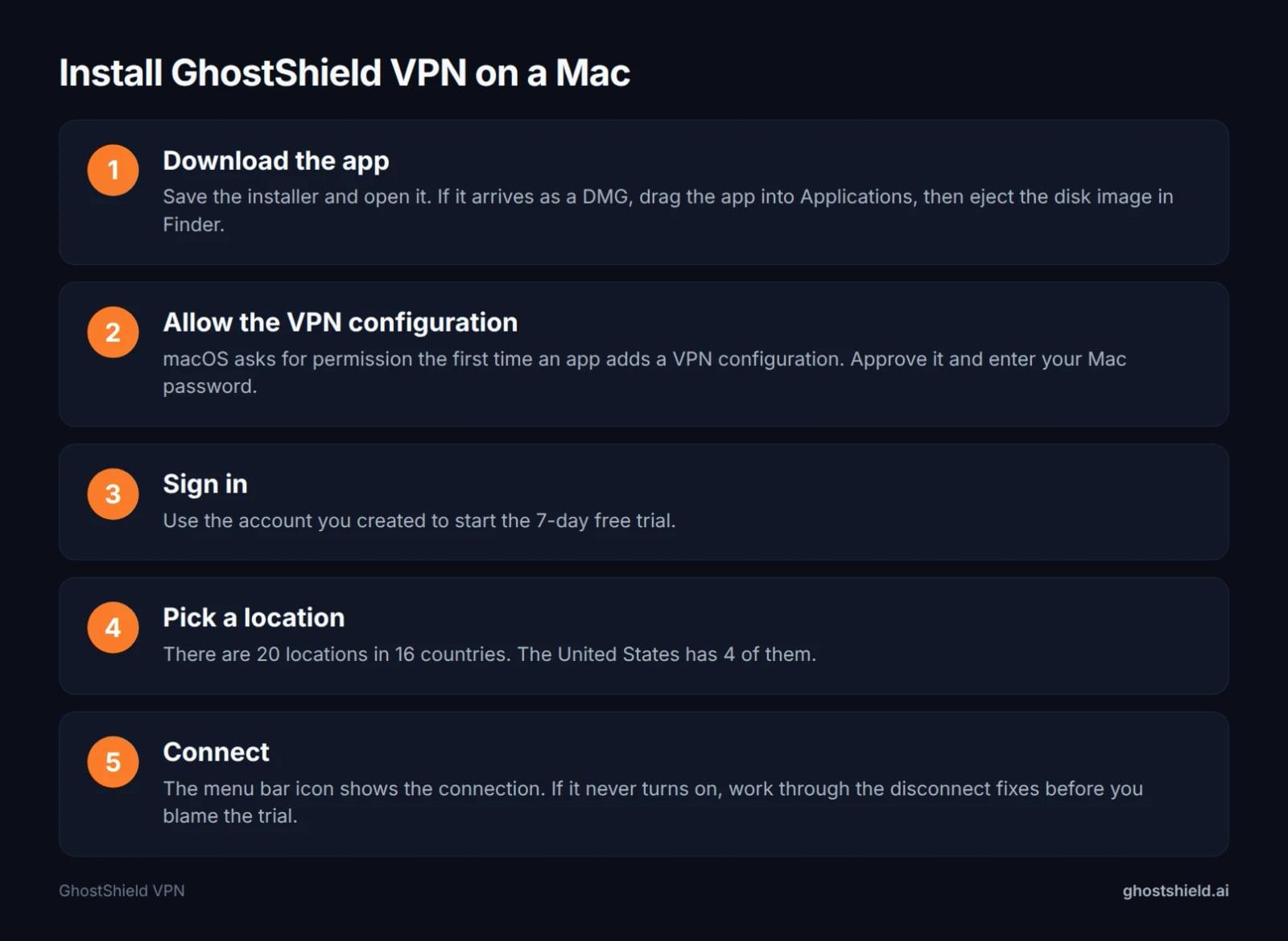 Five steps from download to a connected Mac.
Direct download or the Mac App Store
Most Mac VPNs come as a direct download from the provider's site, some are in the Mac App Store, and a few offer both. The app you end up with is the same, and the settings live in the same place.
What a DMG file is
A DMG is a disk image. Double-click it, drag the app into Applications, then eject the image in Finder. That is the whole "VPN for Mac free download DMG" routine people search for, and there is nothing else to it.
Allow the VPN configuration
The first time an app adds a VPN configuration, macOS asks you to allow it. Approve it, enter your Mac password, and the app can connect. If you click "Don't Allow", the app will look broken until you put it right in System Settings.
GhostShield VPN for macOS uses WireGuard with ChaCha20-Poly1305, and nothing else, so there is no protocol menu to think about. You pick a location and connect.
There are 20 locations in 16 countries: Australia, Canada, France, Germany, Hong Kong, India, Ireland, Italy, Japan, the Netherlands, Singapore, Spain, Switzerland, the UAE, the UK and the United States, which has 4. No plan adds a country outside that list.
If the connection drops and will not come back, our fixes for a VPN that keeps disconnecting start with the likeliest cause.
The day-8 test: 7 checks before your trial ends
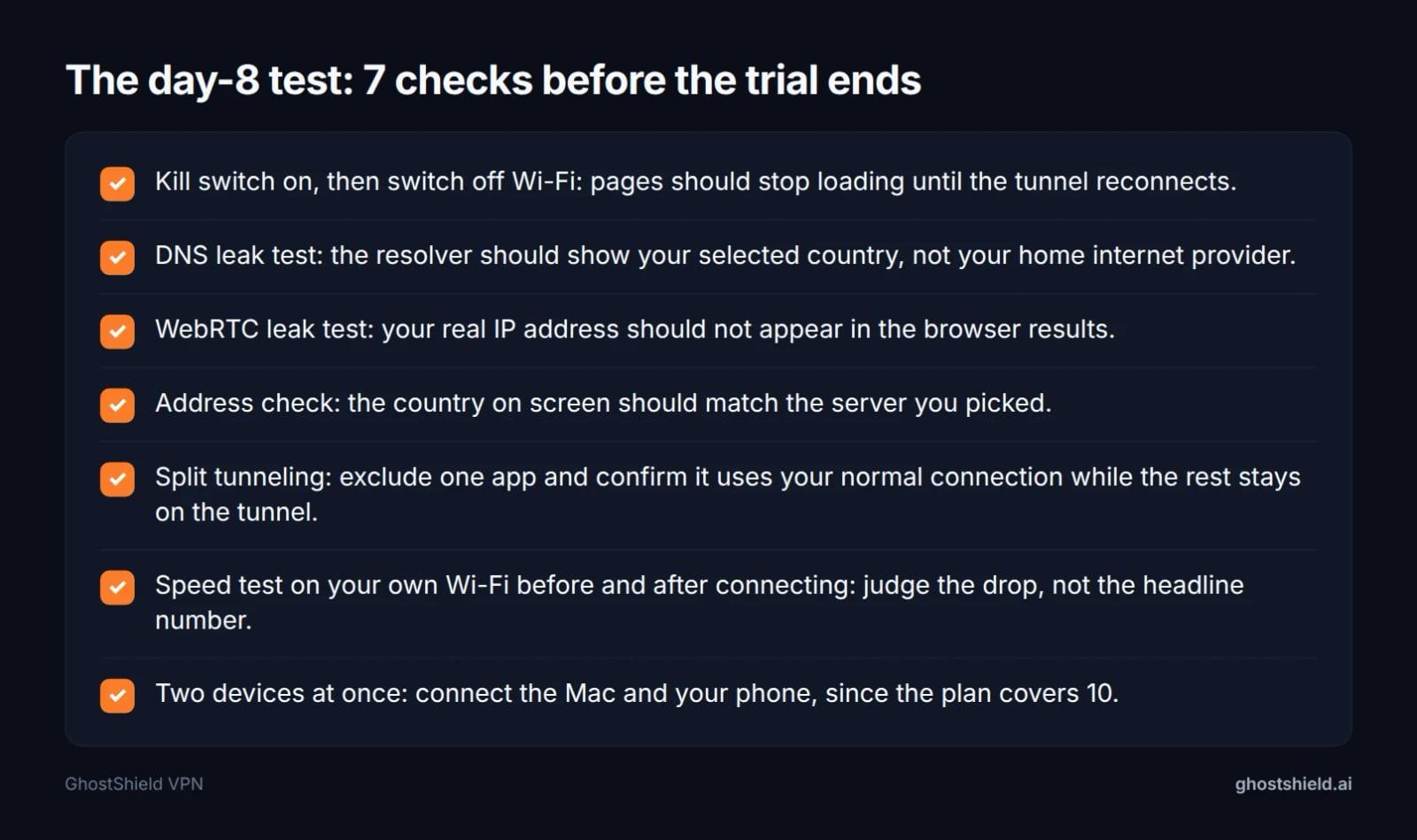 Print this or keep it open in a tab. Each line takes under five minutes.
This is the part the free-tier downloads skip. Run these during the trial and you will know exactly what you would be paying for.
- Kill switch: turn it on, then switch off Wi-Fi. Pages should stop loading until the tunnel is back.
- DNS leaks: run the DNS leak test while connected. The resolver should show the country you selected, not your internet provider at home.
- WebRTC leaks: run the WebRTC leak test. Your real IP address should not appear anywhere in the results.
- Address check: load what is my IP and confirm the country matches the server you picked.
- Split tunneling: exclude one app and confirm it uses your normal connection while the rest stays on the tunnel.
- Speed on your own network: run a speed test before and after, then judge the drop, not the headline number.
- Device count: connect the Mac and your phone at once. The plan covers 10, so two should be simple.
Each line takes under five minutes. Done in one sitting, they turn a free trial into an actual decision.
Older Macs: High Sierra, Sierra and the rest
"Free VPN for High Sierra" is one of the searches that leads here, and version support is where free plans differ most.
In the roundup's table, Proton VPN free and hide.me free reach back to macOS 10.12 (Sierra), Hotspot Shield free to 10.12, TunnelBear to macOS 11 (Big Sur), and ExpressVPN to 10.13 (High Sierra).
If your Mac is stuck on High Sierra, install the oldest version the app lists rather than the newest. A build that needs a later macOS simply will not open, and the download page rarely says so in large type.
The same rule covers the DMG: a downloaded file that will not mount is usually a macOS version problem, not a broken download.
Is a free VPN for Mac safe?
Public Wi-Fi is the case most people download a Mac VPN for, and the business model is the tell. Surfshark's Mac page argues that free services often monitor activity and share data, and that is a cost the data cap never shows you.
Tunnelblick makes the opposite case for itself on its own page: free software, no ads, no affiliates, no tracking. The catch stays the same, since the server you connect to is your responsibility, and a badly run server is worse than none.
GhostShield VPN keeps a strict no-logs policy. Nothing that passes through the tunnel is stored on our servers: no browsing activity, no traffic content, no DNS queries and no real IP address.
Be precise about that. No third-party security review of GhostShield VPN has been published yet, so the policy rests on the published text rather than an outside report. Our guide to checking a no-logs claim shows what evidence to look for.
Our servers are ordinary virtual servers with normal disks, not RAM-only ones. The policy, not the hardware, is what protects you, and it is worth saying plainly.
One practical rule covers every app on this page: download from the provider's own site or the Mac App Store, never from a mirror or a bundle site.
Download the app, then decide with the trial
Download the GhostShield VPN macOS app, run the seven checks, and let the 7-day free trial do the arguing. Every plan starts with that trial, and the 1-year plan is $4.99 a month ($59.88 billed yearly) if you decide to stay. The pricing page lays every plan out side by side, and you can start the 7-day free trial from there.
If you want the wider picture first, our eight macOS checks before you buy a Mac VPN and the plan comparison are the two pages to read next, with best VPN services 2026 behind them if you are still choosing.
FAQ
Does Mac have a free or built-in VPN?
No. macOS has no built-in VPN service: System Settings supports VPN connections, but you still need a server and an app. Free routes are capped tiers like Proton VPN's 5 countries or TunnelBear's 2 GB a month, or a client such as Tunnelblick pointed at a server you run.
Is there a 100% free VPN for Mac?
Yes, in the narrow sense. Proton VPN free, hide.me free and Hotspot Shield free charge nothing and set no data cap, per the roundup, and TunnelBear gives 2 GB a month. None of them is free in capacity: one device and 3 to 5 countries.
How do I download and install a free VPN on macOS?
Get the app from the provider's site or the Mac App Store. If it arrives as a DMG, open it, drag the app into Applications, eject the image, then open the app. The first time it adds a VPN configuration, macOS asks for permission and your Mac password. Then sign in, pick a location and connect.
Which free VPN still works on High Sierra?
On the roundup's table, Proton VPN free, hide.me free and Hotspot Shield free all support macOS 10.12 (Sierra), which covers High Sierra. TunnelBear needs macOS 11 or later, so it will not run there. Install the oldest build the provider lists, since a newer one written for a later macOS will not open.
How much data do free Mac VPNs give you?
It varies by provider. The roundup lists Proton VPN, hide.me and Hotspot Shield as unlimited and TunnelBear as 2 GB a month, while PrivadoVPN's own page says 10 GB a month. Unlimited still comes with a one-device limit, so a cap is not the only way a free plan runs out.
Is it safe to use a free VPN on a Mac?
It depends who runs it. Surfshark's Mac page warns that free services often monitor activity and share data, and that cost does not appear in a data cap. Open-source clients like Tunnelblick carry no ads or tracking, but the server is yours to trust. Download only from the provider's own site.
Related Topics
Keep Reading

VPN Proxy Detected on YouTube? Find the Cause, Then Fix It
VPN iPhone Not Connecting? 12 Fixes, Most Likely First
Why Does My VPN Keep Disconnecting? 8 Causes and Fixes
Please Unblock challenges.cloudflare.com to Proceed: 7 Fixes

How to Bypass Age Verification Blocks in 2026 Without Uploading Your ID