Best VPN Services 2026: Pick by What You Pay It For

The best VPN services in 2026 are not one product: the right pick depends on what you need it for.
- Hotel Wi-Fi: a kill switch that holds, plus a server near you.
- Streaming: a server in the country the library belongs to.
- Remote work: a no-logs policy plus DNS leak protection.
- Gaming: the nearest server to the game.
- A whole household: the simultaneous device limit.
NordVPN, Surfshark and ExpressVPN appear in both MovieMaker's and Cyber Insider's lists, but neither page turns the job into one deciding check.
Best VPN services 2026: pick by the job, not the list
A ranked list cannot answer this question. The service that suits someone unblocking their home library from a hotel abroad is not the one that suits a locked-down work laptop, and no list holds both answers at once.
Octohide, MovieMaker and Cyber Insider all publish ranked lists. Both Octohide and MovieMaker say the choice depends on your priorities, but neither turns that into one deciding check per job.
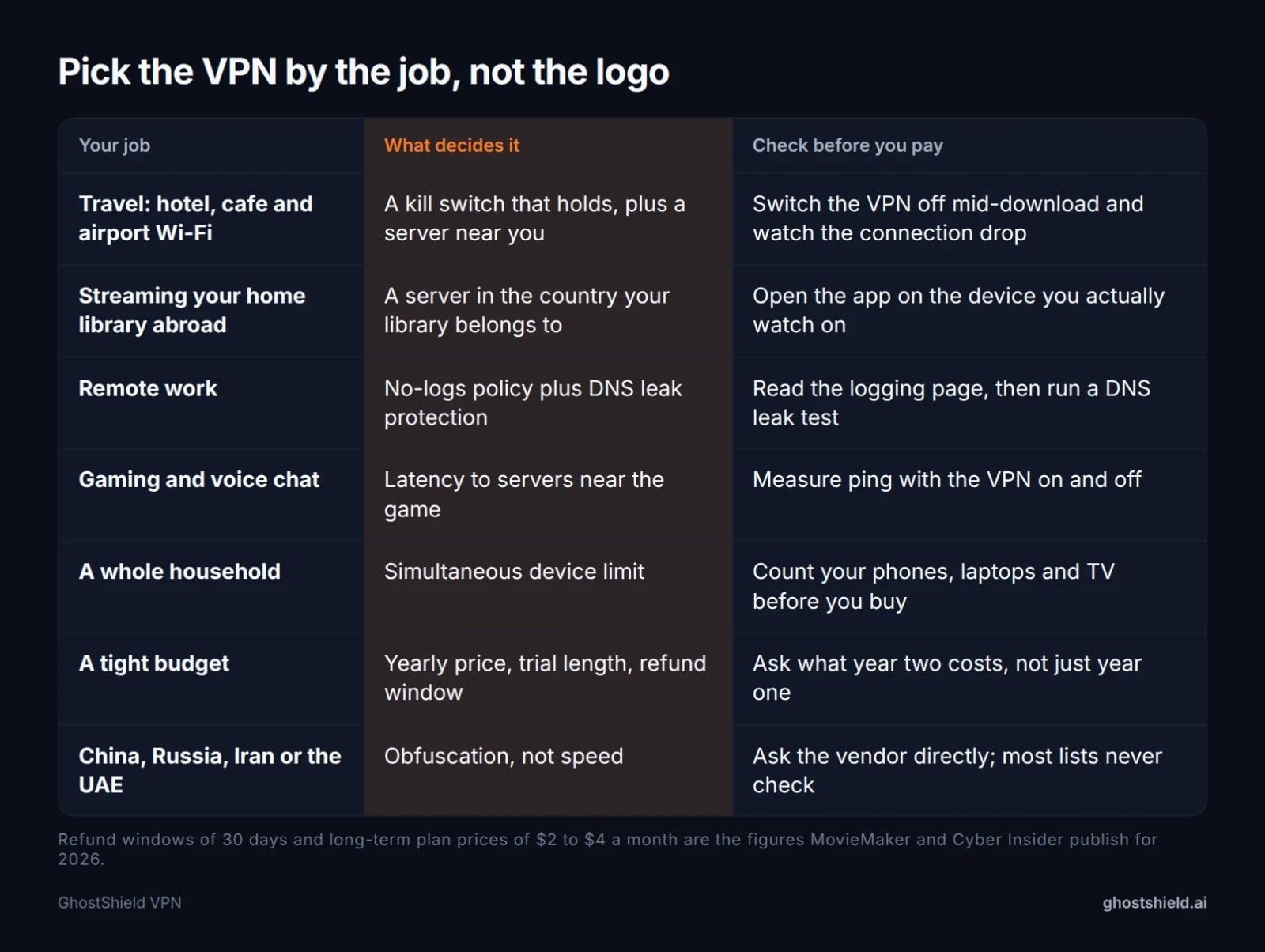 Match the service to the job, then run the check in the right-hand column before you pay.
What the pages already ranking actually compare
Octohide sets out five criteria: a no-logs policy backed by an audit, modern protocols, unlimited bandwidth, a strong server network and multi-device support. It also warns that free VPNs often cap you at 500 MB to 10 GB a month.
MovieMaker names three services and reports speed loss. It puts the best of them under 25 percent on nearby servers and the top performer under 10 percent. Long-term plans sit at $2 to $4 a month, and a 30-day refund is typical, it says.
Cyber Insider reviews six services and publishes a per-service table with jurisdiction, logging, price, support and refund terms. It is the one page of the three that names each service's jurisdiction next to its logging policy. It records 903 Mbps for NordVPN and over 750 Mbps for Surfshark.
| Site | What it compares | Numbers it publishes |
|---|---|---|
| Octohide | Five criteria: no-logs with audit, protocols, bandwidth, servers, devices | Free VPN caps of 500 MB to 10 GB a month |
| MovieMaker | Three named services, speed loss, privacy, streaming | Under 25% speed loss nearby, under 10% for the top performer, $2 to $4 a month long-term, 30-day refunds |
| Cyber Insider | Six services with a per-service table | 903 Mbps for NordVPN, over 750 Mbps for Surfshark, $3.49 and $2.49 a month, 30-day refunds |
None pairs the country you are physically in with the country your library belongs to.
Seven checks to run before you pay anything
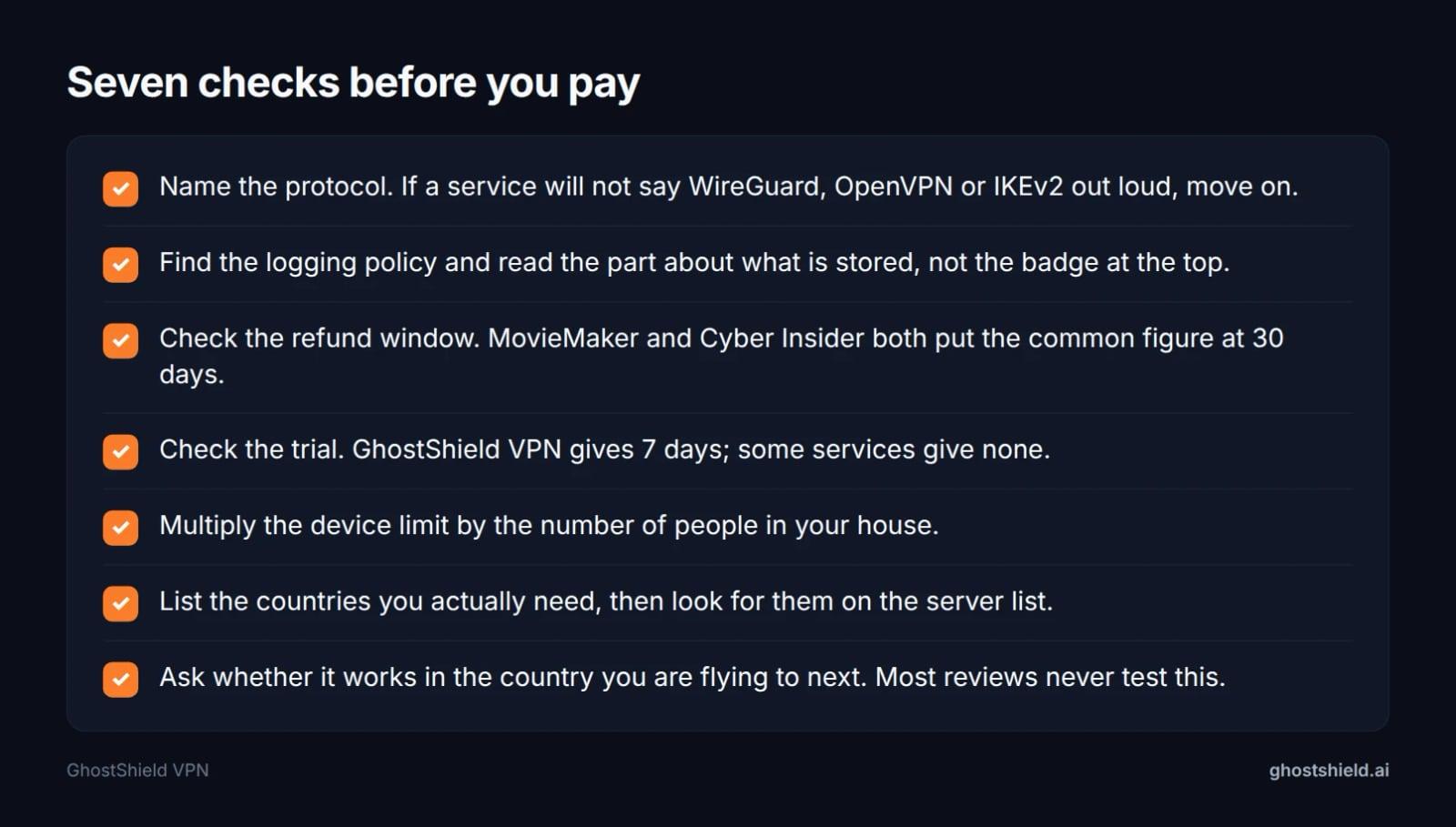 Ten minutes of checks saves a year of paying for the wrong service.
Start with the protocol. If a service will not say WireGuard, OpenVPN or IKEv2 out loud, move on. Then find the logging policy and read the part about what is stored, not the badge at the top. Our guides on best VPN with no logging and 7 checks to run before you buy go through both.
Next, the refund window. MovieMaker and Cyber Insider both put the common figure at 30 days. Check the trial length as well as the refund window. Multiply the device limit by the number of people in your house. List the countries you actually need and look for them on the server list.
Then test, do not trust. After you connect, run a DNS leak test and a WebRTC leak test. Your what is my IP reading should show the country you picked. Run a speed test with the VPN on and off so the comparison is yours.
Best VPN for streaming your home library while you travel
The mechanism is simple. A VPN gives your device an address in another country, so the streaming app sees you there instead of in the hotel room. The deciding check is a server in the country the library belongs to, not the biggest server count.
 Photo by Petter Lagson on Unsplash
GhostShield VPN has servers in 16 countries and 20 locations. The United States has 4, France has 2, and Australia, Canada, Germany, Hong Kong, India, Ireland, Italy, Japan, the Netherlands, Singapore, Spain, Switzerland, the UAE and the United Kingdom have 1 each.
The device matters as much as the service. GhostShield VPN has a Google TV app, so a Google TV set works without the router, while other smart TV platforms still need the manual WireGuard router setup. No VPN can promise a given service keeps working, because detection is a running fight. Our best VPN for streaming post and the VPN for Fubo guide cover the details, and the streaming guide collects them in one place.
Best VPN for remote work and hotel Wi-Fi
 Photo by Mikhail Nilov on Pexels
Hotel, airport and cafe networks are shared with strangers. A VPN encrypts the hop from your device to the server, so the local network sees a tunnel rather than your traffic.
The features that decide this job are a kill switch, DNS leak protection and split tunnelling, so only the traffic you choose goes through the tunnel. If you take video calls on hotel Wi-Fi, run the WebRTC leak test first.
One warning before you install anything on a company machine. A work laptop may forbid a personal VPN or block it outright, so check policy first. Read VPN on a work laptop and, if you bank on the road, using a VPN for online banking. The use-case guides cover similar setups.
Best VPN for gaming and voice chat
Latency decides this job, and latency comes from distance to the server. A location near the game server matters more than a long feature list, so check where the game lives before you pick a country.
Be straight about hardware. GhostShield VPN has no games-console app, so a console has to be covered by a router running a manual WireGuard configuration. The VPN on a router guide walks through that, and the Minecraft VPN post covers one common case.
Measure before you commit. Run a speed test and compare ping with the VPN on and off. Do not expect the VPN to lower your ping, because the extra hop usually adds a little. The 10-device limit covers a console, a PC and phones on one account.
Best VPN for a household of devices
The deciding number is simultaneous connections. GhostShield VPN allows 10 devices at once, so count phones, laptops, a tablet and the TV before buying anything else.
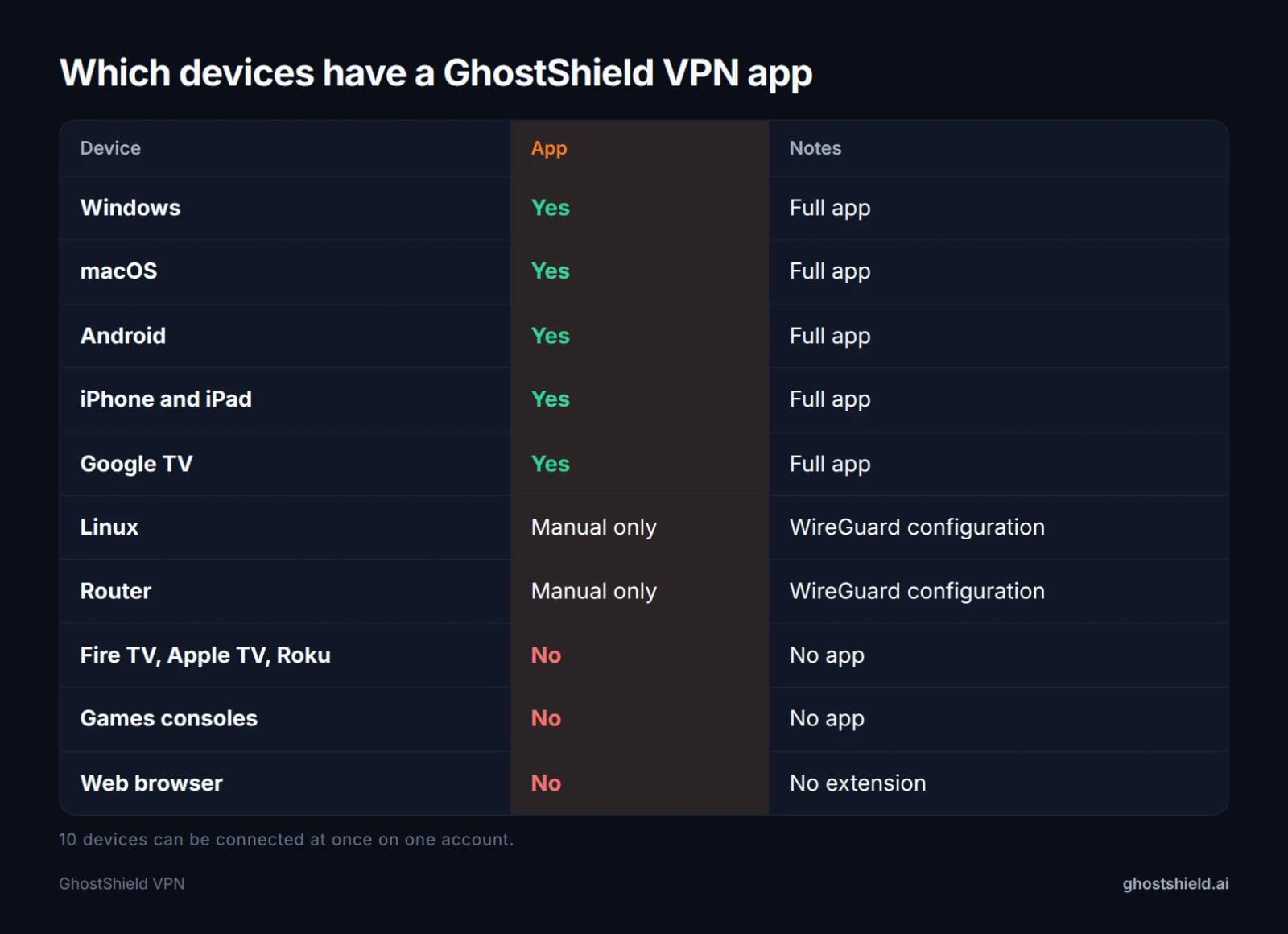 GhostShield VPN app coverage across the devices a household actually owns.
The table shows the shape of it. There are full apps for Windows, macOS, Android, iPhone, iPad and Google TV. Linux and routers work through a manual WireGuard configuration only. There is no browser extension, and no Fire TV, Apple TV, Roku or console app. If your device is on the list, our best iPhone VPN, best Android VPN, best Mac VPN and best VPN software for Windows posts check your own platform in detail.
Where GhostShield VPN is the wrong pick
- GhostShield VPN runs WireGuard only, with no obfuscation or stealth mode, so it is not reliable in China, Russia, Iran or the UAE. See the country guides and bypassing censorship while travelling.
- No third-party audit has been completed yet. If a completed audit is a hard requirement, this is not the product for that requirement. The no-logs policy still stands: no browsing activity, traffic content, DNS queries or real IP addresses are stored, on ordinary virtual servers with normal disks.
- No Fire TV, Apple TV, Roku or games-console app, and no browser extension.
- No dedicated IP, no port forwarding, no double VPN or multi-hop, and no Smart DNS.
- Torrenting and peer-to-peer file sharing are not allowed on GhostShield VPN, so it is the wrong service for that too.
A list that never rules itself out is an advert, not a guide.
What GhostShield VPN does give you
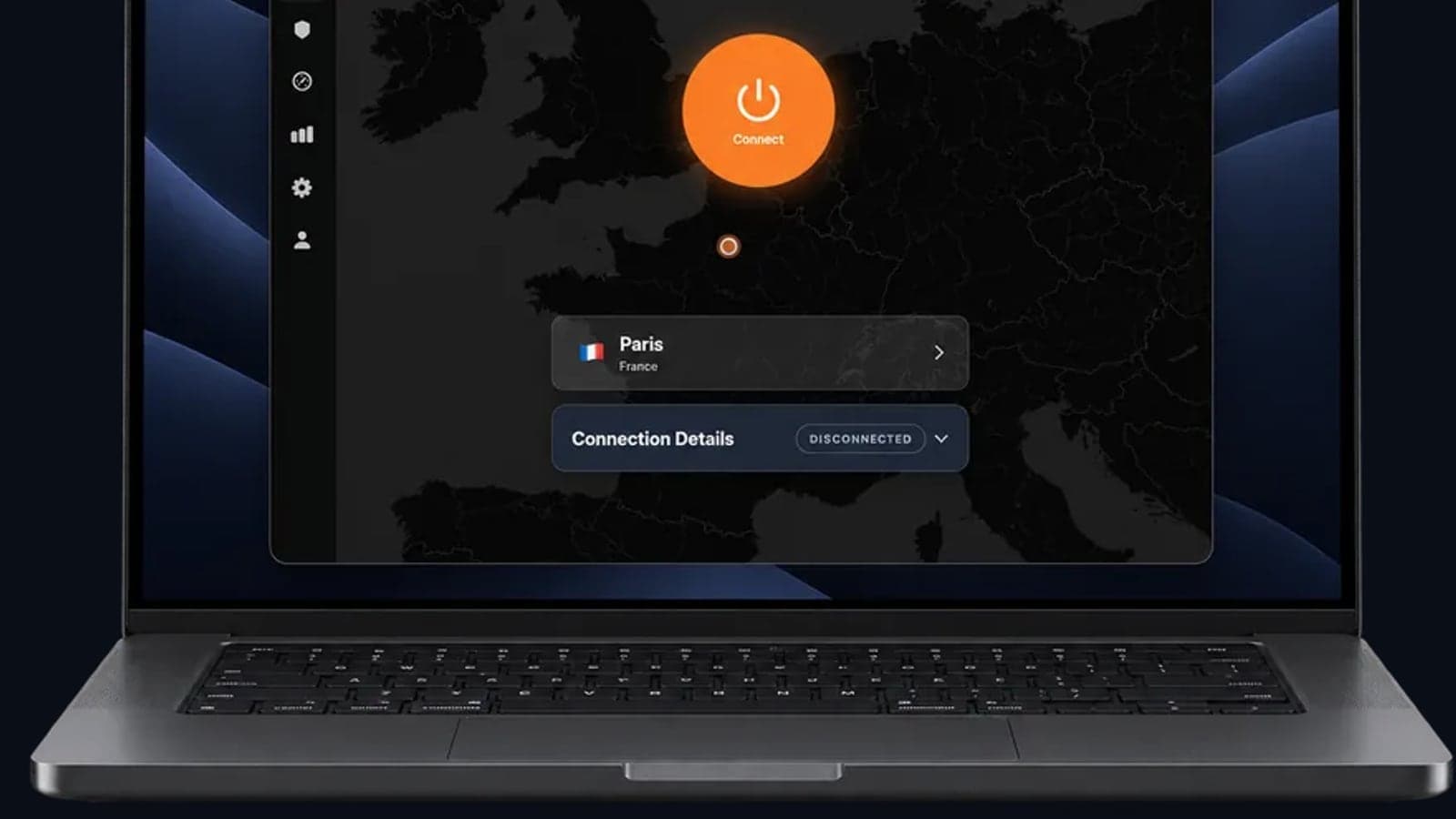
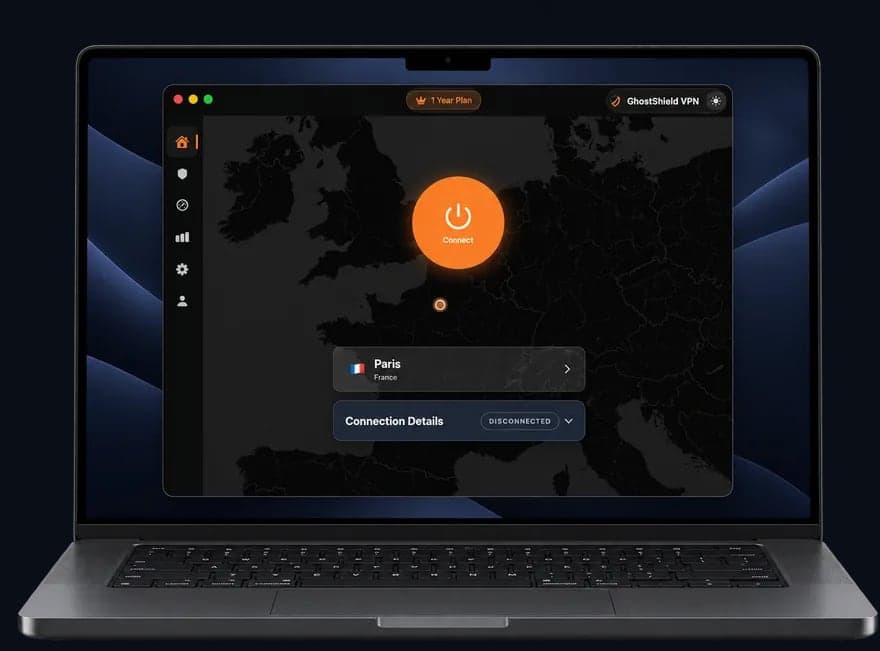 GhostShield VPN app on a MacBook
The factual list: WireGuard with ChaCha20-Poly1305, a kill switch, DNS leak protection, split tunnelling, ad and malware blocking, family mode, AI threat detection and a strict no-logs policy, on servers in 16 countries and 20 locations.
GhostShield VPN costs $4.99 a month on the 1-year plan ($59.88 billed yearly), $3.99 a month on the 3-year plan ($143.64), or $6.99 a month. Every plan starts with a 7-day free trial and carries a 30-day money-back guarantee, and there is no free plan. Price it yourself at the 7-day free trial. If you arrived loyal to another brand, the ExpressVPN alternatives and NordVPN alternatives posts, plus our look at what $3 to $15 a month buys, explain the trade-offs.
How to start the 7-day trial and test it properly
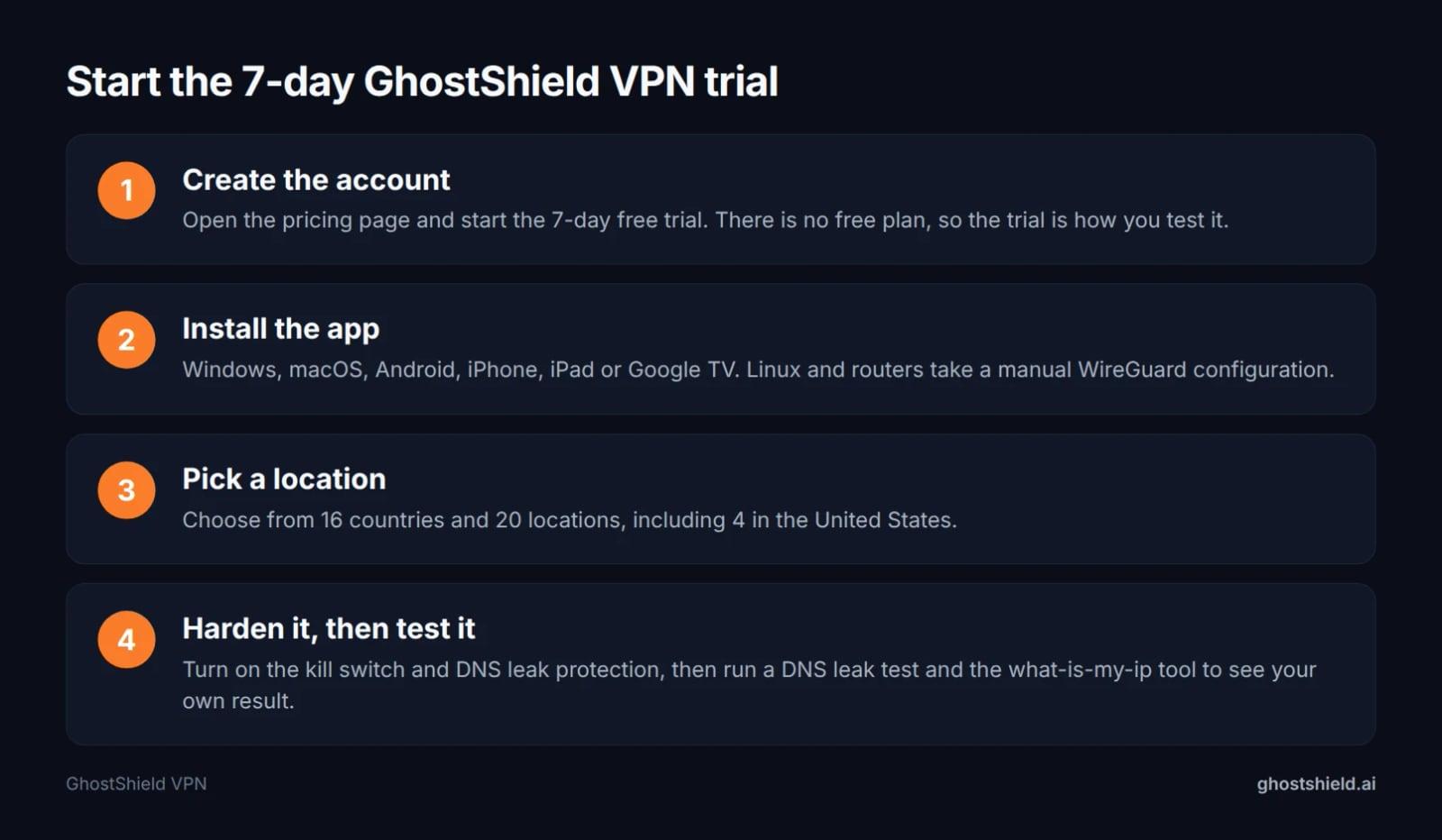 Four steps from account to a tested connection, inside the 7-day trial.
- Create the account: open the pricing page and start the 7-day free trial.
- Install the app: Windows, macOS, Android, iPhone, iPad or Google TV. Linux and routers take a manual WireGuard configuration.
- Pick a location: choose from 16 countries and 20 locations, including 4 in the United States.
- Harden it, then test it: turn on the kill switch and DNS leak protection, then run a DNS leak test and the what-is-my-ip tool to see your own result.
Inside the 7 days, stream something once, take one video call and test on the worst network you use. That tells you more than any review. If the trial ends and you are still unsure, the 30-day money-back guarantee is the longer backstop.
FAQ
What is the best VPN service in 2026?
There is no single best VPN service in 2026, because the answer depends on your job. Pick the job first, then the feature that decides it: a kill switch for hotel Wi-Fi, a server in the right country for streaming, latency for gaming, the device limit for a household. Then run the checks before paying.
Are free VPN services safe in 2026?
Some are, many are not. Octohide notes that free VPNs often come with limitations or unclear data practices, and caps of 500 MB to 10 GB a month. Servers cost money to run, so a free service has to pay for them somehow. Read the logging page before you trust one.
How do I know my VPN is actually working?
Run a DNS leak test and a WebRTC leak test after you connect, then check what is my IP. Your visible address should show the country you picked, and DNS queries should resolve through the VPN rather than your hotel or home router. If either leaks, the tunnel is not doing its job.
Can a VPN make my internet faster?
Usually no, because the traffic takes an extra hop. MovieMaker reports that the better services keep speed loss under 25 percent on nearby servers, with the top performer under 10 percent. A nearby server and a modern protocol keep the loss small, but do not buy a VPN expecting a speed boost.
Can I use a VPN on a smart TV or a game console?
On a smart TV, only with a supported app. GhostShield VPN has a Google TV app. There is no Fire TV, Apple TV, Roku or console app, so those devices need a router running a manual WireGuard configuration. The 10-device limit covers whatever you connect.
How long should I sign up for?
Start with the free trial, move to a year if the service does its job, and only go longer once you trust it. MovieMaker puts long-term plans at $2 to $4 a month, and Cyber Insider's table shows per-service prices in the same range, but check the renewal price, because year two is often higher than year one.
Is dark web monitoring worth paying extra for?
Only if the bundle price stays low. Monitoring alerts you when your email or card details appear in a known breach; it cannot remove them or stop the leak. A free breach alert and a password change cover most of the value.
Related Topics
Keep Reading
IKEv2 vs IKEv1: What Still Matters in 2026

OpenVPN UDP vs TCP: Which to Use, and When
TLS VPN vs IPsec: Key Differences and Where WireGuard Fits
Best VPN With No Logging: How to Check the Claim (2026)
Best VPN Software for Windows 2026: 6 Checks on Your PC