VPN Service for Hulu: Test It in a Trial Before You Pay
When you connect to one of GhostShield VPN's 4 US locations, your device presents a US IP address, so Hulu sees a connection from the US. Hulu is sold in the US only and blocks many data-centre addresses, which is why one evening plays and the next shows "You appear to be using an anonymous proxy".
The short answer: Hulu blocks data-centre addresses, so no VPN can promise a stream. Test GhostShield VPN's 4 US locations in the 14-day free trial, which costs nothing until it ends. The 1-year plan is $4.99 a month; see pricing.
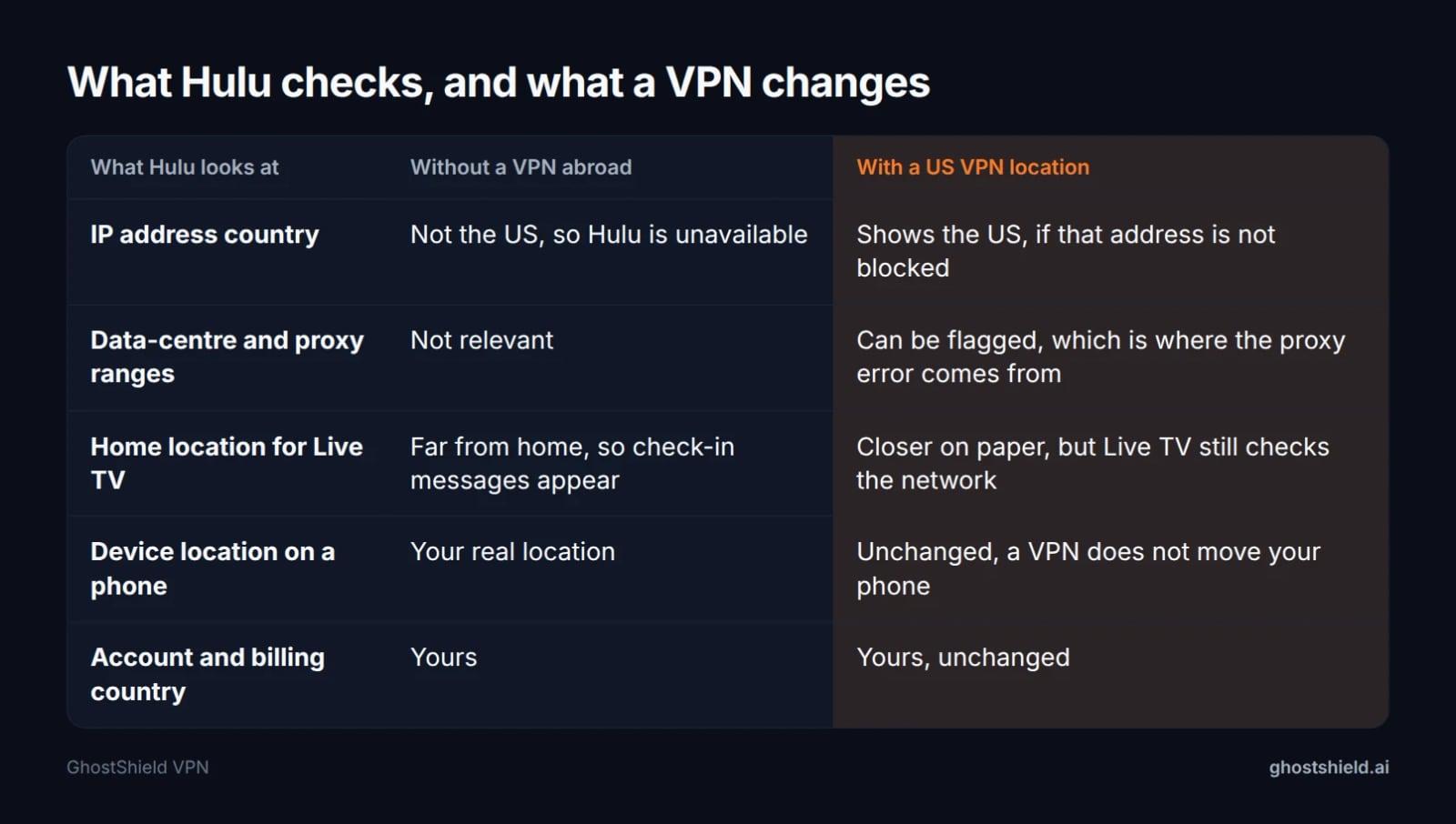 A VPN moves one of these five rows. The other four stay exactly where they were.
What a VPN service for Hulu actually does
A VPN service for Hulu replaces the IP address Hulu sees with one from the VPN's own network. Hulu uses that address to decide whether you are in the US and which library you get. It does not change your account or Hulu's rules, and Hulu can recognise and block the data-centre ranges VPNs use. Treat any claim that a VPN works with Hulu, including ours, as something to check in a trial.
When you compare VPNs for Hulu, check three things: how many US locations the provider has, because one address can be blocked while another works; its logging policy, which you should be able to read before you pay; and its trial terms, including how long the trial runs and how you cancel. A long list of countries means little here. Only the US addresses matter for Hulu.
The one thing it changes
Your address is the lever, and a US address is the one that matters. Your account, your apps and your devices stay as they are.
Our streaming guide explains how a traveller reaches the library they already pay for at home, and the same logic applies here.
What it does not change
Nothing else about your account changes. A VPN does not alter your billing country, Hulu's terms of service, or the fact that Hulu recognises data-centre addresses and can block them. GhostShield VPN has no verified streaming results. If you want a wider view of how the market is priced, our roundup of best VPN services in 2026 looks at plans by price.
Why Hulu shows the anonymous proxy message
The message means Hulu matched your connection to an address it has already flagged, usually a range owned by a data centre rather than a home broadband provider. Server addresses are public. Streaming services buy and build lists of them, so an address that worked last month can be caught this week.
A common DIY route is a self-hosted VPS VPN; a Reddit thread from r/VPN describes exactly that setup being blocked by Hulu. A VPS is still a data-centre address, so Hulu can flag it the same way it flags a commercial VPN's servers.
A DNS leak can produce the same result. Your device asks a local resolver, Hulu sees the wrong country, and the block lands even though the VPN says it is connected. Running a DNS leak test with the VPN on is the quickest way to rule that out.
Blocks are often per address, not per provider. One address in a city can fail while another plays fine. Where a country has a single server, as several do on GhostShield VPN's network, there is no second address to try. pixelprivacy.com has a Hulu troubleshooting guide for the same messages, and our post on being VPN proxy detected on YouTube walks through the pattern on a different service.
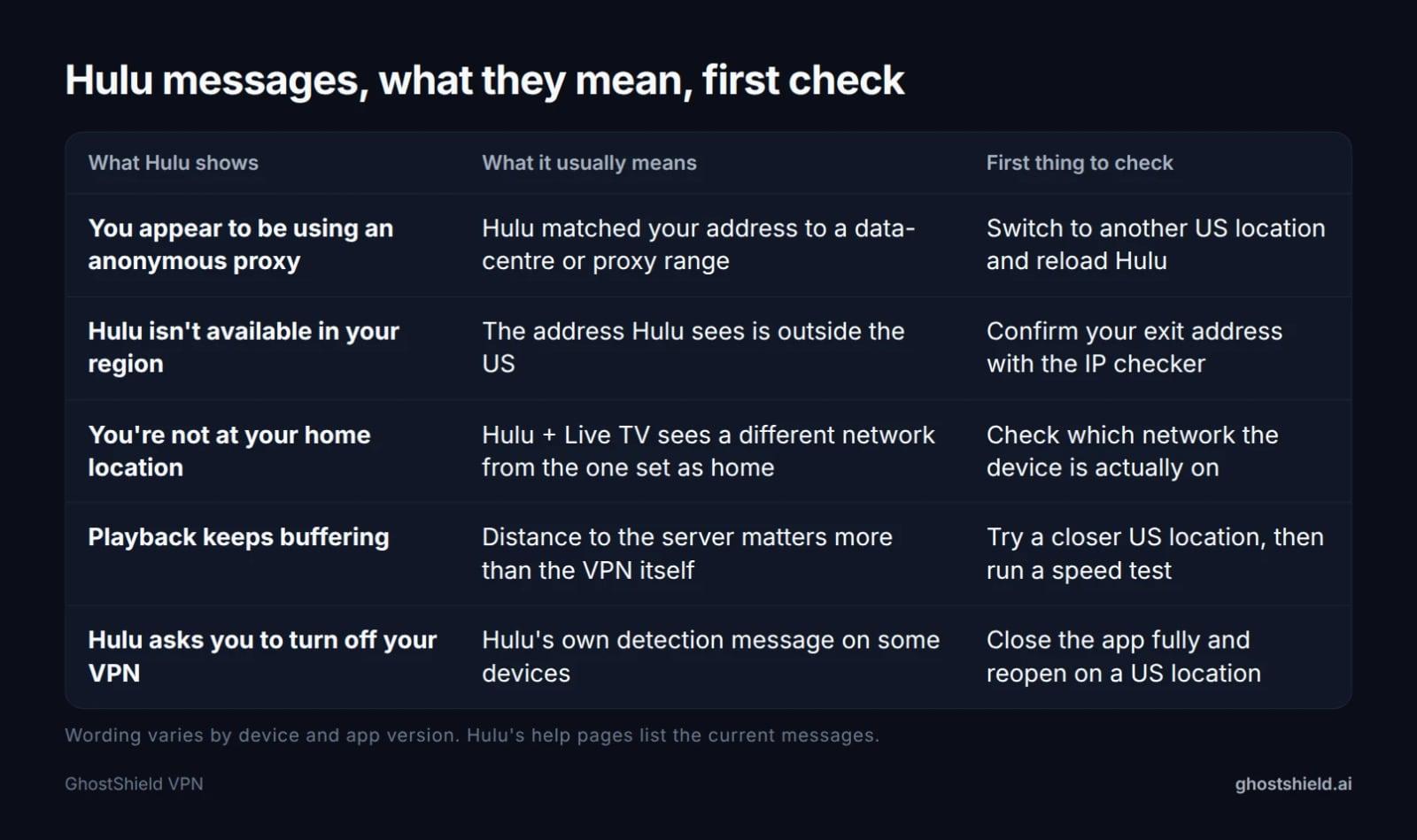 Hulu's messages point at different causes. Match the message before you change anything.
If the message is buffering rather than a block, distance to the server matters more than the VPN itself. Try a closer US location, then run a speed test to see what your line is actually delivering.
Does Hulu accept VPNs?
Plainly, no. Hulu's terms do not allow getting around its geographic restrictions, and Hulu actively detects and blocks proxy and VPN addresses. That is not the same as saying a VPN never works with Hulu. It means the permission is not there, and the technical result varies by address and by day. Hulu decides, not the VPN.
The four US locations, and how to test them
GhostShield VPN has 4 US locations among its 20 locations in 16 countries. That is the whole of the US capacity, so testing takes an evening rather than a week. Test them one at a time: open the app's location list, choose a US entry, connect, open Hulu, play something for two minutes, close Hulu fully, then move to the next.
There is no IP rotation and no dedicated IP. What you test is what you keep, so the trial result is a fair preview of month two. Switching location can change the result, but nothing promises it will. If all four fail, Hulu is blocking the range that day and more clicking will not help.
Record each attempt with the location, the date and what happened. A test at 3pm on a laptop tells you little about 9pm on the television, so run it at the hour you really watch.
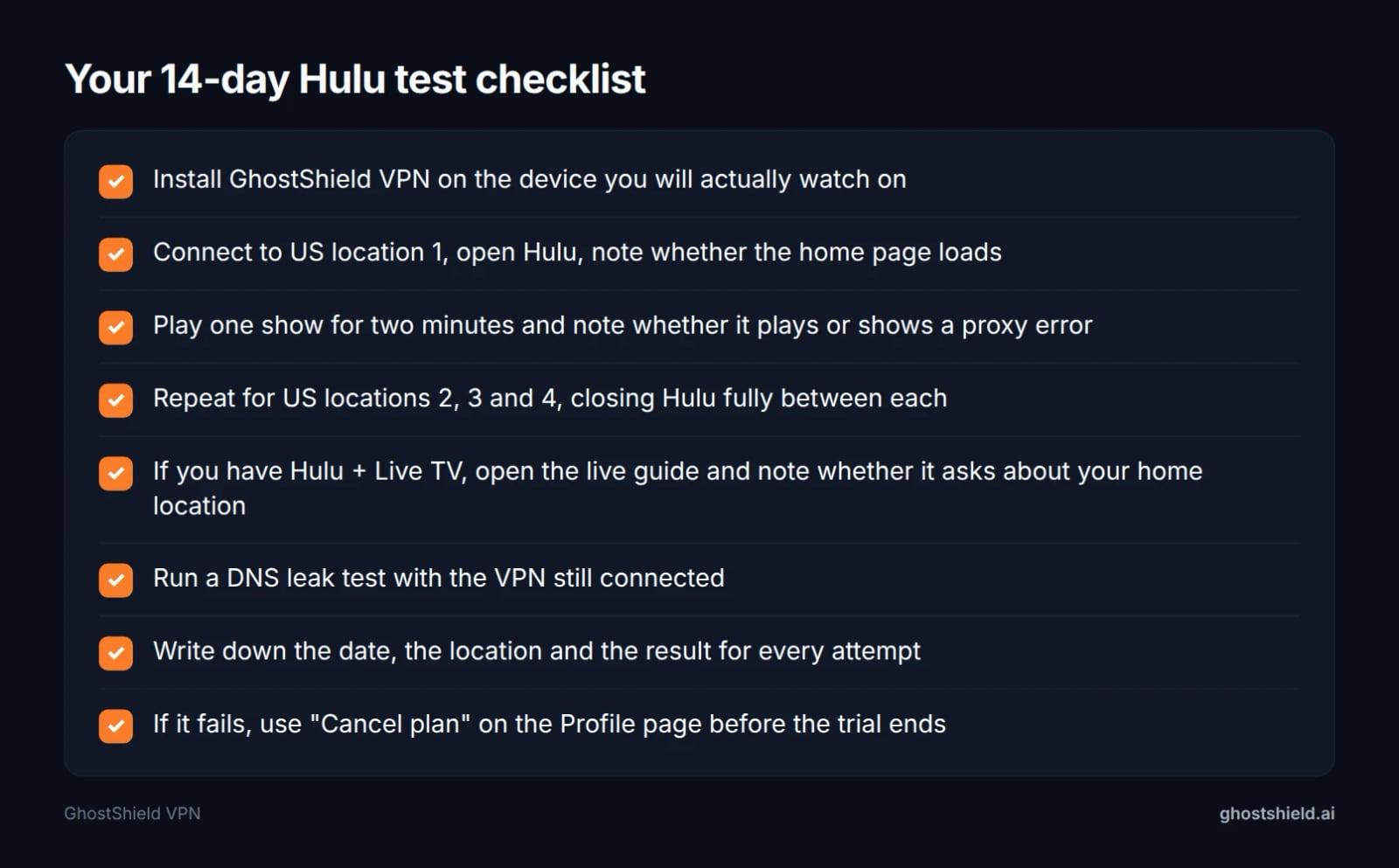 Print this or keep it open. One line per attempt, and the trial answers the question for free.
A 14-day Hulu test plan
Every GhostShield VPN plan starts with a 14-day free trial. Nothing is charged during it; a $1 hold checks the card and is released right away. A reminder email goes out one to three days before the trial ends, before any charge, and the trial is cancelled with "Cancel plan" on the Profile page. If you keep it and change your mind later, there is a 30-day money-back guarantee.
Install on the device you will really watch on first. Windows, macOS, Android, iPhone and iPad, and Google TV all have an app, so the four US locations are there on the device itself.
When to walk away
If two or three US locations fail and the fourth only half works, that is your answer. Stop there rather than paying to find out the same thing again. A different day may differ, but do not buy months on that hope.
Hulu home location, explained
Hulu + Live TV ties the account to a home location and checks the network your devices use. On hotel Wi-Fi or mobile data it can decide you have moved, which is where the "not at your home location" message comes from. One home location per account.
How to change your location on Hulu
For on-demand Hulu, connect from a US address and reload the app fully; Hulu follows the IP address you use. For Hulu + Live TV, the home location is set in your account settings and can only be changed from a device on your home network. help.hulu.com lists the current steps and how often you can change it. On a phone, the GPS is separate, so a VPN alone will not move it, but our IP checker shows which address you are presenting.
Live TV is the strict part
The home location check applies to Hulu + Live TV. On-demand Hulu without Live TV is simpler: it follows your IP address within the US, so there is no home-location reset to do. If you are on demand and Hulu still shows the wrong place, reload the app from a US connection rather than looking for a reset button.
Watching Hulu on a TV while you travel
GhostShield VPN has a Google TV app, so a Google TV stick or set is the straightforward route to Hulu on a big screen with the VPN running on the same device. There is no Fire TV, Apple TV, Roku or games-console app. On those, the VPN has to sit on the router instead, using the manual WireGuard configuration. Our guide to setting up a VPN on a router covers the parts that usually go wrong.
Hotel TVs often will not let you install anything at all. A laptop with an HDMI cable, or a travel router, is usually the practical answer.
 Photo by Vitaly Gariev on Unsplash
Whichever route you take, the device running Hulu must be the device using the US address. A VPN on your phone does nothing for the TV. If you also watch US sport, the setup for VPN for Fubo follows the same rules.
When Hulu still won't play: a short checklist
Confirm the address you are actually showing with our IP checker. If it is not a US address, nothing else matters yet. Then run a DNS leak test with the VPN connected, because a leaked resolver is one of the quietest reasons a US connection still looks foreign.
Turn split tunneling off for the browser or the Hulu app while you test, so the traffic is not sneaking out the normal way. Restart Hulu fully between location changes, not just minimise it, because apps cache the last failed session.
On a phone, check the app's location permission. If Hulu is reading GPS, a new IP will not change its mind. If all four US locations fail after that, that is your answer; there is no fifth address to try.
What it costs, and whether Hulu alone justifies it
GhostShield VPN is $4.99 a month on the 1-year plan ($59.88 billed yearly), $3.99 a month on the 3-year plan ($143.64 for three years), or $6.99 month to month. Every plan carries the 30-day money-back guarantee, and there is no free plan.
| Plan | Price a month | Billed |
|---|---|---|
| 1-year | $4.99 | $59.88 yearly |
| 3-year | $3.99 | $143.64 for three years |
| Monthly | $6.99 | monthly |
If Hulu is the only reason you would buy, use the trial as the test. If the four US locations do not deliver, cancel before the charge and walk away at no cost.
If Hulu is one of several reasons, it is easier to justify. The same connection covers hotel and airport Wi-Fi, banking on the road, and 10 devices at once on one plan. You can see the plans and the trial terms on the pricing page.
If you are travelling somewhere VPNs are restricted
GhostShield VPN uses WireGuard only, with no obfuscation or stealth mode. It is not reliable in China, Russia, Iran or the UAE, and we would rather say so than sell you a trial that cannot work. Read the matching guide in our country guides before you pay for anything, ours or anyone else's.
Sanctions are a separate wall. A VPN is no way around sanctions or around a service's sanctions restrictions, because those rules follow where you are, not what address you show.
FAQ
Why is Hulu telling me I'm not at my home location?
Hulu + Live TV ties your account to a home location and compares the network your device is on with it. Hotel Wi-Fi, mobile data or a VPN exit in another city can look like a move. Check which network the device is actually using before you change anything.
Can I have two home locations for Hulu?
No. One home location per Hulu + Live TV account. Hulu limits how often you can change it, and help.hulu.com states the current limit. If two households need Live TV, each needs its own account. A VPN changes your address, not your account.
How to reset location on Hulu?
Sign in to Hulu on a device connected to your home network, open your account settings, and follow the home location steps. help.hulu.com lists the current screens and how often you can change it. The device must be on the home network, so hotel Wi-Fi will not do it.
How to bypass location on Hulu?
You cannot, in the sense Hulu means. A VPN changes the IP address Hulu sees and nothing else: it does not move your phone's GPS, change your account's billing country or home location, or override Hulu's terms. Hulu also detects and blocks data-centre addresses, so even the IP change is not guaranteed.
Does the Netflix VPN trick still work?
Mostly not. Netflix has blocked known VPN and data-centre addresses for years, and it updates its lists. Some addresses work for a while, then stop. The same pattern applies to Hulu: an address that plays today can show a proxy error next week.
How to get Hulu for free without paying?
There is no legitimate way to make Hulu free with a VPN. Hulu's own sign-up page lists any current free trial or bundle offer, and that is the free route. A VPN changes your IP address, not Hulu's billing system or your account's country. Note the trial's end date so it does not roll into a paid month.
How do I get Hulu to recognize my location?
For on-demand Hulu, connect from a US address and reload the app fully. For Live TV, set the home location from a device on your home network in Hulu's account settings. On a phone, allow location access or Hulu will keep reading your GPS position.
Related Topics
Keep Reading
VPN for Sport: Watch Your Home Games While Abroad

VPN for Fubo: Watch Your US Plan While Traveling (2026)
How to Watch Meta’s AI Shows Early with a VPN in 2026 (Step-by-Step Guide)
How to Watch Avengers: Doomsday Early Without Spoilers Using a VPN
How to Watch Peacock Abroad in 2026: Easy VPN Steps